Dell Venue 8 Pro Quick User Guide
Summary
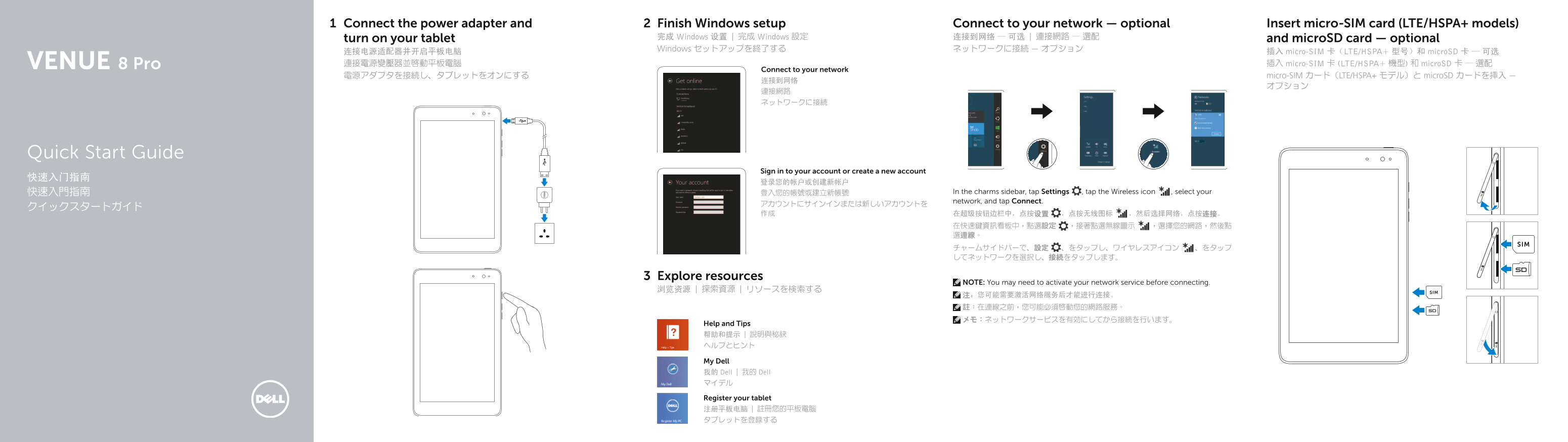
This Quick Start Guide for a Dell Windows 8 tablet provides setup instructions covering power adapter connection, Windows setup, wireless network connectivity, and micro-SIM card insertion for LTE/HSPA+ models along with microSD card installation. It includes a detailed hardware features diagram identifying components such as the front and rear cameras, ambient-light sensor, micro-USB port, battery-charging light, volume buttons, Windows button, and headset port. Designed for mobile professionals and students using a Windows-based tablet.
Page 1 Text Content
Connect the power adapter and Finish Windows setup Connect to your network — optional Insert micro-SIM card (LTE/HSPA+ models)
turn on your tablet 完成 Windows 设置 | 完成 Windows 設定 连接到网络 — 可选 | 連接網路 — 選配 and micro SD card — optional Windows セットアップを終了する ネットワークに接続 — オプション
连接电源适配器并开启平板电脑 插入 micro-SIM 卡(LTE/HSPA+ 型号)和 micro SD 卡 — 可选 8 Pro 連接電源變壓器並啟動平板電腦 插入 micro-SIM 卡 (LTE/HSPA+ 機型) 和 micro SD 卡 — 選配
Connect to your network
電源アダプタを接続し、タブレットをオンにする micro-SIM カード(LTE/HSPA+ モデル)と micro SD カードを挿入 —
Quick Start Guide
Sign in to your account or create a new account
快速入門指南 登入您的帳號或建立新帳號 In the charms sidebar, tap Settings , tap the Wireless icon , select your network, and tap Connect.
Explore resources
NOTE: You may need to activate your network service before connecting.
浏览资源 | 探索資源 | リソースを検索する SIM
Help and Tips 帮助和提示 | 說明與秘訣 ヘルプとヒント
My Dell 我的 Dell | 我的 Dell マイデル
Register your tablet 注册平板电脑 | 註冊您的平板電腦 タブレットを登録する
Page Summary Contents For Dell Venue 8 Pro Quick User Guide
Manual Details
| Brand | Dell |
|---|---|
| Pages | 2 |
| File Size | 300.74 KB |
| Published | July 01, 2026 |
Enter the captcha to get the download link:

Frequently Asked Questions
How do I connect to a wireless network?
In the charms sidebar, tap Settings, select the Wireless icon, choose your network, and then tap Connect.
What are the available card slots for storage?
The tablet supports both a MicroSD-card slot and a micro-SIM card slot (for LTE/HSPA+ models).
What is required before attempting to connect to the internet?
Be aware that you may need to activate your network service before connection is possible.
Where can I find the specific identification number for support?
The Service Tag label is located on the tablet and can be used when contacting Dell Support.