Dell Venue 11i Pro Quick User Guide
Summary
Quick Start Guide for a Dell Windows tablet (Dell Venue 11 Pro style) featuring Windows 8.1. Multi-language document covering power adapter connection, wireless network setup via charms sidebar, Microsoft account sign-in, and optional microSD card installation. Features details include front camera, microphones, cooling vents, optional security card reader and fingerprint reader, dock pins, and USB ports for tablet productivity.
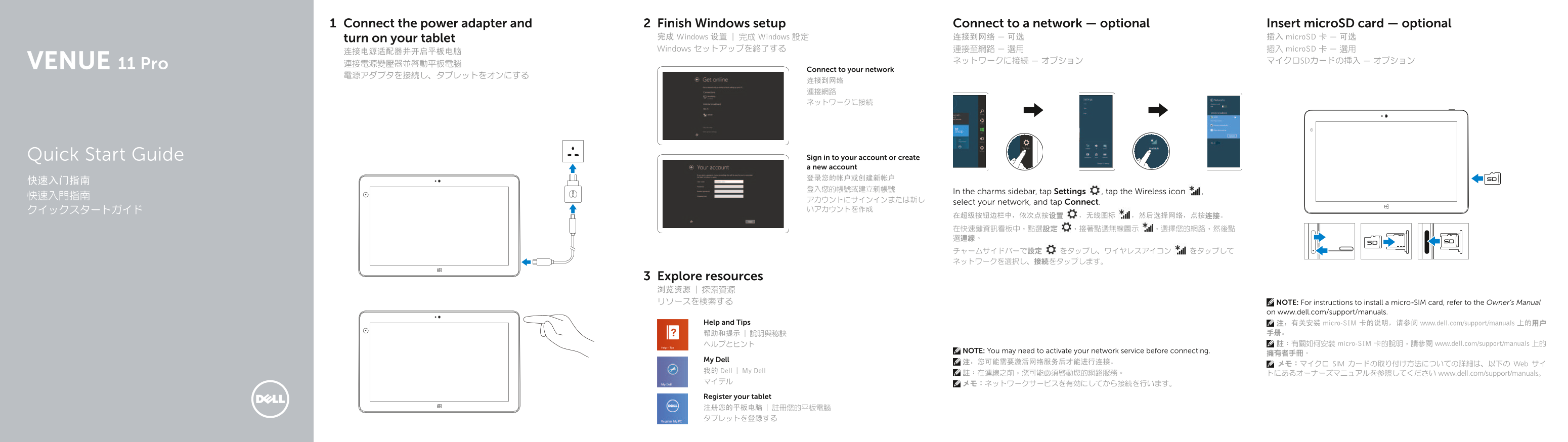
Page 1 Text Content
Connect the power adapter and Finish Windows setup Connect to a network — optional Insert micro SD card — optional
turn on your tablet 完成 Windows 设置 | 完成 Windows 設定 连接到网络 — 可选 插入 micro SD 卡 — 可选 Windows セットアップを終了する 連接至網路 — 選用 插入 micro SD 卡 — 選用
ネットワークに接続 — オプション マイクロSDカードの挿入 — オプション
11 Pro 連接電源變壓器並啟動平板電腦
Connect to your network
Quick Start Guide Sign in to your account or create a new account 登录您的帐户或创建新帐户
In the charms sidebar, tap Settings , tap the Wireless icon ,
select your network, and tap Connect.
Explore resources 浏览资源 | 探索資源 リソースを検索する NOTE: For instructions to install a micro-SIM card, refer to the Owner’s Manual
on www.dell.com/support/manuals.
Help and Tips 注:有关安装 micro-SIM 卡的说明,请参阅 www.dell.com/support/manuals 上的用户
帮助和提示 | 說明與秘訣 手册。 ヘルプとヒント 註:有關如何安裝 micro-SIM 卡的說明,請參閱 www.dell.com/support/manuals 上的
NOTE: You may need to activate your network service before connecting.
My Dell 注:您可能需要激活网络服务后才能进行连接。
メモ:マイクロ SIM カードの取り付け方法についての詳細は、以下の Web サイ
我的 Dell | My Dell 註:在連線之前,您可能必須啟動您的網路服務。
トにあるオーナーズマニュアルを参照してください www.dell.com/support/manuals。
Register your tablet 注册您的平板电脑 | 註冊您的平板電腦 タブレットを登録する
Page Summary Contents For Dell Venue 11i Pro Quick User Guide
Manual Details
| Brand | Dell |
|---|---|
| Pages | 2 |
| File Size | 288.38 KB |
| Published | July 02, 2026 |
Enter the captcha to get the download link:

Frequently Asked Questions
How do I connect to the network?
In the charms sidebar, tap Settings, then select the Wireless icon, choose your network, and tap Connect.
Is a micro-SIM card required for internet connection?
No. For installation instructions regarding a micro-SIM card, refer to the Owner's Manual on www.dell.com/support/manuals.
What optional security features are available?
Optional security features include the fingerprint reader and safety card reader.
Where can I find technical support documentation?
You can visit dell.com/support for product manuals and resources, or dell.com/contactdell to contact Dell.