Dell Venue 8 Quick User Guide
Summary
This Quick Start Guide for the Dell Venue 7 Android tablet provides multilingual setup instructions covering power cable connection, Android operating system configuration, tablet registration, network connectivity, and account sign-in. It documents optional microSD card and micro-SIM card installation for HSPA+ cellular models, identifies all hardware features including front and rear cameras, Micro-USB port, volume buttons, speaker, and headset port, and provides regulatory compliance information with model number T01C. Designed for consumer and mobile users.
Page 1 Text Content
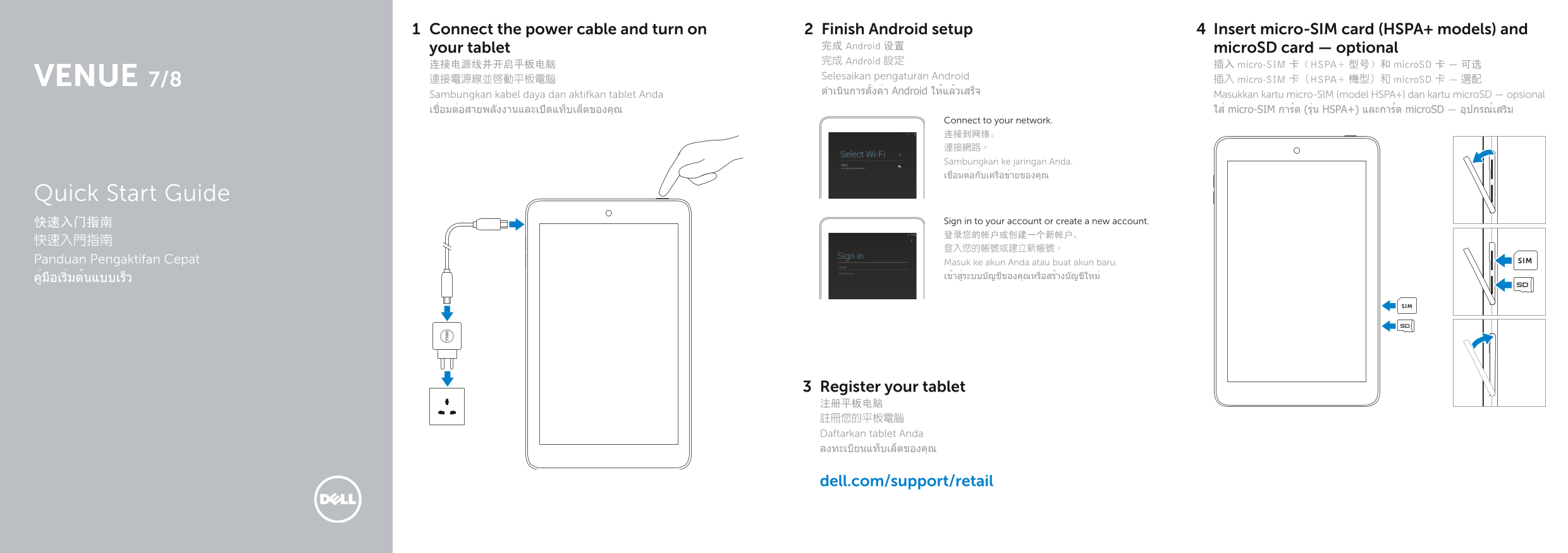
Connect the power cable and turn on Finish Android setup Insert micro‑SIM card (HSPA+ models) and
your tablet 完成 Android 设置 micro SD card — optional 完成 Android 設定
连接电源线并开启平板电脑 插入 micro-SIM 卡(HSPA+ 型号)和 micro SD 卡 — 可选
Selesaikan pengaturan Android
7/8 連接電源線並啟動平板電腦 插入 micro-SIM 卡(HSPA+ 機型)和 micro SD 卡 — 選配
ดำาเนินการตั้งค่า Android ให้แล้วเสร็จ
Sambungkan kabel daya dan aktifkan tablet Anda Masukkan kartu micro-SIM (model HSPA+) dan kartu micro SD — opsional เชื่อมต่อสายพลังงานและเปิดแท็บเล็ตของคุณ ใส่ micro-SIM การ์ด (รุ่น HSPA+) และการ์ด micro SD — อุปกรณ์เสริม
Connect to your network. 连接到网络。 連接網路。 Sambungkan ke jaringan Anda. เชื่อมต่อกับเครือข่ายของคุณ
Quick Start Guide
快速入门指南 Sign in to your account or create a new account. 登录您的帐户或创建一个新帐户。
Panduan Pengaktifan Cepat Masuk ke akun Anda atau buat akun baru. SIM
Register your tablet 注册平板电脑 註冊您的平板電腦 Daftarkan tablet Anda ลงทะเบียนแท็บเล็ตของคุณ
dell.com/support/retail
Page Summary Contents For Dell Venue 8 Quick User Guide
Manual Details
| Brand | Dell |
|---|---|
| Pages | 2 |
| File Size | 261.44 KB |
| Published | July 02, 2026 |
Enter the captcha to get the download link:
