Dell Venue 8 7000 Quick Start Guide
Summary
Dell Venue 8 7000 Series (7840) Quick Start Guide (2015) covering power-on via 7-second power button press, Android setup with Google account sign-in, tablet registration, optional microSD card insertion, secured wireless network connectivity, and features including Intel RealSense Snapshot camera, ambient light sensor, and Micro-USB charging.
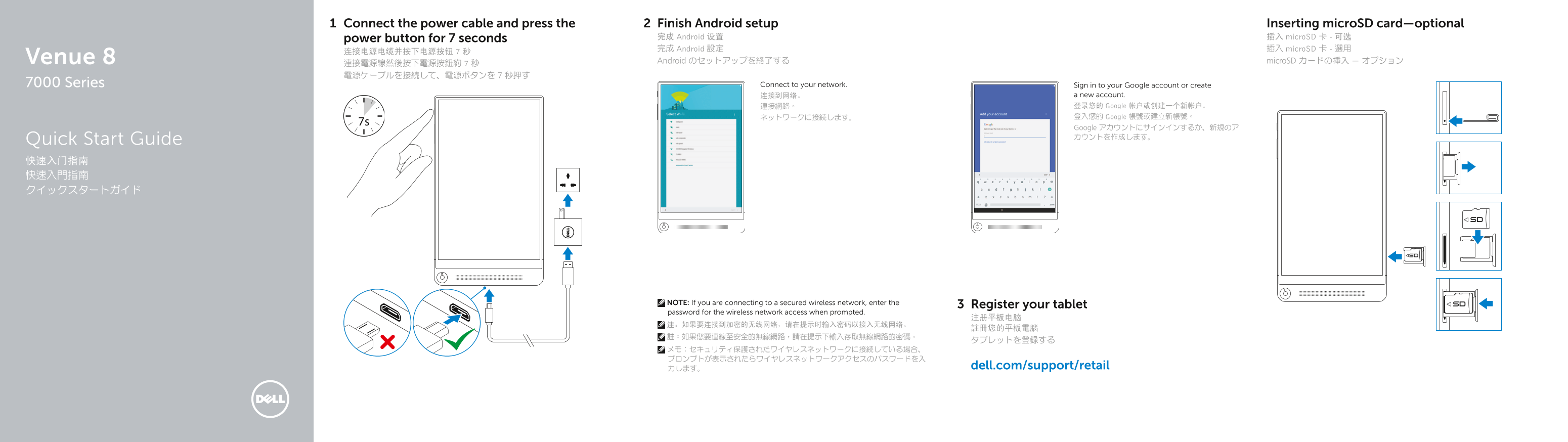
Page 1 Text Content
Connect the power cable and press the Finish Android setup Inserting micro SD card—optional
power button for 7 seconds 完成 Android 设置 插入 micro SD 卡 - 可选 完成 Android 設定 插入 micro SD 卡 - 選用
Venue 8 Android のセットアップを終了する micro SD カードの挿入 — オプション
7000 Series Connect to your network. Sign in to your Google account or create
连接到网络。 a new account. 連接網路。 登录您的 Google 帐户或创建一个新帐户。 ネットワークに接続します。 登入您的 Google 帳號或建立新帳號。 Google アカウントにサインインするか、新規のア カウントを作成します。
Quick Start Guide 快速入门指南 快速入門指南 クイックスタートガイド
NOTE: If you are connecting to a secured wireless network, enter the
Register your tablet
password for the wireless network access when prompted.
力します。 dell.com/support/retail
Page Summary Contents For Dell Venue 8 7000 Quick Start Guide
Manual Details
| Brand | Dell |
|---|---|
| Pages | 2 |
| File Size | 422.45 KB |
| Published | July 03, 2026 |
Enter the captcha to get the download link:

Frequently Asked Questions
How do I connect this tablet to a secure wireless network?
When prompted, you must enter the password for the wireless network access.
Is there a way to increase storage capacity on the device?
Yes, the unit includes a MicroSD card slot for expansion.
What steps should I follow when first powering up the tablet?
Connect the power cable and press the power button for approximately 7 seconds.
Where can I find support or regulatory information for this model?
Visit dell.com/support or dell.com/regulatory_compliance.