Dell Venue 8 3840 Quick Start Guide
Summary
Dell Venue 8 tablet Quick Start Guide (2014) with Android setup covering power button hold, Android OS setup, tablet registration, SIM card insertion (LTE/HSPA+ models), optional microSD card, network connection, and features including front/rear cameras, ambient light sensor, micro-USB charging port, and speaker for models 3840 LTE/HSPA+.
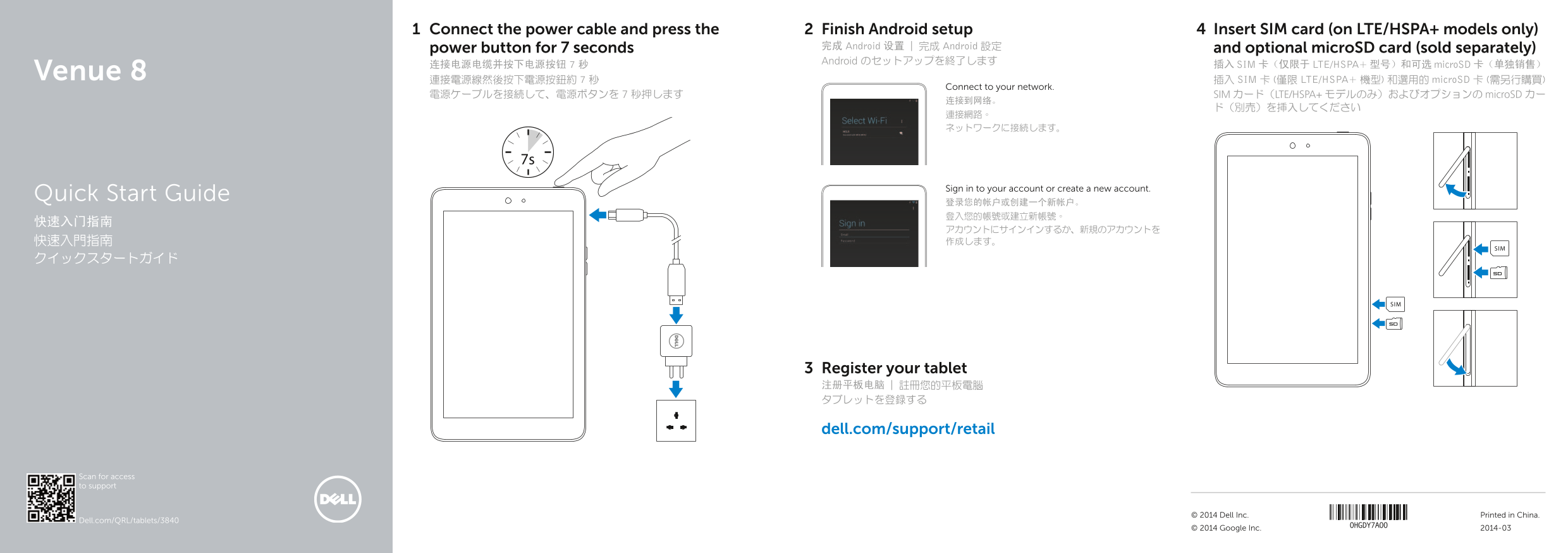
Page 1 Text Content
Connect the power cable and press the Finish Android setup Insert SIM card (on LTE/HSPA+ models only)
power button for 7 seconds 完成 Android 设置 | 完成 Android 設定 and optional micro SD card (sold separately) Android のセットアップを終了します
连接电源电缆并按下电源按钮 7 秒 插入 SIM 卡(仅限于 LTE/HSPA+ 型号)和可选 micro SD 卡(单独销售)
Venue 8 連接電源線然後按下電源按鈕約 7 秒 插入 SIM 卡 (僅限 LTE/HSPA+ 機型) 和選用的 micro SD 卡 (需另行購買)
Connect to your network.
電源ケーブルを接続して、電源ボタンを 7 秒押します SIM カード(LTE/HSPA+ モデルのみ)およびオプションの micro SD カー
Sign in to your account or create a new account.
Quick Start Guide
Register your tablet 注册平板电脑 | 註冊您的平板電腦 タブレットを登録する
dell.com/support/retail
Scan for access to support
© 2014 Dell Inc. Printed in China.
Dell.com/QRL/tablets/3840
© 2014 Google Inc. 2014-03
Page Summary Contents For Dell Venue 8 3840 Quick Start Guide
Manual Details
| Brand | Dell |
|---|---|
| Pages | 2 |
| File Size | 323.79 KB |
| Published | July 03, 2026 |
Enter the captcha to get the download link:

Frequently Asked Questions
What is required to get started with the device?
Connect the power cable, press and hold the power button for 7 seconds, insert an optional microSD card if desired, and optionally insert a SIM card (for LTE/HSPA+ models).
Where can I find support or manuals for this tablet?
You can visit dell.com/support/manuals.
Are there external components I need to buy separately?
The microSD card is sold separately and can be inserted into the device's slot.
What models are capable of using a SIM card?
Only LTE/HSPA+ models have an available SIM-card slot.