Dell Venue 11 Pro Quick User Guide
Summary
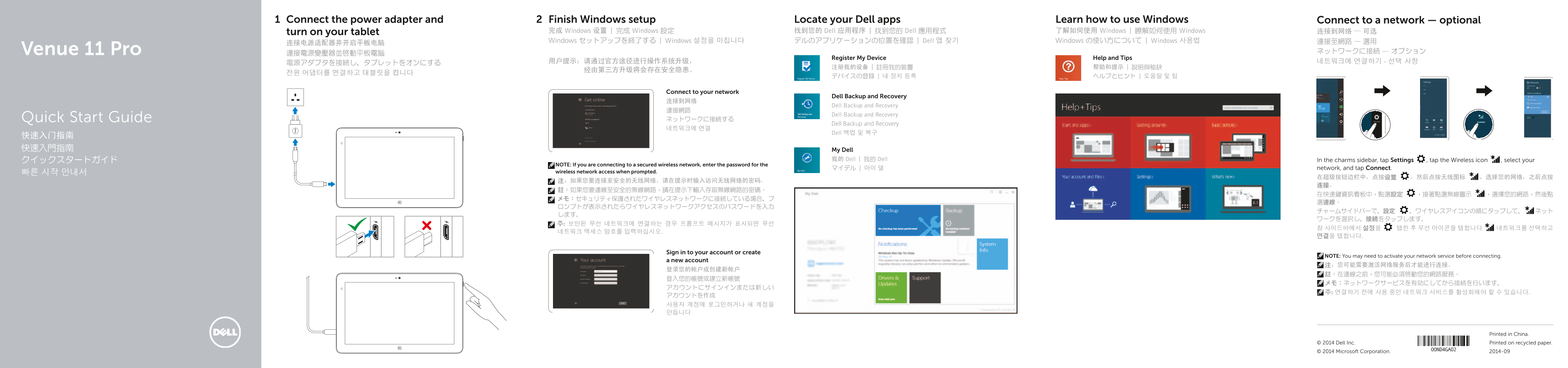
This quick start guide provides initial setup instructions for the Dell Venue 11 Pro tablet. Covers power adapter connection, Windows setup, wireless network connection, and locating Dell applications. Includes multilingual instructions in English, Chinese, Japanese, and Korean. Covers user account creation and device registration. Intended for first-time users needing assistance with initial tablet configuration.
Page 1 Text Content
Connect the power adapter and Finish Windows setup Locate your Dell apps Learn how to use Windows Connect to a network — optional
turn on your tablet 完成 Windows 设置 | 完成 Windows 設定 找到您的 Dell 应用程序 | 找到您的 Dell 應用程式 了解如何使用 Windows | 瞭解如何使用 Windows 连接到网络 — 可选 Windows セットアップを終了する | Windows 설정을 마칩니다 デルのアプリケーションの位置を確認 | Dell 앱 찾기 Windows の使い方について | Windows 사용법 連接至網路 — 選用
Venue 11 Pro 連接電源變壓器並啟動平板電腦 ネットワークに接続 — オプション
Register My Device Help and Tips
Connect to your network
Dell Backup and Recovery
Dell Backup and Recovery
Dell Backup and Recovery
Quick Start Guide ネットワークに接続する
Dell Backup and Recovery
Dell 백업 및 복구
快速入门指南 快速入門指南 My Dell
クイックスタートガイド 我的 Dell | 我的 Dell In the charms sidebar, tap Settings , tap the Wireless icon , select your
NOTE: If you are connecting to a secured wireless network, enter the password for the
マイデル | 마이 델 network, and tap Connect.
빠른 시작 안내서 wireless network access when prompted.
Sign in to your account or create
NOTE: You may need to activate your network service before connecting.
a new account
Printed in China.
© 2014 Dell Inc. Printed on recycled paper. © 2014 Microsoft Corporation. 2014-09
Page Summary Contents For Dell Venue 11 Pro Quick User Guide
Manual Details
| Brand | Dell |
|---|---|
| Pages | 2 |
| File Size | 448.72 KB |
| Published | June 26, 2026 |
Enter the captcha to get the download link:

Frequently Asked Questions
How do I connect to a secured Wi-Fi network?
In the charms sidebar, tap Settings, select the Wireless icon, choose your network, and enter the password when prompted.
What components require external options or are only for specific models?
The microSD card, micro-SIM card, stylus pen tip, and LTE/HSPA+ features (including Micro-SIM reader) may be optional or restricted to certain model types.
Where can I find product manuals and support?
Visit dell.com/support for product support and manuals.