# A B C D E F G H I J K L M N O P Q R S T U V W X Y Z

Dell Precision M6600 Setup and Features Information Tech Sheet

Summary

Setup and features information for Dell Precision M4600 and M6600 mobile workstations. This document provides visual guides identifying front and back panel components, ports, connectors, and status indicators. It includes regulatory model information, safety warnings, and quick reference for hardware features. Target users are creative professionals, engineers, and technical users deploying or using Dell Precision mobile workstations.
📄 Preview 📖 Table of Contents Contents PAGE OF 11

Page 1 Text Content

Dell Precision M4600/M6600 Mobile Workstation Setup And Features Information About Warnings WARNING: A WARNING indicates a potential for property damage, personal injury, or death. M4600 — Front And Back View

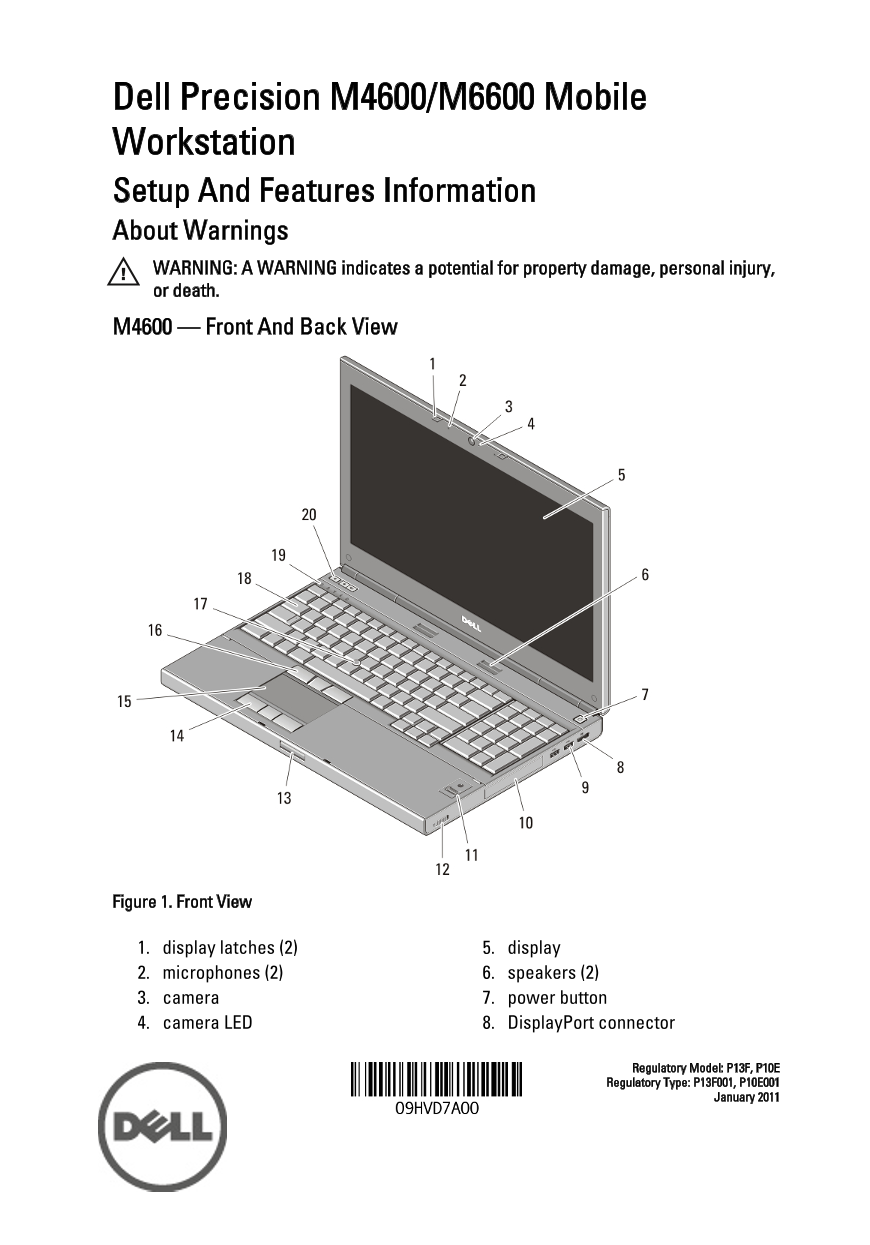
Figure 1. Front View

1. display latches (2) 5. display 2. microphones (2) 6. speakers (2) 3. camera 7. power button 4. camera LED 8. Display Port connector

Regulatory Model: P13F, P10E Regulatory Type: P13F001, P10E001

January 2011

Page Summary Contents For Dell Precision M6600 Setup and Features Information Tech Sheet

Page 1 Dell Precision M4600/M6600 Mobile Workstation Setup And Features Information About Warnings WARNING: A WARNING indicates a potential for property damage, personal injury, or death. M4600 — Front And B...
Page 2 9. USB 3.0 connectors (2) 15. touchpad 10. hard drive 16. track stick buttons (3) 11. fingerprint reader (optional) 17. track stick 12. wireless switch 18. keyboard 13. display latch release button 19...
Page 3 M6600 — Front And Back View Figure 3. Front View 1. display latches (2) 11. fingerprint reader (optional) 2. microphones (2) 12. wireless switch 3. camera 13. display latch release button 4. camera LE...
Page 4 Figure 4. Back View 1. cooling vents 10. microphone connector 2. network connector 11. headphone connector 3. VGA connector 12. battery status light 4. HDMI connector 13. power light 5. e SATA/USB 2.0...
Page 5 NOTE: Some devices may not be included if you did not order them. 1. Connect the AC adapter to the AC adapter connector on the computer and to the electrical outlet. Figure 5. AC Adapter 2. Connect th...
Page 6 Figure 8. 1394 Connector on M4600 Figure 9. 1394 Connector on M6600 5. Open the computer display and press the power button to turn on the computer. Figure 10. Power Button NOTE: It is recommended tha...
Page 7 Video Video type discrete Data bus integrated video Video controller and memory M4600 AMD Fire Pro M5950 Mobility Pro Graphics with 1 GB GDDR5 NVIDIA Quadro 1000M with 2 GB GDDR3 NVIDIA Quadro 2000M w...
Page 8 Battery NOTE: The Dell Precision M6600 Mobile Workstation only supports a 9–cell battery. Depth 80 mm (3.14 inches) Height 190 mm (7.48 inches) Width 20 mm (0.78 inches) Weight 365 g (0.80 lb) (6–cell...
Page 9 AC Adapter M4600 M6600 Non Operating –40 °C to 65 °C (–40 °F to 149 °F) Contactless Smart Card Supported Smart Cards and ISO14443A — 160 kbps, 212 kbps, 424 kbps, and 848 Technologies kbps ISO14443B —...
Page 10 Environmental Non-operating –15.2 m to 10,668 m (–50 ft to 35,000 Finding More Information and Resources See the safety and regulatory documents that shipped with your computer and the regulatory comp...
Page 11 Other trademarks and trade names may be used in this publication to refer to either the entities claiming the marks and names or their products, Dell Inc. disclaims any proprietary interest in tradema...

Manual Details

Brand Dell
Pages 11
File Size 909.70 KB
Published June 29, 2026
3 views

Enter the captcha to get the download link:

captcha

Frequently Asked Questions

What is the recommended procedure for powering on a card?

It is recommended to turn on and shut down your computer at least once before installing any cards or connecting external devices.

Which ports are available for peripheral connections?

Ports include USB 3.0 (2 connectors), eSATA/USB 2.0, headphone connector, HDMI connector, VGA connector, network connector, IEEE 1394 port, and ExpressCard slot.

What is the maximum memory capacity supported by the system?

The maximum processor-dependent memory varies: up to 16 GB for Intel Core i5/i7 Dual Core, 32 GB for Quad Core, and other configurations exist depending on the chipset.

How should I handle the AC adapter cable when disconnecting it?

Grasp the connector, not the cable itself, and pull firmly but gently to avoid damage. Follow the angle of the connector when wrapping.