D-Link DSL-2640R User Guide
Summary
Effortlessly secure and configure your home or office Wi-Fi network with this comprehensive setup guide. This manual details how to access the router's advanced management features, enabling you to establish a robust wireless connection using WPA-Personal security. Learn step-by-step how to define a custom SSID and set a strong pre-shared key that protects your data from unauthorized access. Ideal for both technical novices and experienced users seeking reliable instructions on maximizing their router's connection performance and network security.
Page 1 Text Content
D-Link DSL-2640R User Guide Wireless Config.
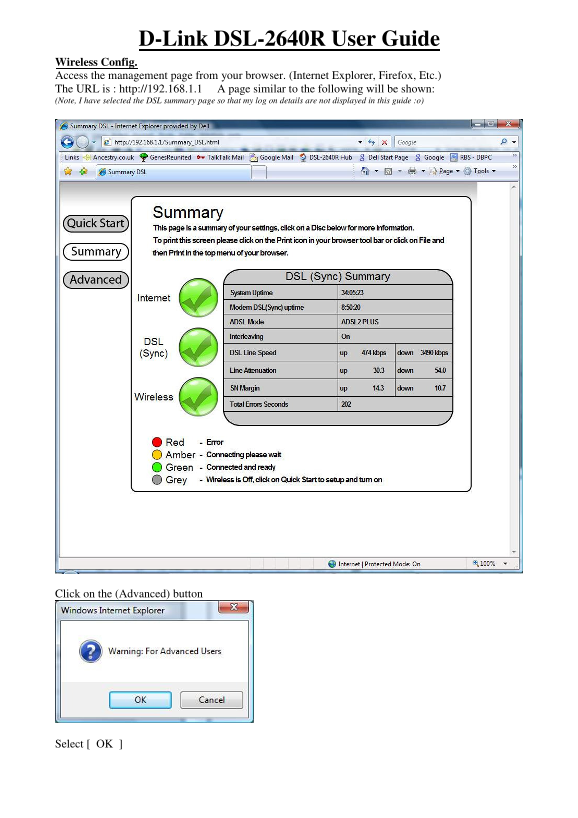
Access the management page from your browser. (Internet Explorer, Firefox, Etc.) The URL is : http://192.168.1.1 A page similar to the following will be shown: (Note, I have selected the DSL summary page so that my log on details are not displayed in this guide :o)
Click on the (Advanced) button
Select [ OK ]
Page Summary Contents For D-Link DSL-2640R User Guide
Manual Details
| Brand | D-Link |
|---|---|
| Pages | 4 |
| File Size | 779.19 KB |
| Published | May 30, 2026 |
Enter the captcha to get the download link:

Frequently Asked Questions
How do I access the router's management page?
Access it via any browser using the URL: http://192.168.1.1
Where can I find wireless setup options?
After logging in, click on the Advanced button and then select the 'Wireless Setup' link.
What security protocol should I use for my new Wi-Fi network?
Set Security Mode to WPA-Personal, WPA Mode to Auto (WPA or WPA2).
How do I connect a PC to the newly configured wireless network?
Use your PC's wireless utility, select the custom SSID, and enter the defined Pre-Shared Key.