# A B C D E F G H I J K L M N O P Q R S T U V W X Y Z

SHARP CD-DH950P Operation Manual

Summary

Enhance your living space with this comprehensive Mini Component Audio System. This manual provides exhaustive operational instructions, safety warnings, and detailed technical specifications for the integrated CD player, tuner, cassette deck, and speaker system. It is designed for home audio enthusiasts seeking a durable, high-fidelity solution for sophisticated multi-media entertainment setups requiring reliable performance and clean connectivity options.
📄 Preview 📖 Table of Contents Contents PAGE OF 16

Page 1 Text Content

ENGLISH

MODEL

CD-DH950P MINI COMPONENT SYSTEM

OPERATION MANUAL

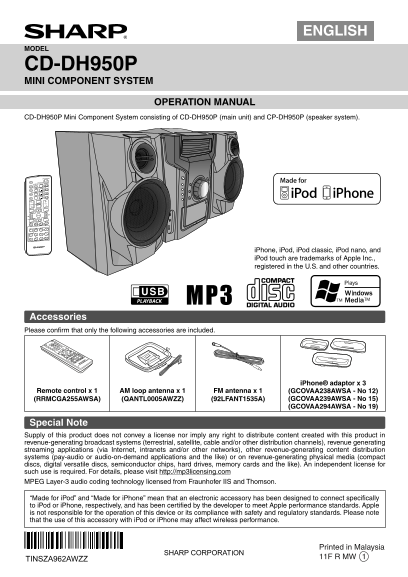
CD-DH950P Mini Component System consisting of CD-DH950P (main unit) and CP-DH950P (speaker system).

ON/STAND-BY

DISPLAY MENU

(TV OUT) CD

TUNER(BAND) TAPE

AUDIO IN USB

X-BASS

TUNING BASS/TREBLE VOL

FOLDER PLAY MODE

PRESET

ENTER

CLOCK/TIMER PRESET MEMORY

DEMO DIMMER CLEAR SLEEP

i Phone, i Pod, i Pod classic, i Pod nano, and i Pod touch are trademarks of Apple Inc., registered in the U.S. and other countries.

Accessories Please confi rm that only the following accessories are included.

i Phone® adaptor x 3

Remote control x 1 AM loop antenna x 1 FM antenna x 1 (GCOVAA238AWSA - No 12)

(RRMCGA255AWSA) (QANTL0005AWZZ) (92LFANT1535A) (GCOVAA239AWSA - No 15) (GCOVAA294AWSA - No 19)

Special Note Supply of this product does not convey a license nor imply any right to distribute content created with this product in revenue-generating broadcast systems (terrestrial, satellite, cable and/or other distribution channels), revenue generating streaming applications (via Internet, intranets and/or other networks), other revenue-generating content distribution systems (pay-audio or audio-on-demand applications and the like) or on revenue-generating physical media (compact discs, digital versatile discs, semiconductor chips, hard drives, memory cards and the like). An independent license for such use is required. For details, please visit http://mp3licensing.com MPEG Layer-3 audio coding technology licensed from Fraunhofer IIS and Thomson.

“Made for i Pod” and “Made for i Phone” mean that an electronic accessory has been designed to connect specifi cally to i Pod or i Phone, respectively, and has been certifi ed by the developer to meet Apple performance standards. Apple is not responsible for the operation of this device or its compliance with safety and regulatory standards. Please note that the use of this accessory with i Pod or i Phone may affect wireless performance.

Printed in Malaysia 11F R MW 1

TINSZA962AWZZ

CD-DH950P_US_EN_cover.indd 1 4/8/2011 7:02:01 PM

Page Summary Contents For SHARP CD-DH950P Operation Manual

Page 1 ENGLISH MODEL CD-DH950P MINI COMPONENT SYSTEM OPERATION MANUAL CD-DH950P Mini Component System consisting of CD-DH950P (main unit) and CP-DH950P (speaker system). ON/STAND-BY DISPLAY MENU (TV OUT) CD ...
Page 2 SPECIAL NOTES FOR YOUR RECORDS For your assistance in reporting this unit in case of loss or theft, please record below the model number and serial number which are located on the rear of the unit. Pl...
Page 3 IMPORTANT SAFETY INSTRUCTIONS (continued) Additional Safety Information 24) Stand - Do not place the product on an unstable 15) Power Sources - This product should be operated cart, stand, tripod or t...
Page 4 For U.S. customer only CONSUMER LIMITED WARRANTY SHARP ELECTRONICS CORPORATION warrants to the first consumer purchaser that this Sharp brand product (the "Product"), when ship in its origin...
Page 5 System connections (continued) Make sure to unplug the AC power cord before making any connections. To video input jack Plug in with Video cable the lever side (not supplied) facing to the top. FM ant...
Page 6 General control POWER ON/ STAND-BY Bass control (X-BASS) When the power is fi rst turned on, the unit will enter the i Pod/i Phone TIMER MINI COMPONENT SYSTEM CD-DH950P REMOTE extra bass mode which em...
Page 7 Listening to the i Pod or i Phone i Phone and i Pod operations To remove i Pod or i Phone adaptor Made for: Insert the tip of a screwdriver (“-” type, small) i Phone 4 i Pod touch (1 st generation) in...
Page 8 Listening to a CD or MP3/WMA disc Listening to the i Pod or i Phone (continued) POWER Various i Pod or i Phone functions ON/ STAND-BY OPEN / CLOSE CD ON/STAND-BY DISPLAY (TV OUT) MENU TUNER(BAND) TAPE...
Page 9 Listening to a CD or MP3/WMA disc (continued) Note: Programmed play If a disc tray with no disc is selected, playback will not start and the disc indicator will disappear. You can choose up to 32 sele...
Page 10 Listening to USB mass storage device/MP3 player USB This USB memory cannot be operated via USB hub. DISPLAY ON/STAND-BY DISPLAY (TV OUT) MENU CD The USB terminal in this unit is not intended for a PC ...
Page 11 Listening to the radio Memorizing a station OPEN / CLOSE You can store 40 AM and FM stations in memory and recall them at the push of a button. (Preset tuning) TUNER (BAND) Perform steps 1 - 3 in “Tun...
Page 12 Listening to a cassette tape Setting the clock (Remote control Before playback: only) For playback, use normal or low-noise In this example, the clock is set for the 12-hour (AM 12:00) tapes for the b...
Page 13 Timer and sleep operation (Remote control only) (continued) 1 minute or more Notes: When performing timer playback using another unit Once timer Daily timer connected to the USB terminal or AUDIO IN j...
Page 14 Timer and sleep operation (Remote Troubleshooting chart control only) (continued) Many potential problems can be resolved by the owner without calling a service technician. If something is wrong with ...
Page 15 Troubleshooting chart (continued) Remote control If problem occurs When this product is subjected to strong external Symptom Possible cause interference (mechanical shock, excessive static electricity...
Page 16 Specifi cations As part of our policy of continuous improvement, SHARP reserves the right to make design and specifi cation changes for product improvement without prior notice. The performance specif...