# A B C D E F G H I J K L M N O P Q R S T U V W X Y Z

SHARP CD-DH899N Operation Manual

Summary

Discover the versatile entertainment hub with the Mini Component System CD-DH899N. This comprehensive audio solution seamlessly integrates features like AM/FM radio tuning, digital CD playback, USB connectivity, and cassette support. The accompanying manual provides detailed guidance on system operation, covering technical specifications for all modules—including power outputs, frequency ranges, and setup instructions. It is essential reading for homeowners looking to establish a reliable, multi-format audio entertainment center.
📄 Preview PAGE OF 16

Page 1 Text Content

ENGLISH

MODEL

CD-DH899N MINI COMPONENT SYSTEM

OPERATION MANUAL

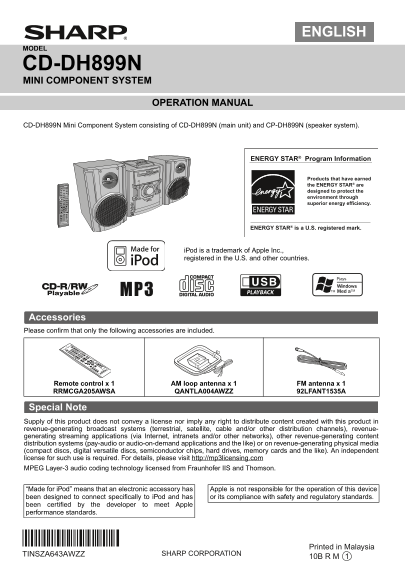
CD-DH899N Mini Component System consisting of CD-DH899N (main unit) and CP-DH899N (speaker system).

ENERGY STAR® Program Information

MINI COMPONENT SYSTEM CD-DH899

Products that have earned

FUNCTION

ON/STAND-BY POWER the ENERGY STAR® are

designed to protect the

CD OPEN PUSH environment through

AUDIO IN

PHONES superior energy efficiency.

ENERGY STAR® is a U.S. registered mark.

i Pod is a trademark of Apple Inc., registered in the U.S. and other countries.

Accessories Please confirm that only the following accessories are included.

CD USB

Remote control x 1 AM loop antenna x 1 FM antenna x 1 RRMCGA205AWSA QANTLA004AWZZ 92LFANT1535A

Special Note Supply of this product does not convey a license nor imply any right to distribute content created with this product in revenue-generating broadcast systems (terrestrial, satellite, cable and/or other distribution channels), revenue- generating streaming applications (via Internet, intranets and/or other networks), other revenue-generating content distribution systems (pay-audio or audio-on-demand applications and the like) or on revenue-generating physical media (compact discs, digital versatile discs, semiconductor chips, hard drives, memory cards and the like). An independent license for such use is required. For details, please visit http://mp3licensing.com MPEG Layer-3 audio coding technology licensed from Fraunhofer IIS and Thomson.

“Made for i Pod” means that an electronic accessory has Apple is not responsible for the operation of this device been designed to connect specifically to i Pod and has or its compliance with safety and regulatory standards. been certified by the developer to meet Apple performance standards.

Printed in Malaysia

TINSZA643AWZZ

09/12/31 CD-DH899N (SEC-LAG) Front.fm

Page Summary Contents For SHARP CD-DH899N Operation Manual

Page 1 ENGLISH MODEL CD-DH899N MINI COMPONENT SYSTEM OPERATION MANUAL CD-DH899N Mini Component System consisting of CD-DH899N (main unit) and CP-DH899N (speaker system). ENERGY STAR® Program Information MINI...
Page 2 For U.S. customer only CONSUMER LIMITED WARRANTY SHARP ELECTRONICS CORPORATION warrants to the first consumer purchaser that this Sharp brand product (the "Product"), when ship in its origin...
Page 3 System connections (continued) Make sure to unplug the AC power cord before making any connections. AM loop antenna Installing the AM loop To video antenna input jack < Assembling > Video cable ...
Page 4 General control Bass control MINI COMPONENT SYSTEM CD-DH899 Press the BASS/TREBLE button to select “BASS”. Within 5 seconds, press the VOLUME (+ or –) button to POWER ON/STAND-BY POWER FUNCTION adjust...
Page 5 Listening to the i Pod Supported i Pod models: i Pod nano (software 1.2 above) i Pod mini (software 1.2 above) MINI COMPONENT SYSTEM CD-DH899 i Pod (5th generation) (software 1.3 above) (Dock connecto...
Page 6 Listening to the i Pod (continued) Listening to a CD or MP3/WMA disc Watching videos on a TV connected to i Pod MINI COMPONENT SYSTEM CD-DH899 Press the DISPLAY (TV OUT) button for more than 2 seconds...
Page 7 Listening to a CD or MP3/WMA disc (continued) Direct track search Random play By using the Direct Search buttons, the desired tracks on The tracks on the disc can be played in random order the current...
Page 8 Listening to a CD or MP3/WMA disc (continued) Programmed play (MP3/WMA) Procedure to playback MP3/WMA disc with folder mode on While in the stop mode, press the MEMORY button to To play back CD-R/RW. ...
Page 9 Listening to USB mass storage device/MP3 player Select desired file to be played back by pressing the or ON/STAND-BY POWER FUNCTION button. Press the / (USB / ) button. Playback will start and the fil...
Page 10 Listening to the radio Memorising a station MINI COMPONENT SYSTEM You can store 40 AM and FM stations in memory and recall CD-DH899 them at the push of a button. (Preset tuning) POWER ON/STAND-BY POWE...
Page 11 Listening to a cassette tape Note: Tape playback Tape recording function is not available in this unit. Before playback: Press the ON/STAND-BY button to turn the power on. For playback, use normal or ...
Page 12 Setting the clock (Remote control Timer and sleep operation (Remote only) control only) Once timer: Once timer play works for one time only at a preset time. Daily timer: Daily timer play works at the...
Page 13 Timer and sleep operation (Remote control only) (continued) Reusing the memorized timer setting: The timer setting will be memorized once it is entered. To reuse the same setting, perform the followin...
Page 14 Enhancing your system Troubleshooting chart The connection cord is not included. Purchase a Many potential problems can be resolved by the owner commercially available cord as shown below. without cal...
Page 15 Troubleshooting chart (continued) Cassette deck If problem occurs Symptom Possible cause When this product is subjected to strong external interference (mechanical shock, excessive static electricity,...
Page 16 Specifications As part of our policy of continuous improvement, SHARP reserves the right to make design and specification USB changes for product improvement without prior notice. The performance spec...

Manual Details

Brand Sharp
Pages 16
File Size 1.18 MB
Published June 05, 2026
42 views

Enter the captcha to get the download link:

captcha

Frequently Asked Questions

What is the warranty period for the Mini Component System?

It includes a one-year warranty covering parts and labor from the date of purchase.

Which audio formats does the system support?

The system supports MP3 (32~320 kbps), WMA, and MPEG 1 Layer 3 technology.

What are the recommended speaker impedance values?

Speakers should be connected to a 4 ohms load. For headphones, a 32 ohm resistance is recommended.

Will this product work with iPod devices?

The manual states 'Made for iPod,' but also warns that Apple is not responsible for operation or compliance of the device.