Sanyo PLC-XU55 Projector Quick Start Guide
Summary
Streamline your presentations with detailed connectivity guidance for this versatile projector unit. This manual provides comprehensive, step-by-step instructions for connecting multiple video sources, including PCs via DVI/VGA and external devices using S-Video or Composite input. It guides users through selecting the correct input source, optimizing computer display settings, and achieving perfect picture clarity by adjusting zoom and focus. Essential reading for professionals, educators, and anyone requiring reliable, seamless visual connectivity.
Page 1 Text Content
Sanyo PLC-XU55 Projector Quick Start Guide How to connect a computer to the projector Step One: Determine connector type First determine the type of output connector on the computer, DVI or VGA (also know as D-sub, from its D shape). The projector comes with a cable to connect to your computer, one end has a DVI connector, the other a VGA connector.
DVI is frequently found on Macintosh computers and some PCs:
VGA is usually found on PCs and some Macintosh computers:
Step Two: Connect cable to the appropriate connectors on the computer and projector
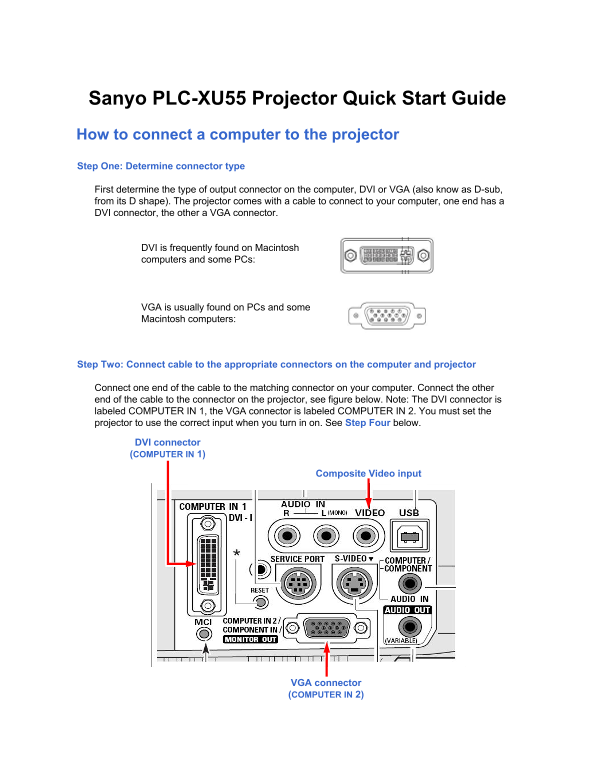
Connect one end of the cable to the matching connector on your computer. Connect the other end of the cable to the connector on the projector, see figure below. Note: The DVI connector is labeled COMPUTER IN 1, the VGA connector is labeled COMPUTER IN 2. You must set the projector to use the correct input when you turn in on. See Step Four below.
DVI connector (COMPUTER IN 1)
Composite Video input
VGA connector (COMPUTER IN 2)
Page Summary Contents For Sanyo PLC-XU55 Projector Quick Start Guide
Manual Details
| Brand | Sanyo |
|---|---|
| Pages | 3 |
| File Size | 242.97 KB |
| Published | May 28, 2026 |
Enter the captcha to get the download link:

Frequently Asked Questions
What are the different ways I can connect my computer?
You can use a cable connecting DVI or VGA outputs from your computer to the projector.
Where are the different input sources located on the projector?
DVI is labeled COMPUTER IN 1, and VGA is labeled COMPUTER IN 2.
How do I adjust the image quality after setup?
First, set the zoom using the zoom lever, and then focus the image using the focus ring.
What steps should I follow if the screen remains black after connecting devices?
Ensure both units are powered on, verify the computer is outputting through its VGA/DVI port, and manually set the projector's input source to match the connected port.