PHILIPS LX8500W Quick User Guide
Summary
A DVD home theater system quick-use guide covering setup and playback operations for a Philips LX8500W DVD player with integrated speaker system. The manual provides connection instructions for SCART, composite video, S-video, and component video outputs to television, speaker assembly guidance, disc playback controls, remote control functions, and basic audio configuration. Includes progressive scan setup and video output switching between RGB and YUV modes. Designed for home entertainment consumers seeking straightforward guidance on initial system setup, disc loading, and daily playback operation of their DVD home theater system.
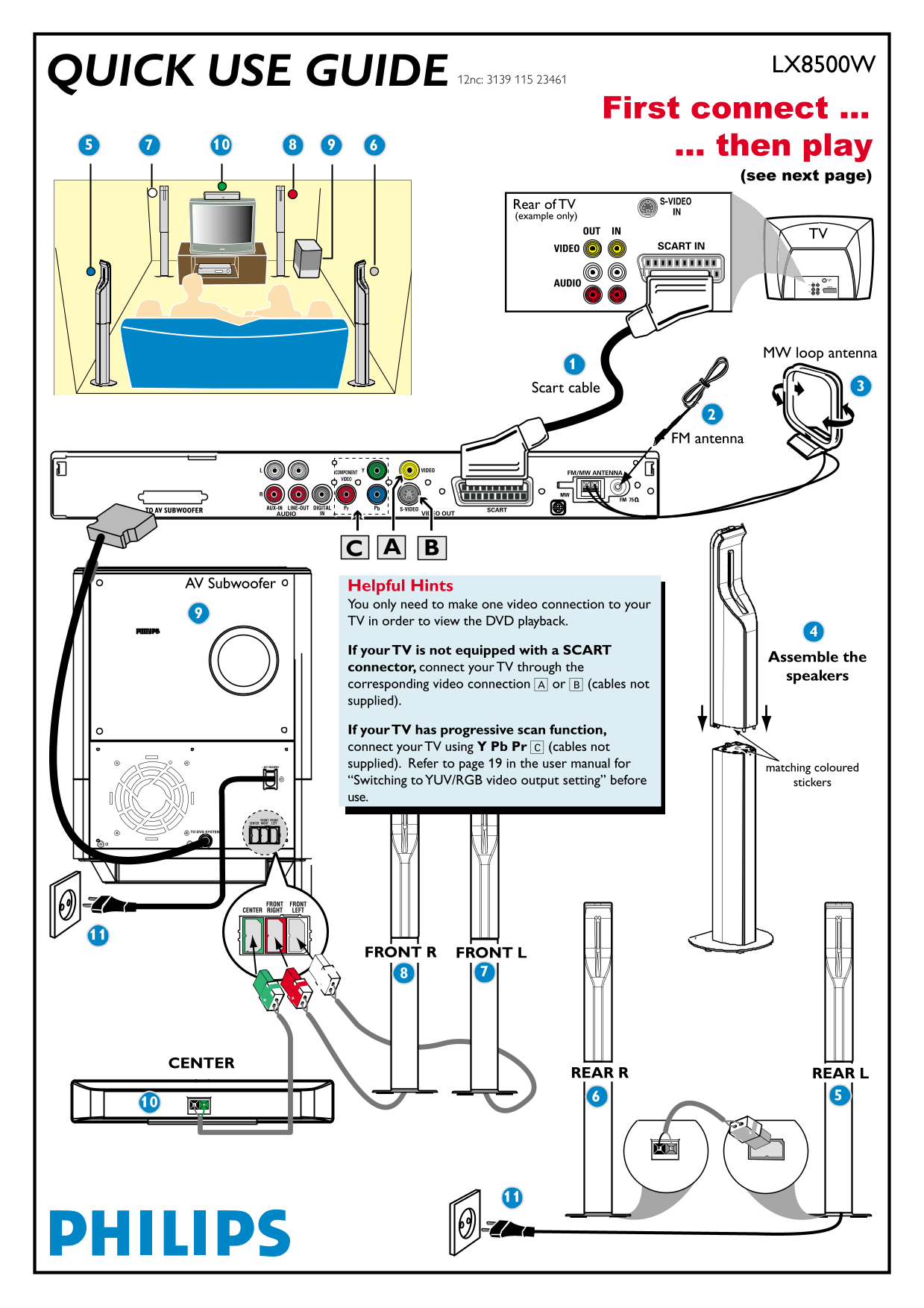
Page 1 Text Content
LX8500WQUICK USE GUIDE
12nc: 3139 115 23461
First connect ... ... then play
(see next page)
Rear of TV (example only)
PHILIPS PHILIPS
OUT IN
VIDEO SCART IN
OUT IN S-VIDEO IN
AUDIO VIDEO SCART IN
AUDIO
MW loop antenna
Scart cable
FM antenna
TO AV SUBWOOFER
AV Subwoofer Helpful Hints
You only need to make one video connection to your TV in order to view the DVD playback.
If your TV is not equipped with a SCART
Assemble the
connector, connect your TV through the
speakers
corresponding video connection A or B (cables not supplied).
If your TV has progressive scan function, connect your TV using Y Pb Pr C (cables not supplied). Refer to page 19 in the user manual for
matching coloured
“Switching to YUV/RGB video output setting” before stickers use.
FRONT R FRONT L
CENTER
REAR R REAR L
Page Summary Contents For PHILIPS LX8500W Quick User Guide
Manual Details
| Brand | Philips |
|---|---|
| Pages | 9 |
| File Size | 1.15 MB |
| Published | July 04, 2026 |
Enter the captcha to get the download link:

Frequently Asked Questions
What video connection do I need for DVD playback?
Only one video connection to your TV is required to view DVD playback.
Why is there no picture when playing a disc?
Turn on the TV and select the correct AV input mode, such as A/V IN or VIDEO.
How do I fix no sound from rear speakers?
Press SURR to select the 'MULTI-CHANNEL' mode on the remote control.
How can I improve the sound quality?
Press SOUND repeatedly to select a predefined digital sound effect.