PHILIPS CEM1100 Quick User Guide
Summary
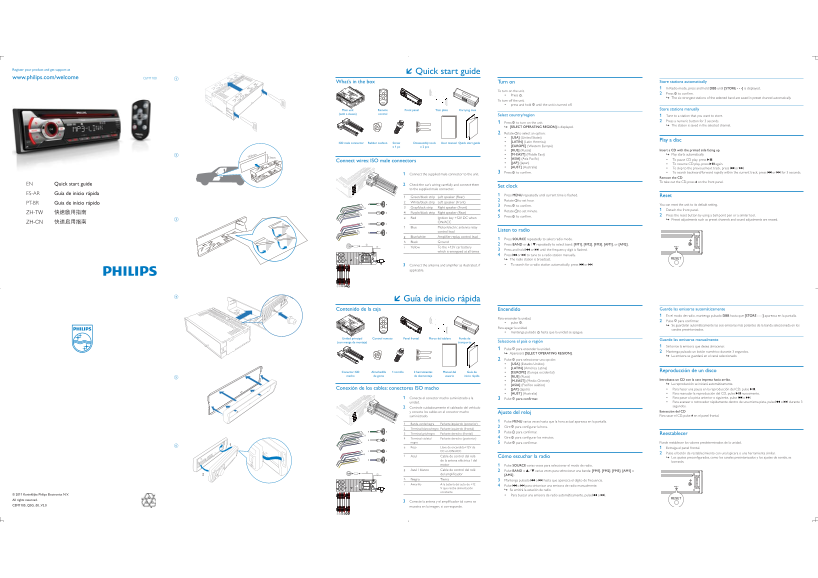
Multilingual quick start guide (English, Spanish, Portuguese) for the Philips CEM1100 car audio system, a CD receiver with FM/AM tuner. Package contents: main unit, remote control, front panel, trim plate, carrying case (with sleeve), ISO male connector, rubber cushion (x2), screws, disassembly tools, user manual, and quick start guide. Wiring diagram documents speaker connections: green/black (rear left), white/black (front left), gray/black (front right), purple/black (rear right). Initial set
Page 1 Text Content
Register your product and get support at
Quick start guide
CEM1100
press and hold until the unit is turned off.
Main unit Remote Front panel Trim plate Carrying case Store stations manually
(with a sleeve) control Select country/region 1 Tune to a station that you want to store.
1 Press to turn on the unit. 2 Press a numeric button for 3 seconds. [SELECT OPERATING REGION] is displayed. The station is saved in the selected channel.
2 Rotate to select an option: [USA] (United States)
[LATIN] (Latin America) Play a disc
ISO male connector Rubber cushion Screw Disassembly tools User manual Quick start guide
x 1 pc x 2 pcs [EUROPE] (Western Europe)
[RUS] (Russia) Insert a CD with the printed side facing up.
[M-EAST] (Middle East) Play starts automatically.
183mm 53mm [ASIA]
Connect wires: ISO male connectors [JAP] (Japan)
again.
EN Quick start guide 2 Check the car’s wiring carefully and connect them
Set clock
to the supplied male connector.
ES-AR Guía de inicio rápida 1 Press MENU
Green/black strip Left speaker (Rear) Reset
White/black strip Left speaker (Front) 2 Rotate to set hour.
PT-BR Guia de início rápido You can reset the unit to its default setting.
Gray/black strip Right speaker (Front) 3 Press
4 Rotate to set minute. 1 Detach the front panel.
Purple/black strip Right speaker (Rear)
5 Press 2 Press the reset button by using a ball-point pen or a similar tool.
Red Ignition key +12V DC when Preset adjustments such as preset channels and sound adjustments are erased.
ON/ACC
Blue Motor/electric antenna relay
control lead Listen to radio
Blue/white
1 Press SOURCE repeatedly to select radio mode.
Black Ground
Yellow To the +12V car battery
applicable.
Guía de inicio rápida
mantenga pulsado hasta que la unidad se apague.
Unidad principal Control remoto Panel frontal Marco del tablero Funda de Guarde las emisoras manualmente
(con manga de montaje) transporte Selecciona el país o región
1 Sintonice la emisora que desea almacenar.
1 Pulse para encender la unidad.
Aparecerá [SELECT OPERATING REGION]. 2 Mantenga pulsado un botón numérico durante 3 segundos. La emisora se guardará en el canal seleccionado.
2 Pulse para seleccionar una opción: [USA] (Estados Unidos) [LATIN] (América Latina)
Conector ISO 1 tornillo Almohadilla 2 herramientas Manual del Guía de [EUROPE] (Europa occidental) Reproducción de un disco
macho de goma de desmontaje usuario inicio rápida [RUS] (Rusia)
[M-EAST] (Medio Oriente) Introduzca un CD con la cara impresa hacia arriba.
1 Conecte el conector macho suministrado a la 3 Pulse o .
y conecte los cables en el conector macho Ajuste del reloj Extracción del CD
suministrado. en el panel frontal.
1 Pulse MENU varias veces hasta que la hora actual aparezca en la pantalla.
Banda verde/negra Parlante izquierdo (posterior)
Terminal blanco/negro Parlante izquierdo (frontal) 2 Gire Terminal gris/negro Parlante derecho (frontal) 3 Pulse Reestablecer Terminal violeta/ Parlante derecho (posterior) 4 Gire
negro 5 Pulse Puede restablecer los valores predeterminados de la unidad. Rojo Llave de encendido+12V de 1 Extraiga el panel frontal.
CC en ON/ACC
2 Pulse el botón de restablecimiento con una lapicera o una herramienta similar.
de la antena eléctrica / del borrarán. motor 1 Pulse SOURCE varias veces para seleccionar el modo de radio.
[AM2] .
Negro Tierra 3 Mantenga pulsado o hasta que aparezca el dígito de frecuencia. Amarillo A la batería del auto de +12 4 Pulse o para sintonizar una emisora de radio manualmente.
V que recibe alimentación Se emitirá la estación de radio. constante
Page Summary Contents For PHILIPS CEM1100 Quick User Guide
Manual Details
| Brand | Philips |
|---|---|
| Pages | 2 |
| File Size | 2.11 MB |
| Published | June 15, 2026 |
Enter the captcha to get the download link:

Frequently Asked Questions
How can I reset the unit if I forget my settings?
Press and hold the reset button using a ball-point pen or similar tool. This erases preset channels and sound adjustments.
What is required to set up radio frequency bands (FM/AM)?
Select 'Radio' mode by repeatedly pressing SOURCE, then use BAND or SOURCE to select desired band groups like [FM1], [AM2], etc.
How do I manually store a favorite radio station?
Tune to the station, press and hold a numeric button for 3 seconds. This saves it in the selected channel after selecting the operating region.
What is included when buying this car stereo system?
The box contains the main unit, remote control, front panel, carrying case/sleeve, ISO male connector, rubber cushion, screws, and disassembly tools.