PHILIPS CID2780 Quick User Guide
Summary
Upgrade your vehicle's sound system with this advanced Bluetooth-enabled car stereo unit. This comprehensive manual is designed for DIY users and auto enthusiasts, providing step-by-step instructions for professional-quality installation. It covers everything from safe dashboard mounting and complex wiring diagrams to straightforward Bluetooth pairing, allowing you to easily connect and enjoy high-quality audio from your phone. Get expert guidance to transform your in-car entertainment experience.
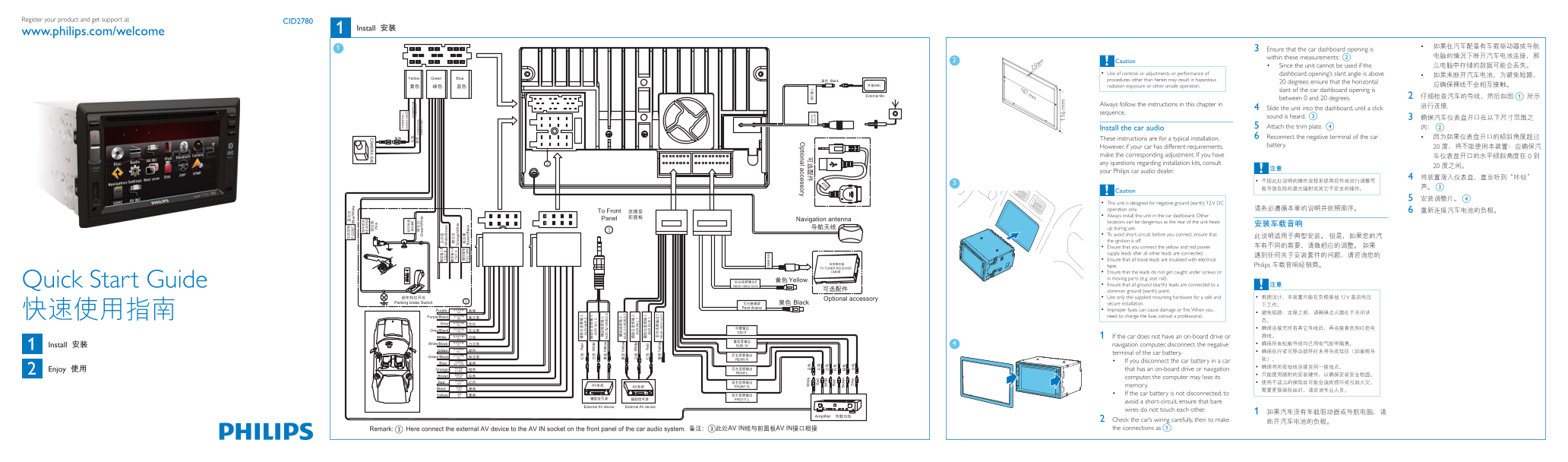
Page 1 Text Content
Register your product and get support at
CID2780
Install
www.philips.com/welcome
3 Ensure that the car dashboard opening is within these measurements: b
Caution
Since the unit cannot be used if the
Use of controls or adjustments or performance of dashboard opening’s slant angle is above procedures other than herein may result in hazardous
20 degrees: ensure that the horizontal
radiation exposure or other unsafe operation.
187 mm slant of the car dashboard opening is
between 0 and 20 degrees. 2 a
Always follow the instructions in this chapter in
4 Slide the unit into the dashboard, until a click
sequence.
sound is heard. c Install the car audio 5 Attach the trim plate. d 6 Reconnect the negative terminal of the car
These instructions are for a typical installation.
battery.
However, if your car has different requirements, make the corresponding adjustment. If you have any questions regarding installation kits, consult your Philips car audio dealer.
Caution
This unit is designed for negative ground (earth) 12 V DC operation only. Always install this unit in the car dashboard. Other locations can be dangerous as the rear of the unit heats up during use. To avoid short-circuit: before you connect, ensure that the ignition is off. Ensure that you connect the yellow and red power supply leads after all other leads are connected. Ensure that all loose leads are insulated with electrical
tape. Philips
Ensure that the leads do not get caught under screws or in moving parts (e.g. seat rail). Quick Start Guide Ensure that all ground (earth) leads are connected to a common ground (earth) point. Use only the supplied mounting hardware for a safe and 12 V secure installation. need to change the fuse, consult a professional.
1 If the car does not have an on-board drive or Install navigation computer, disconnect the negative terminal of the car battery. If you disconnect the car battery in a car Enjoy that has an on-board drive or navigation computer, the computer may lose its memory. If the car battery is not disconnected, to avoid a short-circuit, ensure that bare wires do not touch each other. 2 Check the car’s wiring carefully, then to make cc the connections as a.
Page Summary Contents For PHILIPS CID2780 Quick User Guide
Manual Details
| Brand | Philips |
|---|---|
| Pages | 2 |
| File Size | 698.25 KB |
| Published | June 04, 2026 |
Enter the captcha to get the download link:

Frequently Asked Questions
What power requirements does this system use?
This unit is designed for negative ground (earth) operation only using 12 V DC.
How do I pair a Bluetooth phone with the unit?
Turn on the Bluetooth function, search for the device, select 'CID2780,' and enter the default password '0000.'
What safety steps must be taken before wiring the system?
Ensure the ignition is off and disconnect the negative terminal of the car battery to prevent a short-circuit.