Philips CID3695 Quick User Guide
Summary
Upgrade your vehicle with this comprehensive in-car multimedia unit. This manual provides detailed, step-by-step instructions for owners who wish to install and operate their new car audio system. Learn everything from initial dashboard mounting and wiring connections to advanced functionality like Bluetooth connectivity, digital radio tuning, USB playback, and integrated GPS navigation. It is the essential guide for utilizing all key features—including phone call management and clock settings—to ensure a seamless and modern driving experience.
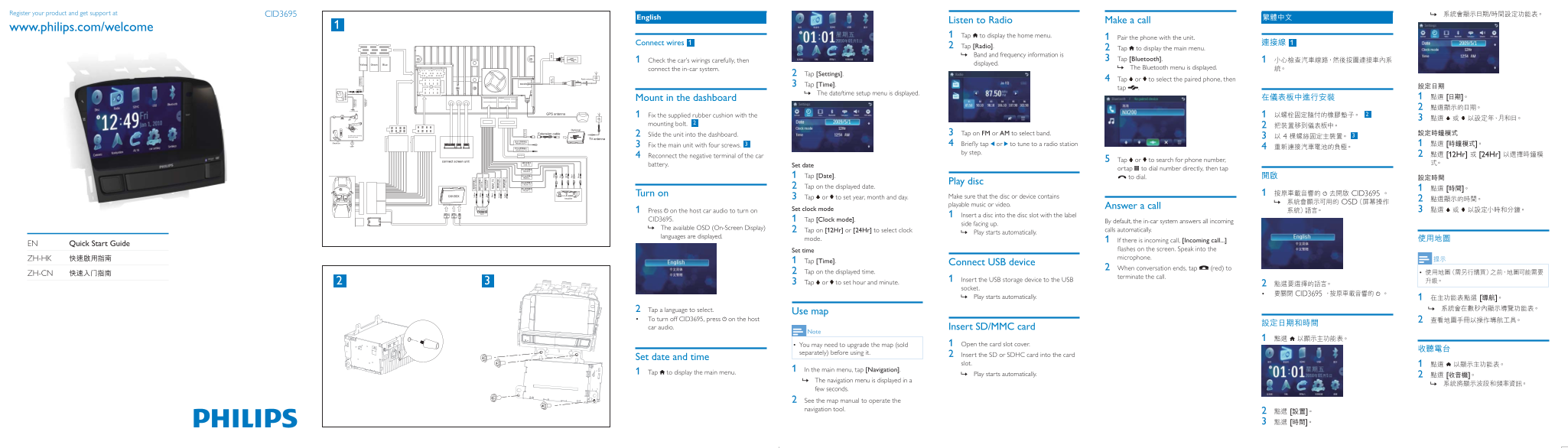
Page 1 Text Content
Register your product and get support at CID3695 / »
English
Listen to Radio Make a call
www.philips.com/welcome
1 Tap to display the home menu. 1 Pair the phone with the unit.
Connect wires 1
2 Tap [Radio]. 2 Tap to display the main menu. Band and frequency information is »
1 Check the car’s wirings carefully, then 3 Tap [Bluetooth].
displayed.
connect the in-car system. The Bluetooth menu is displayed. »
2 Tap [Settings].
4 Tap or to select the paired phone, then
3 Tap [Time].
tap .
The date/time setup menu is displayed. »
Mount in the dashboard 1 [
1 Fix the supplied rubber cushion with the 1 2
mounting bolt. 2
2 Slide the unit into the dashboard. 3 Tap on FM or AM to select band.
3 Fix the main unit with four screws. 3 4 Briefly tap or to tune to a radio station 1 [ by step. 2 [12Hr] [24Hr]
4 Reconnect the negative terminal of the car
5 Tap or to search for phone number,
battery. Set date
ortap to dial number directly, then tap
1 Tap [Date]. to dial.
Play disc
2 Tap on the displayed date. 1 [
Turn on 1 CID3695
3 Tap or to set year, month and day. Make sure that the disc or device contains
OSD »
playable music or video. Answer a call
1 Press on the host car audio to turn on Set clock mode
1 Insert a disc into the disc slot with the label
CID3695. 1 Tap [Clock mode].
By default, the in-car system answers all incoming
side facing up.
The available OSD (On-Screen Display) » 2 Tap on [12Hr] or [24Hr] to select clock
calls automatically.
Play starts automatically. »
languages are displayed.
mode. 1 If there is incoming call, [Incoming call...]
EN Quick Start Guide
Set time flashes on the screen. Speak into the ZH-HK microphone.
1 Tap [Time]. Connect USB device
2 When conversation ends, tap (red) to
ZH-CN 2 Tap on the displayed time.
terminate the call.
1 Insert the USB storage device to the USB
3 Tap or to set hour and minute.
socket.
• CID3695
Play starts automatically. » 1 [
2 Tap a language to select. Use map To turn off CID3695, press • on the host car audio. Insert SD/MMC card
You may need to upgrade the map (sold • 1 Open the card slot cover.
separately) before using it. 2 Insert the SD or SDHC card into the card
Set date and time
slot.
1 In the main menu, tap [Navigation].
1 Tap to display the main menu.
Play starts automatically. » 2 [
The navigation menu is displayed in a » few seconds. 2 See the map manual to operate the navigation tool. 2 [
Page Summary Contents For Philips CID3695 Quick User Guide
Manual Details
| Brand | Philips |
|---|---|
| Pages | 2 |
| File Size | 629.48 KB |
| Published | June 04, 2026 |
Enter the captcha to get the download link:

Frequently Asked Questions
How do I mount the unit in the car dashboard?
Fix it using mounting bolts to secure it to the dash, connecting the necessary electrical wires. Additionally, use the supplied rubber cushion for stable placement.
What types of storage devices are supported by the system?
The unit supports SD/MMC cards (Micro, Mini, and SDHC formats), USB drives, and discs.
How do I set the date and time on the in-car system?
Navigate to [Time] in the main menu. Select either 12Hr or 24Hr format, then adjust the date using up/down arrows and press OK when finished.