PHILIPS AS140 Quick User Guide
Summary
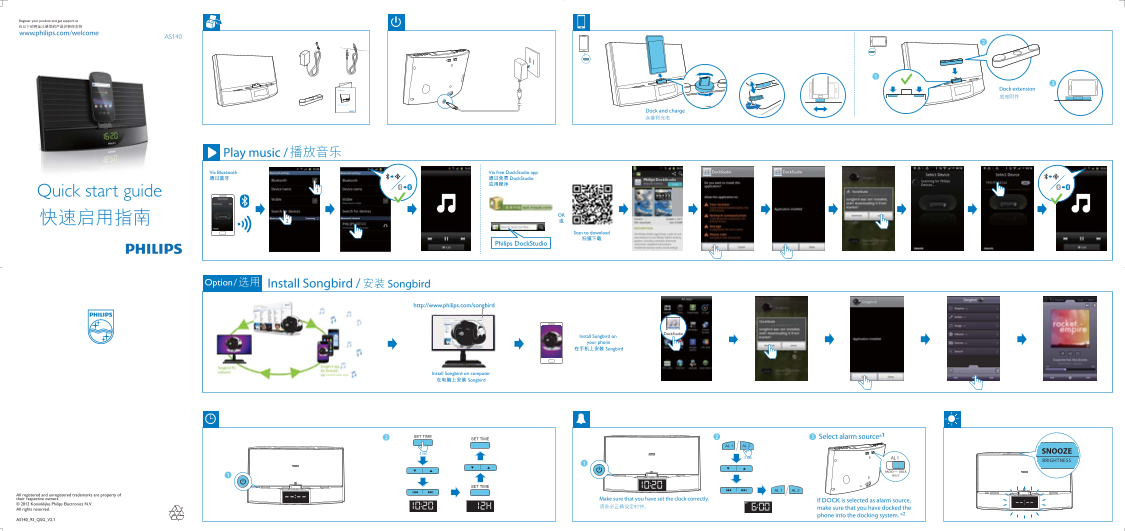
Bilingual quick start guide (English and Chinese) for the Philips AS140 Dock Extension, a bedside docking speaker system with dual alarm clock for smartphones. Key features: dock and charge phone, play music via Bluetooth or free Philips DockStudio app with Songbird music management. Setup steps: (1) dock phone, (2) install DockStudio app by scanning QR code or from app store, (3) option to install Songbird on phone or computer (www.philips.com/songbird) for music library management. Alarm funct
Page 1 Text Content
AS140www.philips.com/welcome
Dock extension 底座附件
Quick start guide
Dock and charge
Play music /
Via Bluetooth Via free Dock Studio app Dock Studio Dock Studio
Dock Studio
Quick start guide
Scan to download
Philips Dock Studio
Install Songbird / Songbird Option /
http://www.philips.com/songbird
Dock Studio
Install Songbird on your phone
Songbird
Install Songbird on computer
Songbird
Select alarm source*1
2 sec. SNOOZE
2 sec. AL 1
BRIGHTNESS
RADIO DOCK BUZZ
All registered and unregistered trademarks are property of their respective owners. Make sure that you have set the clock correctly.
If DOCK is selected as alarm source,
© 2012 Koninklijke Philips Electronics N.V.
All rights reserved. make sure that you have docked the phone into the docking system. *2
AS140_93_QSG_V2.
AS140_93_QSG_V2.1.indd 1 2012-2-16 17:07:02
Page Summary Contents For PHILIPS AS140 Quick User Guide
Manual Details
| Brand | Philips |
|---|---|
| Pages | 2 |
| File Size | 730.85 KB |
| Published | June 15, 2026 |
Enter the captcha to get the download link:

Frequently Asked Questions
How can I connect my phone to the Dockstudio for music?
You can stream music via Bluetooth or using a free DockStudio app from your phone or computer.
What must I check before setting up an alarm?
Make sure that you have set the clock correctly, and if DOCK is selected as the alarm source, ensure the phone is docked into the docking system.
How do I add music streaming features to my device?
You can install Songbird on your phone or computer by visiting the Philips website (http://www.philips.com/songbird) and following the provided instructions.