PHILIPS FWD14 Quick User Guide (English)
Summary
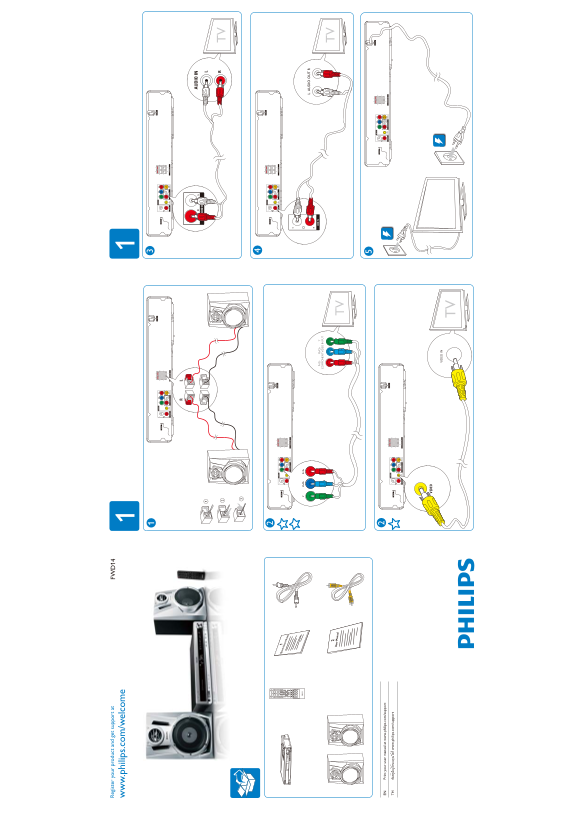
This Philips FWD14 DVD mini home theater system quick start guide provides simplified setup and connection instructions for enjoying surround sound movie and music playback from DVD video Video CD audio CD CD-R CD-RW and MP3 CD optical disc formats. Covers speaker system connection with color-coded speaker wire terminals for front left right center and rear left right surround satellite speakers plus active subwoofer with integrated amplifier for rich bass reproduction in compact living room ent
Page 1 Text Content
Re gis te ry ou r p ro du ct nd et su pp or t a FW
w. ph ilip s.c om /w el co
IO IN
AU IO
Pr /C b/ PO EN VI EO IN
Pr in t y ou r u se r m an ua l a t w .p hi lip s.c om /su pp or
Page Summary Contents For PHILIPS FWD14 Quick User Guide (English)
Manual Details
| Brand | Philips |
|---|---|
| Pages | 2 |
| File Size | 1.13 MB |
| Published | June 17, 2026 |
Enter the captcha to get the download link:

Frequently Asked Questions
Where can I register my product and get support information?
Register your product and get support at FWD14 www.philips.com/welcome.
How can I print a copy of the user manual?
You can print your user manual at www.philips.com/support.
What types of inputs are available for video connectivity?
Available inputs include Component Video In (Y) and connections designated for TV.
Which ports are available for audio connections?
Audio connections include AUDIO IN, L Audio Out, R, Pr/Cr, and Pb/Cb outputs.