PHILIPS FWD398 98 Quick User Guide (English)
Summary
This Philips FWD398/98 DVD home cinema system quick start guide provides simplified one-page plug and play setup instructions for immediate DVD movie enjoyment with surround sound multi-channel audio reproduction capability in compact residential living room entertainment center installations. Covers single component video S-Video or composite video cable connection from DVD system to television set for high-quality DVD video signal transmission with automatic region code detection and NTSC PAL
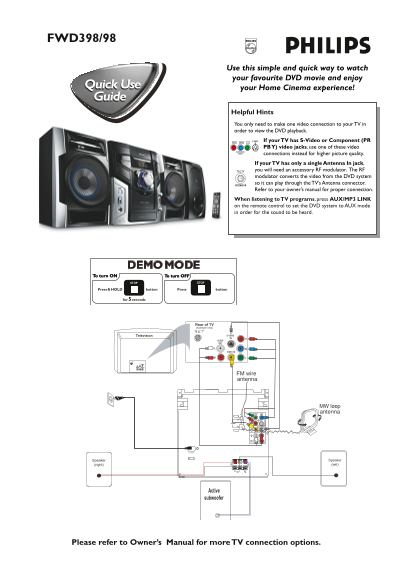
Page 1 Text Content
FWD398/98
Use this simple and quick way to watch your favourite DVD movie and enjoy your Home Cinema experience!
Helpful Hints You only need to make one video connection to your TV in order to view the DVD playback.
If your TV has S-Video or Component (PR PB Y) video jacks, use one of these video connections instead for higher picture quality. If your TV has only a single Antenna In jack, you will need an accessory RF modulator. The RF modulator converts the video from the DVD system so it can play through the TV’s Antenna connector. Refer to your owner’s manual for proper connection.
When listening to TV programs, press AUX/MP3 LINK on the remote control to set the DVD system to AUX mode in order for the sound to be heard.
Please refer to Owner’s Manual for more TV connection options.
Page Summary Contents For PHILIPS FWD398 98 Quick User Guide (English)
Manual Details
| Brand | Philips |
|---|---|
| Pages | 2 |
| File Size | 895.02 KB |
| Published | June 17, 2026 |
Enter the captcha to get the download link:

Frequently Asked Questions
How do I connect the FWD398/98 video signal for best quality?
Use S-Video or Component (PR PB Y) jacks if your TV has them. Otherwise, an RF modulator may be needed.
What should I do to hear sound when watching TV programs?
Press AUX/MP3 LINK on the remote control to set the DVD system to AUX mode.
How does the initial setup process work?
After turning it on, press 2; on the system and then press DISC1/2/3 with a disc loaded. Select the TV's correct video mode.
What region codes are compatible with this DVD system?
The DVDs must be labeled for ALL regions or Region 3 to play correctly.