PHILIPS CAM100 Quick User Guide (English)
Summary
Streamline your setup experience with this comprehensive guide for your Philips HDTV unit. This manual provides step-by-step instructions covering everything from initial installation and connectivity details (Mini HDMI/HDMI) to optimal long-term operation. Designed for first-time users and existing owners, it ensures you understand all features and troubleshooting tips required to maximize your viewing enjoyment immediately. Get connected quickly with clear, reliable support documentation right out of the box.
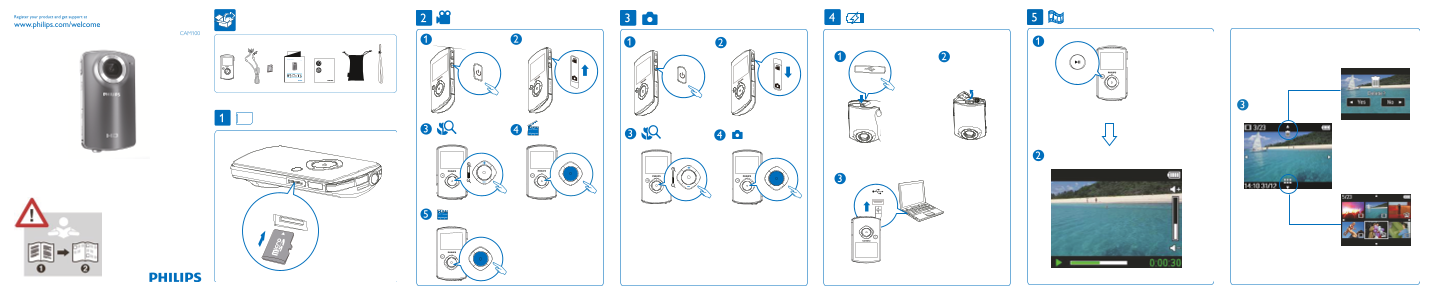
Page 1 Text Content
Register your product and get support at
www.philips.com/welcome
CAM100
CAM100GY_12_QSG_V1.5.indd 1 7/30/2010 11:03:57 AM
Page Summary Contents For PHILIPS CAM100 Quick User Guide (English)
Manual Details
| Brand | Philips |
|---|---|
| Pages | 2 |
| File Size | 2.80 MB |
| Published | June 05, 2026 |
Enter the captcha to get the download link:

Frequently Asked Questions
What is the full product support website?
The user can find support at www.philips.com/support.
How do I get further support or assistance with the device?
Please contact us and visit our website at 4523www.philips.com/welcome to get round-the-clock support.
Do you offer mini HDMI connectors?
Yes, the manual mentions both 'Mini HDMI' and standard 'HDMI' ports.
What are the proper names for the included cables or connectivity types?
The document refers to various connections including HDMI, Mini HDMI, and potentially includes detailed connector diagrams in associated filenames.