PHILIPS Portable DVD Player PET722 Quick User Guide (English)
Summary
This quick start guide provides basic setup and operating instructions for the Philips PET722 portable DVD player, covering battery charging procedures, disc playback operation, and AV output connection to external televisions for mobile entertainment users seeking portable video playback on the go.
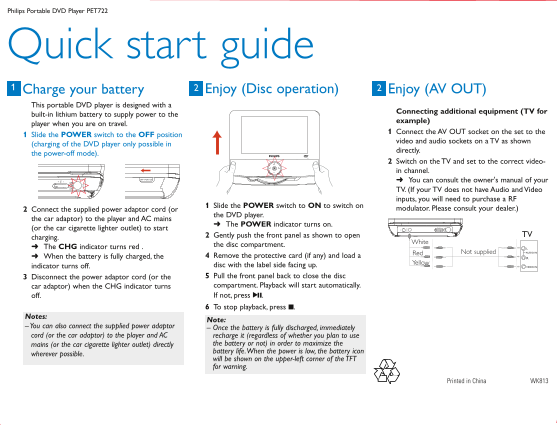
Page 1 Text Content
PET722-Eng_QSG.qxd 2008.3.26 9:53 Page 1
Philips Portable DVD Player PET722
Quick start guide
Charge your battery1 Enjoy (Disc operation) Enjoy (AV OUT)
This portable DVD player is designed with a
Connecting additional equipment (TV for
built-in lithium battery to supply power to the
example)
player when you are on travel.
Connect the AV OUT socket on the set to the
Slide the POWER switch to the OFF position
video and audio sockets on a TV as shown
(charging of the DVD player only possible in
directly.
the power-off mode).
Switch on the TV and set to the correct video- in channel. You can consult the owner's manual of your TV. (If your TV does not have Audio and Video inputs, you will need to purchase a RF
Slide the POWER switch to ON to switch on
Connect the supplied power adaptor cord (or modulator. Please consult your dealer.)
the DVD player.
the car adaptor) to the player and AC mains
The POWER indicator turns on.
(or the car cigarette lighter outlet) to start
Gently push the front panel as shown to open TV
charging.
White
the disc compartment.
The CHG indicator turns red .
Red Not supplied AUDIO IN
When the battery is fully charged, the Remove the protective card (if any) and load a
Yellow
indicator turns off. disc with the label side facing up. VIDEO IN Disconnect the power adaptor cord (or the Pull the front panel back to close the disc car adaptor) when the CHG indicator turns compartment. Playback will start automatically. off. If not, press 2;. To stop playback, press 9.
Notes:
Note:
– You can also connect the supplied power adaptor – Once the battery is fully discharged, immediately cord (or the car adaptor) to the player and AC recharge it (regardless of whether you plan to use
mains (or the car cigarette lighter outlet) directly the battery or not) in order to maximize the battery life.When the power is low, the battery icon
wherever possible.
will be shown on the upper-left corner of the TFT for warning.
Printed in China WK813
Page Summary Contents For PHILIPS Portable DVD Player PET722 Quick User Guide (English)
Manual Details
| Brand | Philips |
|---|---|
| Pages | 1 |
| File Size | 125.20 KB |
| Published | June 18, 2026 |
Enter the captcha to get the download link:

Frequently Asked Questions
How do I charge the portable DVD player?
Connect the supplied power adaptor cord to AC mains or a car cigarette lighter outlet; the POWER indicator will turn on.
How can I connect this player to a TV?
Connect the AV OUT socket to the TV’s video and audio inputs, then switch on your TV and select the correct video-in channel.
What should I do if the battery runs out or is low?
When discharging completely, immediately recharge it using AC mains or car adaptor. A warning icon will appear in the upper-left corner of the TFT when power is low.