PHILIPS DVP5990K DVD Video Player Quick Start Guide
Summary
Effortlessly set up your DVP5990K DVD Video Player with this comprehensive quick start guide. Designed for new users, the manual provides step-by-step instructions on connecting the unit to various display types—including Composite, Component, and high-quality HDMI connections. Learn how to optimize audio and video settings, manage playback controls, and troubleshoot common issues such as power loss or sound distortion, ensuring you enjoy clear viewing from disc to screen.
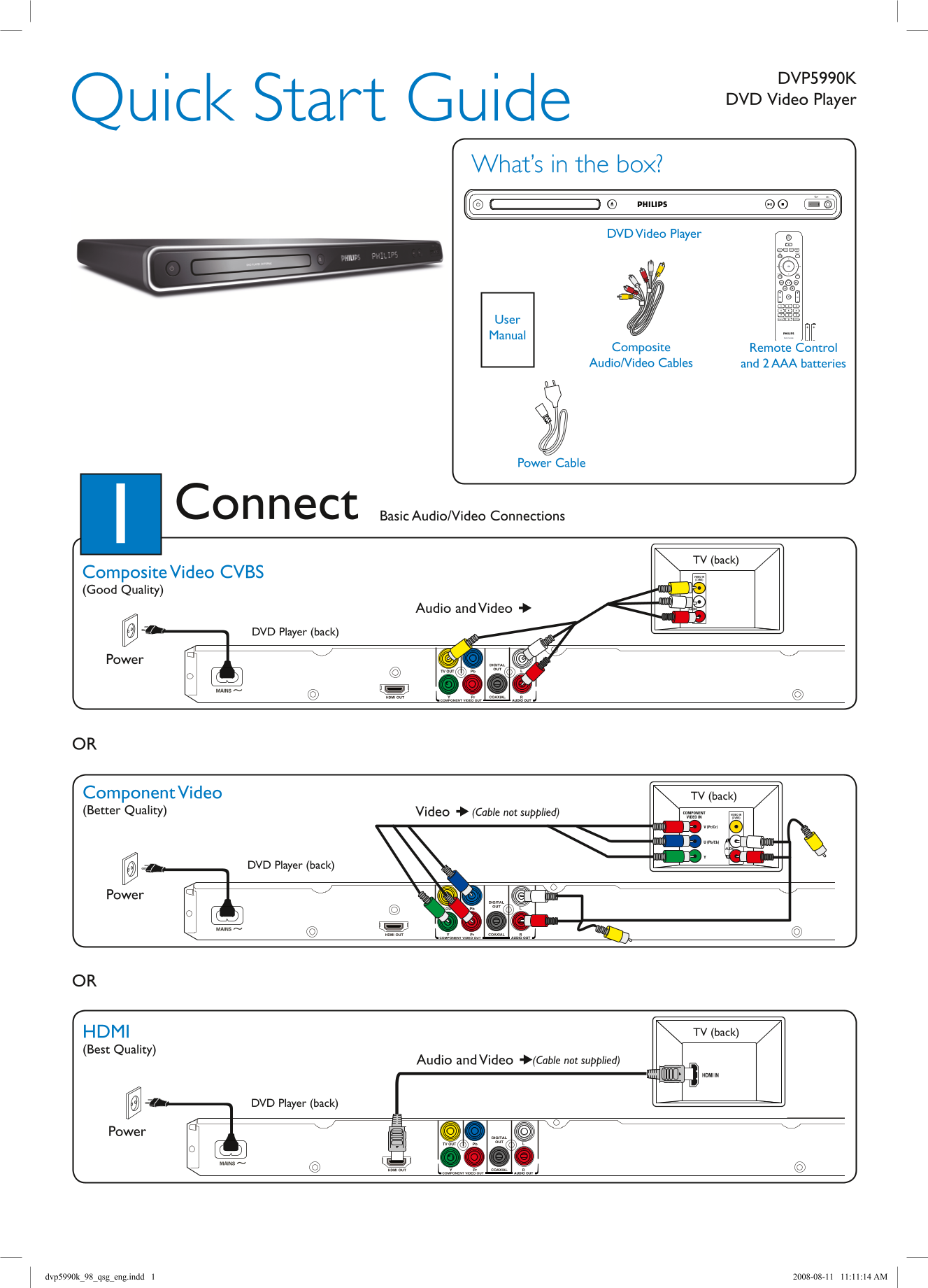
Page 1 Text Content
DVP5990K DVD Video Player Quick Start Guide
What’s in the box?
DVD Video Player
User Manual
Composite Remote Control Audio/Video Cables and 2 AAA batteries
Power Cable
Connect Basic Audio/Video Connections
TV (back) Composite Video CVBS VIDEO IN (CVBS)
(Good Quality)
Audio and Video
DVD Player (back)
Power
VIDEO IN (CVBS)
Component Video TV (back) (Better Quality) Video (Cable not supplied) COMPONENT VIDEO IN
VIDEO IN (CVBS)
V (Pr/Cr)
U (Pb/Cb)
DVD Player (back)
Power
Audio
HDMI TV (back)
(Best Quality)
Audio and Video (Cable not supplied)
HDMI IN
DVD Player (back)
Power
dvp5990k_98_qsg_eng.indd 1 2008-08-11 11:11:14 AM
Page Summary Contents For PHILIPS DVP5990K DVD Video Player Quick Start Guide
Manual Details
| Brand | Philips |
|---|---|
| Pages | 2 |
| File Size | 625.92 KB |
| Published | July 16, 2026 |
Enter the captcha to get the download link:
