PHILIPS AS35 Quick User Guide (English)
Summary
Discover optimal wireless audio performance with the Philips portable speaker system. This comprehensive manual serves as your guide to connecting and operating the unit via Bluetooth, Micro USB, and advanced mobile applications like Songbird. It is essential reading for users who wish to maximize their listening experience using Android devices. Inside, you will find clear setup instructions, crucial safety warnings, connection requirements, and tips for reliable outdoor enjoyment.
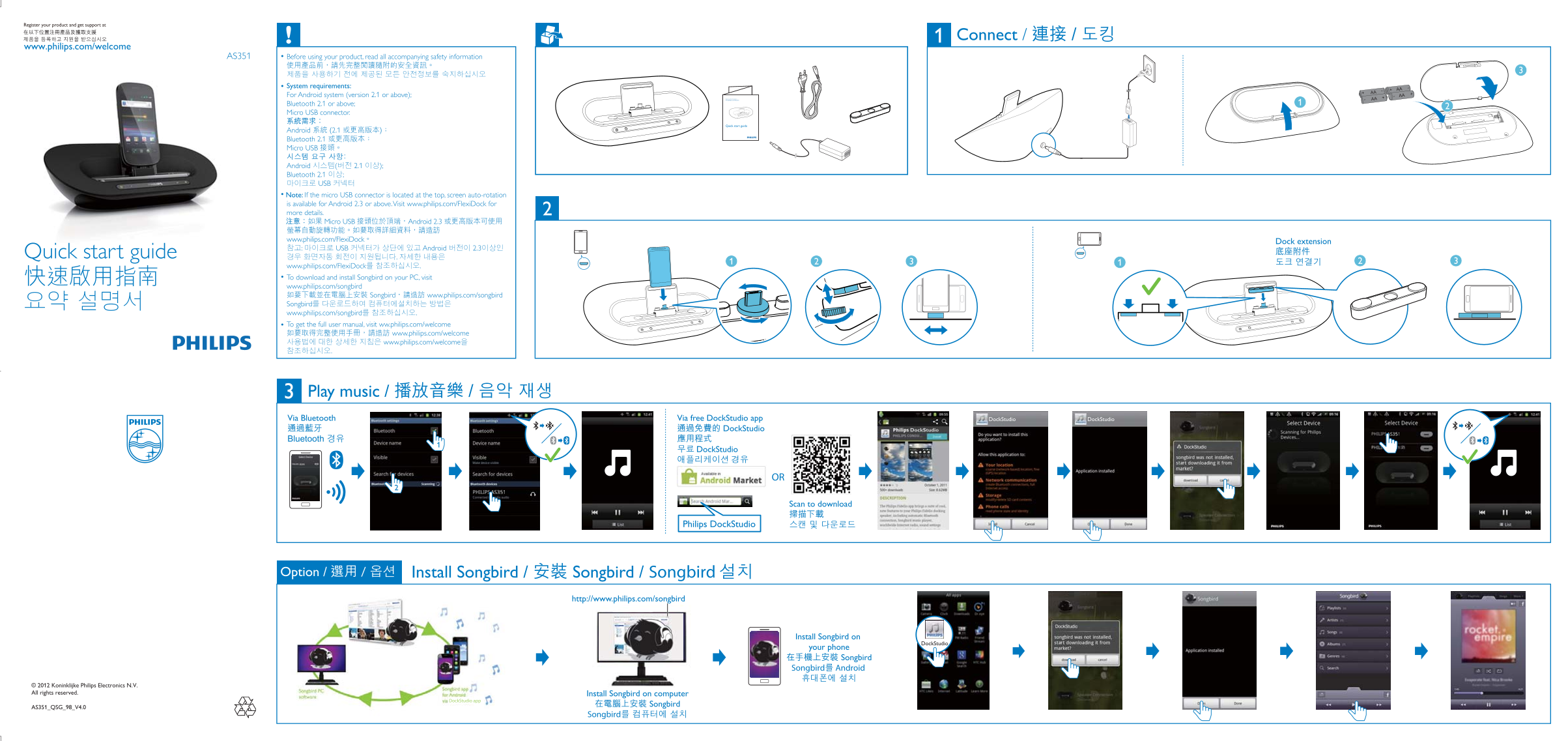
Page 1 Text Content
Connect /
www.philips.com/welcome
AS351 Before using your product, read all accompanying safety information
System requirements: AA
For Android system (version 2.1 or above); AA
Bluetooth 2.1 or above; Micro USB connector.
Quick start guide
Android 2.1 Bluetooth 2.1 Micro USB
Android ( 2.1 ); Bluetooth 2.1 ;
Note: If the micro USB connector is located at the top, screen auto-rotation is available for Android 2.3 or above. Visit www.philips.com/Flexi Dock for more details.
Micro USB Android 2.3
www.philips.com/Flexi Dock Dock extension : USB Android 2.3
Quick start guide
www.philips.com/Flexi Dock To download and install Songbird on your PC, visit www.philips.com/songbird
Songbird www.philips.com/songbird
Songbird www.philips.com/songbird To get the full user manual, visit ww.philips.com/welcome
www.philips.com/welcome
www.philips.com/welcome
Play music / Via Bluetooth Via free Dock Studio app Dock Studio Dock Studio
Dock Studio
Dock Studio
Scan to download
Philips Dock Studio
Install Songbird / Songbird / Songbird Option / /
http://www.philips.com/songbird
Install Songbird on
Dock Studio
your phone Songbird Songbird Android
© 2012 Koninklijke Philips Electronics N.V. All rights reserved. Install Songbird on computer
AS351_QSG_98_V4.0 Songbird
Songbird
AS351_QSG_98_V4.0.indd 1 2012-2-8 11:08:58
Page Summary Contents For PHILIPS AS35 Quick User Guide (English)
Manual Details
| Brand | Philips |
|---|---|
| Pages | 2 |
| File Size | 866.10 KB |
| Published | July 06, 2026 |
Enter the captcha to get the download link:

Frequently Asked Questions
What are the minimum system requirements for this device?
It requires an Android operating system version 2.1 or above, Bluetooth 2.1 or above, and a Micro USB connector.
How should I clean the unit safely?
Only clean the apparatus with a dry cloth. Do not use cleaning liquids on it.
What safety precautions must I take when using this device?
Do not operate the unit near water or heat sources (like radiators/stoves). Unplug it during lightning storms or long periods of unused time.