Panasonic SV-SD80 User Guide
Summary
This portable SD Audio Player provides a versatile solution for enjoying digital music formats, including MP3, AAC, and WMA. The unit accepts audio via removable memory cards and USB readers/writers. This manual is designed for new users, offering detailed setup instructions such as installing necessary driver software and connecting to a PC for content recording. It also covers essential operational guidelines, FCC compliance warnings regarding interference, and comprehensive technical specifications, making it ideal for any consumer seeking high-quality, reliable portable stereo audio enjoyment.
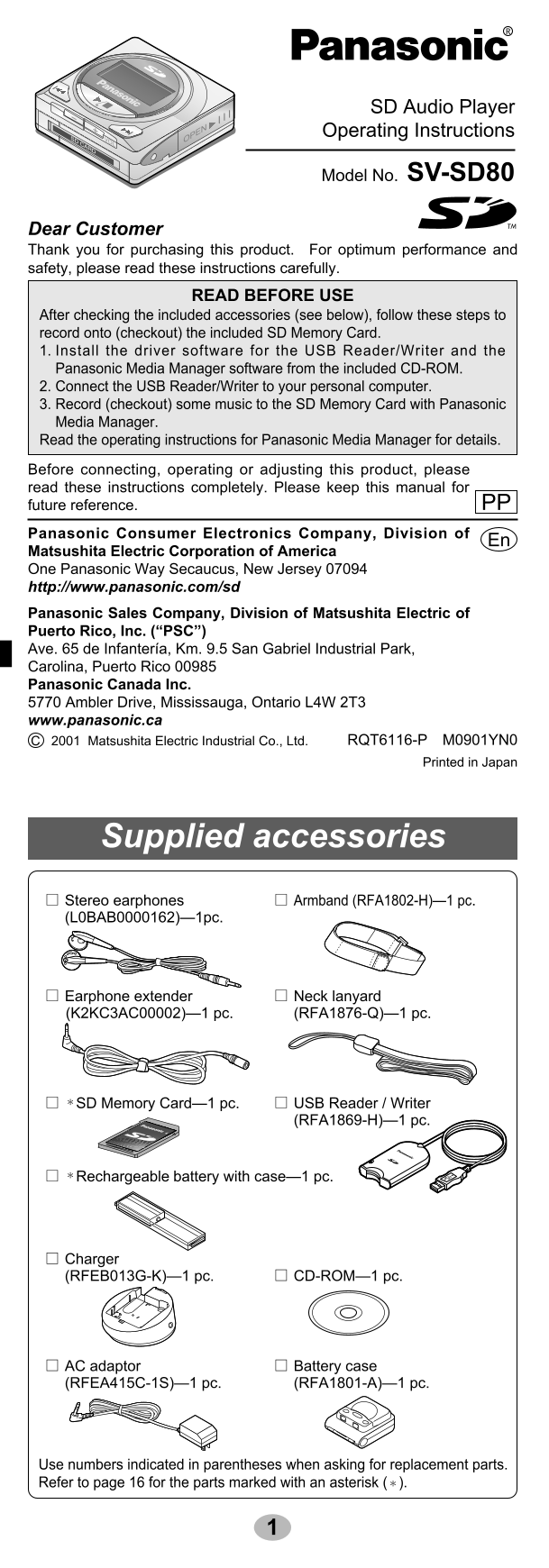
Page 1 Text Content
THE FOLLOWING APPLIES ONLY IN THE U.S.A.:
CAUTION:
SD Audio Player
This equipment has been tested and found to comply with the limits
for a Class B digital device, pursuant to Part 15 of the FCC Rules. Operating Instructions
These limits are designed to provide reasonable protection against harmful interference in a residential installation. This equipment gen- SV-SD80
Model No.
erates, uses and can radiate radio frequency energy and, if not installed and used in accordance with the instructions, may cause harmful interference to radio communications. However, there is no
Dear Customer
guarantee that interference will not occur in a particular installation. If
Thank you for purchasing this product. For optimum performance and
this equipment does cause harmful interference to radio or television
safety, please read these instructions carefully.
reception, which can be determined by turning the equipment off and on, the user is encouraged to try to correct the interference by one or READ BEFORE USE more of the following measures: After checking the included accessories (see below), follow these steps to Reorient or relocate the receiving antenna. record onto (checkout) the included SD Memory Card. Increase the separation between the equipment and receiver. 1. Install the driver software for the USB Reader/Writer and the Connect the equipment into an outlet on a circuit different from that Panasonic Media Manager software from the included CD-ROM. to which the receiver is connected. 2. Connect the USB Reader/Writer to your personal computer. Consult the dealer or an experienced radio/TV technician for help. 3. Record (checkout) some music to the SD Memory Card with Panasonic
Media Manager.
Any unauthorized changes or modifications to this equipment would Read the operating instructions for Panasonic Media Manager for details. void the user’s authority to operate this device.
Before connecting, operating or adjusting this product, please read these instructions completely. Please keep this manual for
This device complies with Part 15 of the FCC Rules. Operation is sub-
future reference. PP
ject to the following two conditions: (1) This device may not cause harmful interference, and (2) this device must accept any interference
Panasonic Consumer Electronics Company, Division of
received, including interference that may cause undesired operation. En
Matsushita Electric Corporation of America One Panasonic Way Secaucus, New Jersey 07094 THE FOLLOWING APPLIES ONLY IN CANADA: http://www.panasonic.com/sd Panasonic Sales Company, Division of Matsushita Electric of
This Class B digital apparatus complies with Canadian ICES-003.
Puerto Rico, Inc. (“PSC”) Ave. 65 de Infantería, Km. 9.5 San Gabriel Industrial Park, Carolina, Puerto Rico 00985 Panasonic Canada Inc.
Optional accessories 5770 Ambler Drive, Mississauga, Ontario L4W 2T3
www.panasonic.ca
SD Memory Card (as of September 1st, 2001) C 2001 Matsushita Electric Industrial Co., Ltd. RQT6116-P M0901YN0 RP-SD064B (64 MB) • RP-SD032B (32 MB)
Printed in Japan
Rechargeable battery with case Part number : HHF-AZ10A Personal computer card adaptor Part number : BN-SDABPU/1B Supplied accessories
Specifications
Stereo earphones Armband (RFA1802-H)—1 pc. (L0BAB0000162)—1pc.
Sampling rate: 32 k Hz, 44.1 k Hz, and 48 k Hz Compression/decompression: AAC, MP3 and WMA No. of channels: Stereo, 2 channels Frequency response: 20 Hz to 20,000 Hz (+0 d B, -6 d B) Output terminal: M3 earphone jack Earphone extender Neck lanyard Output level: 3.5 m W + 3.5 m W (22 Ω) (K2KC3AC00002)—1 pc. (RFA1876-Q)—1 pc. Power supply: DC 1.2 V (one rechargeable battery)
DC 1.5 V (one LR03, AAA, AM-4 battery)
Approximate play time: 18 hours (When the included recharge-
able battery is fully charged) 32 hours (Panasonic alkaline battery) *SD Memory Card—1 pc. USB Reader / Writer 50 hours (When the ful ly charged (RFA1869-H)—1 pc. rechargeable battery and alkaline bat- tery are used together)
Maximum dimensions (Wx Hx D): 43.3 x 44.5 x 17.3 mm *Rechargeable
battery with case—1 pc.
Cabinet dimensions (Wx Hx D): 42.2 x 41.6 x 15.8 mm
Mass: 38 g (1.34 oz.) with battery
26 g (0.92 oz.) without battery Charger AC adaptor / Charger: Input : AC 120 V 60 Hz (RFEB013G-K)—1 pc. CD-ROM—1 pc.
Output : DC 2V, 220 m A
Specifications are subject to change without notice. The play times shown depend on operating conditions.
Mass and dimensions are approximate. AC adaptor Battery case (RFEA415C-1S)—1 pc. (RFA1801-A)—1 pc.
A nickel metal hydride battery that is recyclable powers the product you have purchased. Please call 1-800-8-BATTERY
Use numbers indicated in parentheses when asking for replacement parts.
for information on how to recy-
This manual was printed
Refer to page 16 for the parts marked with an asterisk (*).
cle this battery.
with soy based ink.
Page Summary Contents For Panasonic SV-SD80 User Guide
Manual Details
| Brand | Panasonic |
|---|---|
| Pages | 9 |
| File Size | 1.00 MB |
| Published | July 15, 2026 |
Enter the captcha to get the download link:

Frequently Asked Questions
What are the necessary steps to prepare the device for use?
Install the driver software, connect the USB Reader/Writer to your computer, record music onto the SD Card, and plug it into a circuit different from the receiver.
How do I address potential radio frequency interference issues?
You can try reorienting or relocating the receiving antenna, increasing separation between the equipment and the receiver, or connecting outlets on a different circuit.
What audio formats are supported by this model?
It supports AAC, MP3, and WMA compression/decompression in stereo (2 channel) format.
How long does the device last on its batteries?
The approximate play time is 18 hours with a rechargeable battery or up to 32 hours using an alkaline battery.