Panasonic SV-MP100V SV-MP110V SV-MP120V User Manual
Summary
This multi-functional digital audio player serves as a portable solution for music enjoyment, recording, and learning. Supporting formats like MP3 and WMA, it features an integrated FM radio tuner and a high-quality IC voice recorder. The included manual provides comprehensive operational instructions covering MUSIC, LEARN, FM RADIO, and SYSTEM modes. It is ideal for music enthusiasts, students, and general listeners seeking one reliable device for diverse media playback and recording needs.
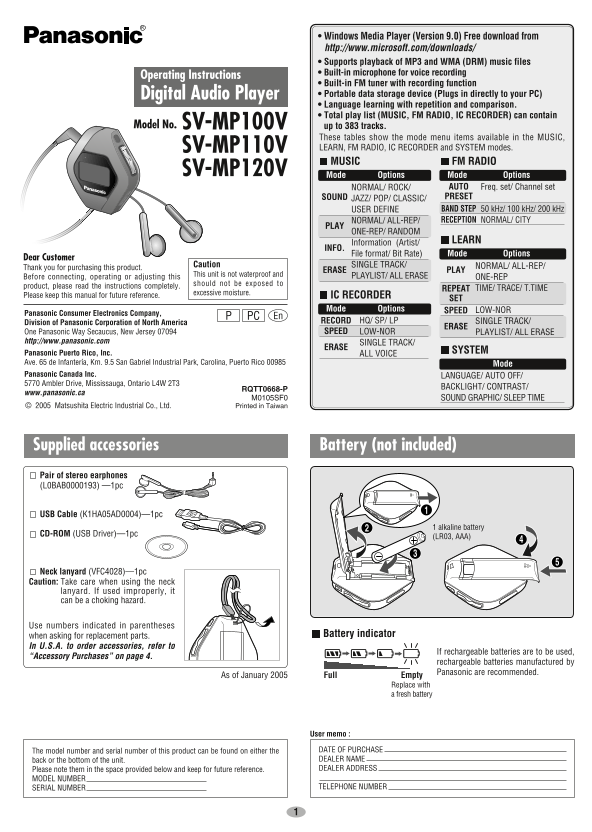
Page 1 Text Content
SV_mp100V0119_En 05.1.19 7:51 PM ページ 1
• Windows Media Player (Version 9.0) Free download from http://www.microsoft.com/downloads/ • Supports playback of MP3 and WMA (DRM) music files • Built-in microphone for voice recording
Operating Instructions
• Built-in FM tuner with recording function Digital Audio Player • Portable data storage device (Plugs in directly to your PC) • Language learning with repetition and comparison. • Total play list (MUSIC, FM RADIO, IC RECORDER) can contain
Model No. SV-MP100V up to 383 tracks.
These tables show the mode menu items available in the MUSIC, SV-MP110V LEARN, FM RADIO, IC RECORDER and SYSTEM modes. MUSIC FM RADIO
SV-MP120V Mode Options Mode Options
NORMAL/ ROCK/ AUTO Freq. set/ Channel set SOUND JAZZ/ POP/ CLASSIC/ PRESET USER DEFINE BAND STEP 50 k Hz/ 100 k Hz/ 200 k Hz NORMAL/ ALL-REP/ RECEPTION NORMAL/ CITY
PLAY ONE-REP/ RANDOM
Information (Artist/ LEARN
INFO.
File format/ Bit Rate) Mode Options
Dear Customer
Caution SINGLE TRACK/ NORMAL/ ALL-REP/
Thank you for purchasing this product.
ERASE PLAY
This unit is not waterproof and PLAYLIST/ ALL ERASE
Before connecting, operating or adjusting this ONE-REP
should not be exposed to
product, please read the instructions completely.
REPEAT TIME/ TRACE/ T.TIME
excessive moisture.
Please keep this manual for future reference. IC RECORDER
Mode Options SPEED LOW-NOR
Panasonic Consumer Electronics Company,
PC En
Division of Panasonic Corporation of North America RECORD HQ/ SP/ LP SINGLE TRACK/
ERASE
One Panasonic Way Secaucus, New Jersey 07094 SPEED LOW-NOR PLAYLIST/ ALL ERASE
http://www.panasonic.com SINGLE TRACK/
ERASE
SYSTEM
Panasonic Puerto Rico, Inc. ALL VOICE Ave. 65 de Infantería, Km. 9.5 San Gabriel Industrial Park, Carolina, Puerto Rico 00985 Mode Panasonic Canada Inc. LANGUAGE/ AUTO OFF/ 5770 Ambler Drive, Mississauga, Ontario L4W 2T3
BACKLIGHT/ CONTRAST/
RQTT0668-P
www.panasonic.ca
M0105SF0 SOUND GRAPHIC/ SLEEP TIME © 2005 Matsushita Electric Industrial Co., Ltd. Printed in Taiwan
Supplied accessories Battery (not included) Pair of stereo earphones (L0BAB0000193) —1pc
USB Cable (K1HA05AD0004)—1pc
1 alkaline battery
CD-ROM (USB Driver)—1pc
(LR03, AAA)
Neck lanyard (VFC4028)—1pc Caution: Take care when using the neck lanyard. If used improperly, it can be a choking hazard.
Use numbers indicated in parentheses
when asking for replacement parts. Battery indicator
In U.S.A. to order accessories, refer to
If rechargeable batteries are to be used,
“Accessory Purchases” on page 4.
rechargeable batteries manufactured by Panasonic are recommended.
As of January 2005 Full Empty
Replace with a fresh battery
User memo :
The model number and serial number of this product can be found on either the DATE OF PURCHASE back or the bottom of the unit. DEALER NAME Please note them in the space provided below and keep for future reference. DEALER ADDRESS
MODEL NUMBER
SERIAL NUMBER TELEPHONE NUMBER
Page Summary Contents For Panasonic SV-MP100V SV-MP110V SV-MP120V User Manual
Manual Details
| Brand | Panasonic |
|---|---|
| Pages | 8 |
| File Size | 838.06 KB |
| Published | June 21, 2026 |
Enter the captcha to get the download link:

Frequently Asked Questions
What is the memory size for different models?
SV-MP100V has 128 MB, SV-MP110V has 256 MB, and SV-MP120V has 512 MB.
How do I use the device with a USB cable?
The unit supports external storage via USB connection for copying files or drag and drop support.
What types of music files are supported?
It supports MP3 (8 kbps to 320 kbps) and WMA (32 kbps to 192 kbps) file formats.
How is the display sleep time set?
You can adjust it using the SLEEP TIME function, which sets how long the unit waits before automatically turning off the display when a button is pressed.