Panasonic GPMF852PT User Manual
Summary
The GP-MF852PT is a high-precision Double Speed Machine Vision Camera featuring an Interline Transfer CCD sensor for industrial imaging requirements. This comprehensive manual provides expert guidance on system setup, including electrical connections, physical mounting (C-mount), and advanced operational modes like variable shutter speeds and external synchronization. It is designed for technical professionals and engineers implementing reliable vision systems in controlled industrial environments.
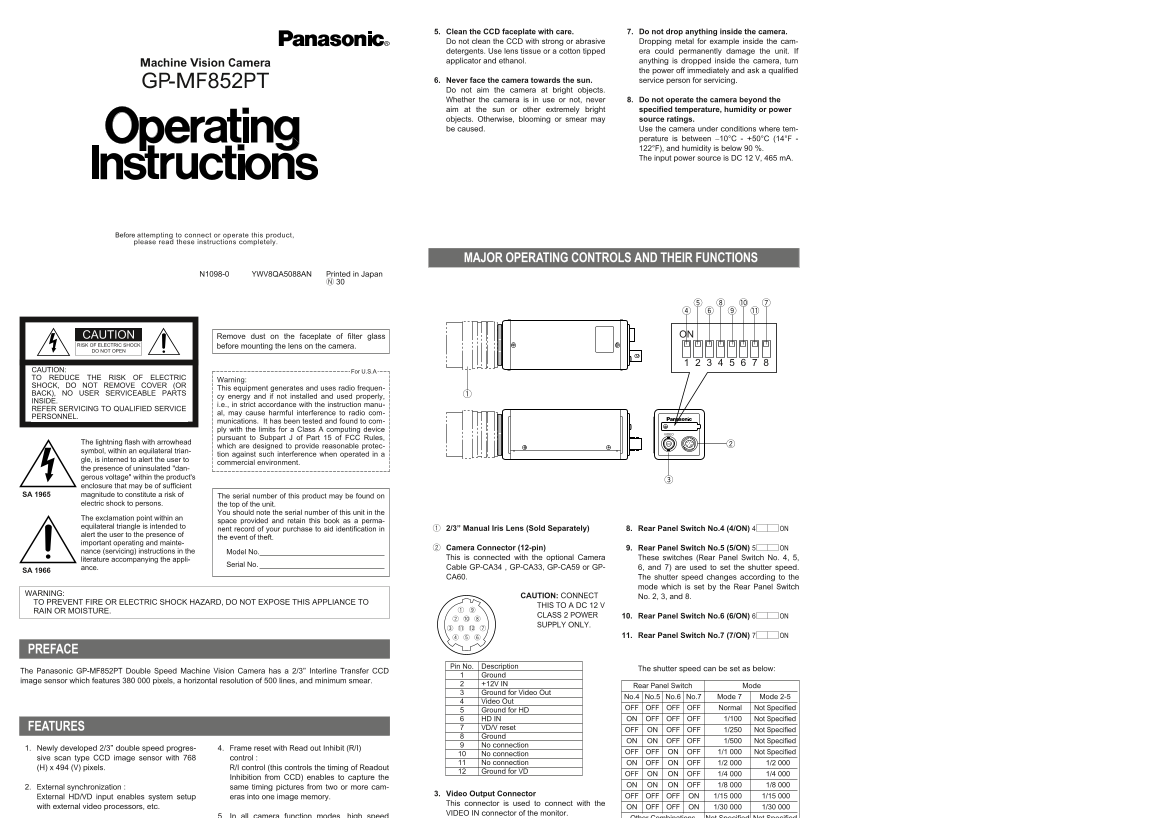
Page 1 Text Content
5. Clean the CCD faceplate with care. 7. Do not drop anything inside the camera. Do not clean the CCD with strong or abrasive Dropping metal for example inside the cam- detergents. Use lens tissue or a cotton tipped era could permanently damage the unit. If applicator and ethanol. anything is dropped inside the camera, turn
Machine Vision Camera
the power off immediately and ask a qualified
GP-MF852PT 6. Never face the camera towards the sun. service person for servicing. Do not aim the camera at bright objects. Whether the camera is in use or not, never 8. Do not operate the camera beyond the aim at the sun or other extremely bright specified temperature, humidity or power objects. Otherwise, blooming or smear may source ratings. be caused. Use the camera under conditions where tem-
perature is between −10°C - +50°C (14°F - 122°F), and humidity is below 90 %. The input power source is DC 12 V, 465 m A.
Before attempting to connect or operate this product, please read these instructions completely.
MAJOR OPERATING CONTROLS AND THEIR FUNCTIONS
N1098-0 YWV8QA5088AN Printed in Japan
CAUTION Remove dust on the faceplate of filter glass ON
RISK OF ELECTRIC SHOCK before mounting the lens on the camera. DO NOT OPEN
CAUTION: For U.S.A TO REDUCE THE RISK OF ELECTRIC
Warning:
SHOCK, DO NOT REMOVE COVER (OR
This equipment generates and uses radio frequen-
BACK), NO USER SERVICEABLE PARTS
cy energy and if not installed and used properly,
INSIDE.
i.e., in strict accordance with the instruction manu-
REFER SERVICING TO QUALIFIED SERVICE
al, may cause harmful interference to radio com-
PERSONNEL.
munications. It has been tested and found to com- ply with the limits for a Class A computing device
VIDEO
pursuant to Subpart J of Part 15 of FCC Rules,
The lightning flash with arrowhead
which are designed to provide reasonable protec-
symbol, within an equilateral trian-
tion against such interference when operated in a
gle, is interned to alert the user to
commercial environment.
the presence of uninsulated "dan- gerous voltage" within the product's enclosure that may be of sufficient
SA 1965 magnitude to constitute a risk of The serial number of this product may be found on
electric shock to persons. the top of the unit.
You should note the serial number of this unit in the
The exclamation point within an
space provided and retain this book as a perma-
equilateral triangle is intended to
nent record of your purchase to aid identification in 2/3” Manual Iris Lens (Sold Separately) 8. Rear Panel Switch No.4 (4/ON) 4 ON
alert the user to the presence of
the event of theft.
important operating and mainte-
Camera Connector (12-pin) 9. Rear Panel Switch No.5 (5/ON) 5 ON
nance (servicing) instructions in the Model No.
literature accompanying the appli- This is connected with the optional Camera These switches (Rear Panel Switch No. 4, 5,
Serial No.
ance. Cable GP-CA34 , GP-CA33, GP-CA59 or GP- 6, and 7) are used to set the shutter speed.
SA 1966
CA60. The shutter speed changes according to the
mode which is set by the Rear Panel Switch
WARNING:
CAUTION: CONNECT No. 2, 3, and 8.
TO PREVENT FIRE OR ELECTRIC SHOCK HAZARD, DO NOT EXPOSE THIS APPLIANCE TO
THIS TO A DC 12 V
RAIN OR MOISTURE.
CLASS 2 POWER 10. Rear Panel Switch No.6 (6/ON) 6 ON
SUPPLY ONLY.
11. Rear Panel Switch No.7 (7/ON) 7 ON
PREFACE
Pin No. Description
The shutter speed can be set as below:
The Panasonic GP-MF852PT Double Speed Machine Vision Camera has a 2/3” Interline Transfer CCD
Ground
image sensor which features 380 000 pixels, a horizontal resolution of 500 lines, and minimum smear.
+12V IN Mode Rear Panel Switch Ground for Video Out
No.4 No.5 No.6 No.7 Mode 7 Mode 2-5
Video Out
OFF OFF OFF OFF Normal Not Specified
Ground for HD
HD IN ON OFF OFF OFF 1/100 Not Specified
FEATURES VD/V reset
OFF ON OFF OFF 1/250 Not Specified
Ground
ON ON OFF OFF 1/500 Not Specified
No connection
1. Newly developed 2/3” double speed progres- 4. Frame reset with Read out Inhibit (R/I)
OFF OFF ON OFF 1/1 000 Not Specified
No connection
sive scan type CCD image sensor with 768 control :
No connection ON OFF ON OFF 1/2 000 1/2 000
(H) x 494 (V) pixels. R/I control (this controls the timing of Readout
Ground for VD
OFF ON ON OFF 1/4 000 1/4 000
Inhibition from CCD) enables to capture the
ON ON ON OFF 1/8 000 1/8 000
2. External synchronization : same timing pictures from two or more cam-
3. Video Output Connector
External HD/VD input enables system setup eras into one image memory. OFF OFF OFF ON 1/15 000 1/15 000
This connector is used to connect with the
with external video processors, etc. ON OFF OFF ON 1/30 000 1/30 000
VIDEO IN connector of the monitor.
5. In all camera function modes, high speed Other Combinations Not Specified Not Specified
Page Summary Contents For Panasonic GPMF852PT User Manual
Manual Details
| Brand | Panasonic |
|---|---|
| Pages | 2 |
| File Size | 52.91 KB |
| Published | June 21, 2026 |
Enter the captcha to get the download link:

Frequently Asked Questions
What equipment should I use to clean the CCD faceplate?
Use only lens tissue or a cotton-tipped ear; strong or abrasive cleaners could permanently damage the unit.
What are the required power specifications and operational temperature limits?
The input power source is DC 12 V, 465 mA. It must operate at temperatures between 10°C and +50°C.
How do I set up external high-definition synchronization (HD/VD)?
Supply the signal to pin-6 and pin-7 of the camera connector and ensure it matches the phases of falling edges.
What are the recommended precautions when using the camera?
Never aim the camera at bright objects, or face it towards the sun, regardless of whether it is in use.
Which parts of the unit should I note for service records?
The serial number can be found on the top of the unit.