Panasonic SV-MP700V SV-MP710V SV-MP720V User Manual
Summary
This versatile digital audio player is an all-in-one entertainment hub, combining music playback, FM radio reception, and internal cassette recording capabilities. The accompanying manual provides comprehensive instructions on setting up advanced features such as customizable EQ modes, diverse listening patterns (e.g., ALL-REP, RANDOM), speed adjustments, and language learning functions. Ideal for audiophiles or general consumers seeking a highly portable and feature-rich device for enjoying music, radio, and guided lessons anywhere.
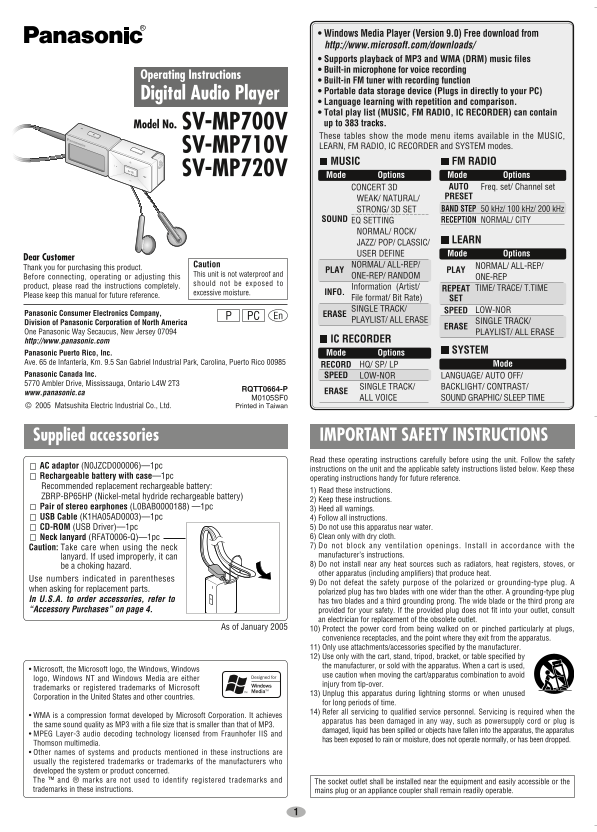
Page 1 Text Content
SV_mp700V_En0128 05.2.2 10:02 AM ページ 1
• Windows Media Player (Version 9.0) Free download from http://www.microsoft.com/downloads/ • Supports playback of MP3 and WMA (DRM) music files • Built-in microphone for voice recording
Operating Instructions
• Built-in FM tuner with recording function • Portable data storage device (Plugs in directly to your PC)
Digital Audio Player
• Language learning with repetition and comparison. • Total play list (MUSIC, FM RADIO, IC RECORDER) can contain Model No. SV-MP700V up to 383 tracks. These tables show the mode menu items available in the MUSIC, SV-MP710V LEARN, FM RADIO, IC RECORDER and SYSTEM modes. MUSIC FM RADIO
SV-MP720V Mode Options Mode Options
CONCERT 3D AUTO Freq. set/ Channel set WEAK/ NATURAL/ PRESET STRONG/ 3D SET BAND STEP 50 k Hz/ 100 k Hz/ 200 k Hz
SOUND EQ SETTING RECEPTION NORMAL/ CITY
NORMAL/ ROCK/
JAZZ/ POP/ CLASSIC/ LEARN USER DEFINE Mode Options
Dear Customer
Caution NORMAL/ ALL-REP/ NORMAL/ ALL-REP/
Thank you for purchasing this product.
PLAY PLAY
This unit is not waterproof and ONE-REP/ RANDOM
Before connecting, operating or adjusting this ONE-REP
should not be exposed to
product, please read the instructions completely. Information (Artist/
REPEAT TIME/ TRACE/ T.TIME
excessive moisture. INFO.
Please keep this manual for future reference.
File format/ Bit Rate) SET SINGLE TRACK/ SPEED LOW-NOR
Panasonic Consumer Electronics Company, ERASE
PC En
PLAYLIST/ ALL ERASE SINGLE TRACK/
Division of Panasonic Corporation of North America
ERASE
One Panasonic Way Secaucus, New Jersey 07094 PLAYLIST/ ALL ERASE
http://www.panasonic.com IC RECORDER
Mode Options SYSTEM
Panasonic Puerto Rico, Inc. Ave. 65 de Infantería, Km. 9.5 San Gabriel Industrial Park, Carolina, Puerto Rico 00985 Mode
RECORD HQ/ SP/ LP
Panasonic Canada Inc. SPEED LOW-NOR LANGUAGE/ AUTO OFF/ 5770 Ambler Drive, Mississauga, Ontario L4W 2T3
SINGLE TRACK/ BACKLIGHT/ CONTRAST/
RQTT0664-P
www.panasonic.ca ERASE
M0105SF0 ALL VOICE SOUND GRAPHIC/ SLEEP TIME © 2005 Matsushita Electric Industrial Co., Ltd. Printed in Taiwan
Supplied accessories IMPORTANT SAFETY INSTRUCTIONS
Read these operating instructions carefully before using the unit. Follow the safety
AC adaptor (N0JZCD000006)—1pc
instructions on the unit and the applicable safety instructions listed below. Keep these
Rechargeable battery with case—1pc
operating instructions handy for future reference.
Recommended replacement rechargeable battery:
1) Read these instructions.
ZBRP-BP65HP (Nickel-metal hydride rechargeable battery)
2) Keep these instructions.
Pair of stereo earphones (L0BAB0000188) —1pc 3) Heed all warnings. USB Cable (K1HA05AD0003)—1pc 4) Follow all instructions.
CD-ROM (USB Driver)—1pc 5) Do not use this apparatus near water. Neck lanyard (RFAT0006-Q)—1pc 6) Clean only with dry cloth. Caution: Take care when using the neck 7) Do not block any ventilation openings. Install in accordance with the lanyard. If used improperly, it can manufacturer’s instructions. be a choking hazard. 8) Do not install near any heat sources such as radiators, heat registers, stoves, or other apparatus (including amplifiers) that produce heat.
Use numbers indicated in parentheses
9) Do not defeat the safety purpose of the polarized or grounding-type plug. A
when asking for replacement parts.
polarized plug has two blades with one wider than the other. A grounding-type plug
In U.S.A. to order accessories, refer to has two blades and a third grounding prong. The wide blade or the third prong are “Accessory Purchases” on page 4. provided for your safety. If the provided plug does not fit into your outlet, consult
an electrician for replacement of the obsolete outlet.
As of January 2005 10) Protect the power cord from being walked on or pinched particularly at plugs,
convenience receptacles, and the point where they exit from the apparatus. 11) Only use attachments/accessories specified by the manufacturer. 12) Use only with the cart, stand, tripod, bracket, or table specified by the manufacturer, or sold with the apparatus. When a cart is used,
• Microsoft, the Microsoft logo, the Windows, Windows
use caution when moving the cart/apparatus combination to avoid
logo, Windows NT and Windows Media are either
injury from tip-over.
trademarks or registered trademarks of Microsoft
13) Unplug this apparatus during lightning storms or when unused
Corporation in the United States and other countries.
for long periods of time. 14) Refer all servicing to qualified service personnel. Servicing is required when the
• WMA is a compression format developed by Microsoft Corporation. It achieves
apparatus has been damaged in any way, such as powersupply cord or plug is
the same sound quality as MP3 with a file size that is smaller than that of MP3.
damaged, liquid has been spilled or objects have fallen into the apparatus, the apparatus
• MPEG Layer-3 audio decoding technology licensed from Fraunhofer IIS and
has been exposed to rain or moisture, does not operate normally, or has been dropped.
Thomson multimedia. • Other names of systems and products mentioned in these instructions are usually the registered trademarks or trademarks of the manufacturers who developed the system or product concerned. The ™ and ® marks are not used to identify registered trademarks and The socket outlet shall be installed near the equipment and easily accessible or the trademarks in these instructions. mains plug or an appliance coupler shall remain readily operable.
Page Summary Contents For Panasonic SV-MP700V SV-MP710V SV-MP720V User Manual
Manual Details
| Brand | Panasonic |
|---|---|
| Pages | 8 |
| File Size | 823.35 KB |
| Published | June 06, 2026 |
Enter the captcha to get the download link:

Frequently Asked Questions
What file formats does this player support?
It supports playback of MP3 and WMA (DRM) music files.
How can I recharge the device?
Use rechargeable batteries like ZBRP-BP65HP (Nickel-metal hydride) according to instructions.
What is the total capacity for a play list?
The total playlist (MUSIC, FM RADIO, IC RECORDER) can contain up to 383 tracks.
Does it have recording functions?
Yes, it has an IC RECORDER function and a built-in microphone for voice recording.