Panasonic SV-SW30V SV-SW20V User's Manual
Summary
Experience portability with this digital music and FM radio receiver. Designed for audio enthusiasts, the unit flawlessly plays MP3 and WMA files while offering built-in sound controls (BASS/TREBLE) and multiple playback modes. The accompanying manual provides comprehensive operating instructions, covering everything from basic setup to advanced features like playlist management, troubleshooting, and essential safety guidelines, ensuring you enjoy your music library on the go.
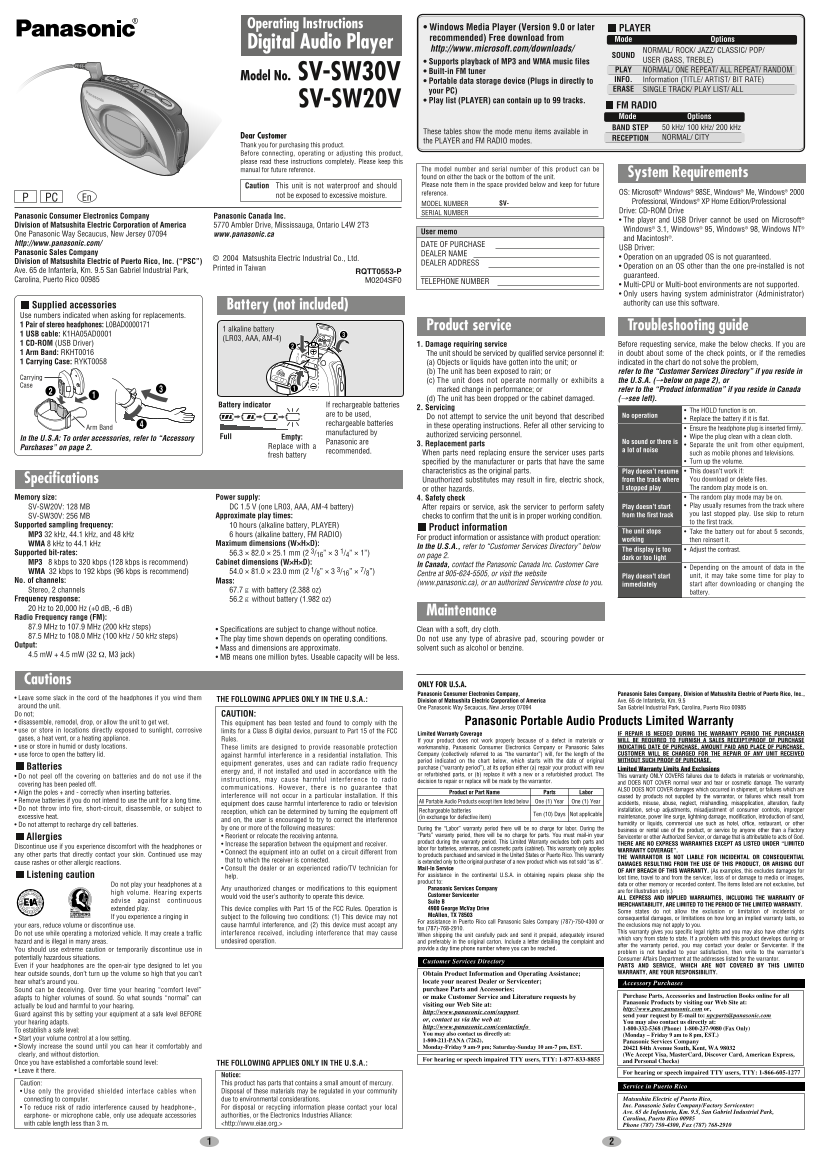
Page 1 Text Content
Operating Instructions • Windows Media Player (Version 9.0 or later
PLAYER
recommended) Free download from Mode Options
Digital Audio Player
http://www.microsoft.com/downloads/ NORMAL/ ROCK/ JAZZ/ CLASSIC/ POP/
SOUND • Supports playback of MP3 and WMA music files USER (BASS, TREBLE) • Built-in FM tuner PLAY NORMAL/ ONE REPEAT/ ALL REPEAT/ RANDOM
Model No. SV-SW30V INFO. Information (TITLE/ ARTIST/ BIT RATE)
• Portable data storage device (Plugs in directly to
your PC) ERASE SINGLE TRACK/ PLAY LIST/ ALL
SV-SW20V • Play list (PLAYER) can contain up to 99 tracks.
FM RADIO Mode Options
BAND STEP 50 k Hz/ 100 k Hz/ 200 k Hz
These tables show the mode menu items available in
Dear Customer NORMAL/ CITY
RECEPTION
the PLAYER and FM RADIO modes.
Thank you for purchasing this product. Before connecting, operating or adjusting this product, please read these instructions completely. Please keep this
manual for future reference. The model number and serial number of this product can be
System Requirements
found on either the back or the bottom of the unit. Caution This unit is not waterproof and should Please note them in the space provided below and keep for future
reference. OS: Microsoft® Windows® 98SE, Windows® Me, Windows®
not be exposed to excessive moisture.
PCP En
MODEL NUMBER SV- Professional, Windows® XP Home Edition/Professional SERIAL NUMBER Drive: CD-ROM Drive
Panasonic Consumer Electronics Company Panasonic Canada Inc.
• The player and USB Driver cannot be used on Microsoft®
Division of Matsushita Electric Corporation of America 5770 Ambler Drive, Mississauga, Ontario L4W 2T3
Windows® 3.1, Windows® 95, Windows® 98, Windows NT®
User memo
One Panasonic Way Secaucus, New Jersey 07094 www.panasonic.ca
and Macintosh®.
http://www.panasonic.com/ DATE OF PURCHASE
USB Driver:
Panasonic Sales Company DEALER NAME
© 2004 Matsushita Electric Industrial Co., Ltd. • Operation on an upgraded OS is not guaranteed.
Division of Matsushita Electric of Puerto Rico, Inc. (“PSC”) DEALER ADDRESS
Printed in Taiwan • Operation on an OS other than the one pre-installed is not
Ave. 65 de Infantería, Km. 9.5 San Gabriel Industrial Park, RQTT0553-P
guaranteed.
Carolina, Puerto Rico 00985 M0204SF0 TELEPHONE NUMBER
• Multi-CPU or Multi-boot environments are not supported. • Only users having system administrator (Administrator) Battery (not included) authority can use this software.
Supplied accessories Use numbers indicated when asking for replacements. 1 Pair of stereo headphones: L0BAD0000171 Product service Troubleshooting guide
1 alkaline battery
1 USB cable: K1HA05AD0001
(LR03, AAA, AM-4)
1 CD-ROM (USB Driver) 1. Damage requiring service Before requesting service, make the below checks. If you are 1 Arm Band: RKHT0016 The unit should be serviced by qualified service personnel if: in doubt about some of the check points, or if the remedies 1 Carrying Case: RYKT0058 (a) Objects or liquids have gotten into the unit; or indicated in the chart do not solve the problem,
(b) The unit has been exposed to rain; or refer to the “Customer Services Directory” if you reside in
Carrying
(c) The unit does not operate normally or exhibits a the U.S.A. (→below on page 2), or
marked change in performance; or refer to the “Product information” if you reside in Canada (d) The unit has been dropped or the cabinet damaged. (→see left).
Battery indicator If rechargeable batteries
2. Servicing
The HOLD function is on.
are to be used, No operation
Do not attempt to service the unit beyond that described Replace the battery if it is flat.
rechargeable batteries
Arm Band in these operating instructions. Refer all other servicing to
Ensure the headphone plug is inserted firmly.
manufactured by
Full authorized servicing personnel. Wipe the plug clean with a clean cloth.
In the U.S.A: To order accessories, refer to “Accessory Empty:
Panasonic are No sound or there is
3. Replacement parts Separate the unit from other equipment,
Purchases” on page 2. Replace with a
recommended. a lot of noise
When parts need replacing ensure the servicer uses parts such as mobile phones and televisions.
fresh battery
specified by the manufacturer or parts that have the same Turn up the volume. characteristics as the original parts. Play doesn’t resume This doesn’t work if: Specifications Unauthorized substitutes may result in fire, electric shock, from the track where You download or delete files. or other hazards. I stopped play The random play mode is on. Memory size: Power supply: 4. Safety check The random play mode may be on. SV-SW20V: 128 MB DC 1.5 V (one LR03, AAA, AM-4 battery) After repairs or service, ask the servicer to perform safety Play doesn’t start Play usually resumes from the track where from the first track you last stopped play. Use skip to return
SV-SW30V: 256 MB Approximate play times: checks to confirm that the unit is in proper working condition.
to the first track.
Supported sampling frequency: 10 hours (alkaline battery, PLAYER)
Product information
The unit stops Take the battery out for about 5 seconds,
MP3 32 k Hz, 44.1 k Hz, and 48 k Hz 6 hours (alkaline battery, FM RADIO)
For product information or assistance with product operation: working
then reinsert it.
WMA 8 k Hz to 44.1 k Hz Maximum dimensions (W×H×D):
In the U.S.A., refer to “Customer Services Directory” below
The display is too Adjust the contrast.
Supported bit-rates: 56.3 × 82.0 × 25.1 mm (2 3/16” × 3 1/4” × 1”)
on page 2. dark or too light
MP3 8 kbps to 320 kbps (128 kbps is recommend) Cabinet dimensions (W×H×D):
In Canada, contact the Panasonic Canada Inc. Customer Care
Depending on the amount of data in the
WMA 32 kbps to 192 kbps (96 kbps is recommend) 54.0 × 81.0 × 23.0 mm (2 1/8” × 3 3/16” ×
Centre at 905-624-5505, or visit the website unit, it may take some time for play to
Play doesn't start
No. of channels: Mass:
(www.panasonic.ca), or an authorized Servicentre close to you. immediately start after downloading or changing the
Stereo, 2 channels 67.7 with battery (2.388 oz)
battery.
Frequency response: 56.2 without battery (1.982 oz) 20 Hz to 20,000 Hz (+0 d B, -6 d B)
Maintenance
Radio Frequency range (FM): 87.9 MHz to 107.9 MHz (200 k Hz steps)
• Specifications are subject to change without notice. Clean with a soft, dry cloth.
87.5 MHz to 108.0 MHz (100 k Hz / 50 k Hz steps)
• The play time shown depends on operating conditions. Do not use any type of abrasive pad, scouring powder or
Output:
• Mass and dimensions are approximate. solvent such as alcohol or benzine.
4.5 m W + 4.5 m W (32 Ω, M3 jack)
• MB means one million bytes. Useable capacity will be less.
Cautions
ONLY FOR U.S.A. Panasonic Consumer Electronics Company, Panasonic Sales Company, Division of Matsushita Electric of Puerto Rico, Inc.,
• Leave some slack in the cord of the headphones if you wind them THE FOLLOWING APPLIES ONLY IN THE U.S.A.:
Division of Matsushita Electric Corporation of America Ave. 65 de Infantería, Km. 9.5
around the unit. One Panasonic Way Secaucus, New Jersey 07094 San Gabriel Industrial Park, Carolina, Puerto Rico 00985 Do not; CAUTION: • disassemble, remodel, drop, or allow the unit to get wet. This equipment has been tested and found to comply with the Panasonic Portable Audio Products Limited Warranty • use or store in locations directly exposed to sunlight, corrosive limits for a Class B digital device, pursuant to Part 15 of the FCC
Limited Warranty Coverage IF REPAIR IS NEEDED DURING THE WARRANTY PERIOD THE PURCHASER
gases, a heat vent, or a heating appliance. Rules. If your product does not work properly because of a defect in materials or WILL BE REQUIRED TO FURNISH A SALES RECEIPT/PROOF OF PURCHASE • use or store in humid or dusty locations. These limits are designed to provide reasonable protection workmanship, Panasonic Consumer Electronics Company or Panasonic Sales INDICATING DATE OF PURCHASE, AMOUNT PAID AND PLACE OF PURCHASE.
• use force to open the battery lid. against harmful interference in a residential installation. This Company (collectively referred to as “the warrantor”) will, for the length of the CUSTOMER WILL BE CHARGED FOR THE REPAIR OF ANY UNIT RECEIVED period indicated on the chart below, which starts with the date of original WITHOUT SUCH PROOF OF PURCHASE.
equipment generates, uses and can radiate radio frequency
Batteries purchase (“warranty period”), at its option either (a) repair your product with new Limited Warranty Limits And Exclusions
energy and, if not installed and used in accordance with the
or refurbished parts, or (b) replace it with a new or a refurbished product. The This warranty ONLY COVERS failures due to defects in materials or workmanship,
• Do not peel off the covering on batteries and do not use if the
instructions, may cause harmful interference to radio decision to repair or replace will be made by the warrantor.
covering has been peeled off. and DOES NOT COVER normal wear and tear or cosmetic damage. The warranty
communications. However, there is no guarantee that ALSO DOES NOT COVER damages which occurred in shipment, or failures which are
• Align the poles + and - correctly when inserting batteries. Product or Part Name Parts Labor
interference will not occur in a particular installation. If this caused by products not supplied by the warrantor, or failures which result from
• Remove batteries if you do not intend to use the unit for a long time. All Portable Audio Products except item listed below One (1) Year One (1) Year
equipment does cause harmful interference to radio or television accidents, misuse, abuse, neglect, mishandling, misapplication, alteration, faulty
• Do not throw into fire, short-circuit, disassemble, or subject to Rechargeable batteries installation, set-up adjustments, misadjustment of consumer controls, improper
reception, which can be determined by turning the equipment off
Ten (10) Days Not applicable
excessive heat. (in exchange for defective item) maintenance, power line surge, lightning damage, modification, introduction of sand,
and on, the user is encouraged to try to correct the interference
• Do not attempt to recharge dry cell batteries. humidity or liquids, commercial use such as hotel, office, restaurant, or other
by one or more of the following measures: During the “Labor” warranty period there will be no charge for labor. During the business or rental use of the product, or service by anyone other than a Factory
• Reorient or relocate the receiving antenna. “Parts” warranty period, there will be no charge for parts. You must mail-in your Servicenter or other Authorized Servicer, or damage that is attributable to acts of God.
Allergies
product during the warranty period. This Limited Warranty excludes both parts and THERE ARE NO EXPRESS WARRANTIES EXCEPT AS LISTED UNDER “LIMITED
• Increase the separation between the equipment and receiver.
Discontinue use if you experience discomfort with the headphones or labor for batteries, antennas, and cosmetic parts (cabinet). This warranty only applies
WARRANTY COVERAGE”.
• Connect the equipment into an outlet on a circuit different from
any other parts that directly contact your skin. Continued use may to products purchased and serviced in the United States or Puerto Rico. This warranty
THE WARRANTOR IS NOT LIABLE FOR INCIDENTAL OR CONSEQUENTIAL
that to which the receiver is connected. is extended only to the original purchaser of a new product which was not sold “as is”.
cause rashes or other allergic reactions. DAMAGES RESULTING FROM THE USE OF THIS PRODUCT, OR ARISING OUT
• Consult the dealer or an experienced radio/TV technician for Mail-In Service
OF ANY BREACH OF THIS WARRANTY. (As examples, this excludes damages for
Listening caution help. For assistance in the continental U.S.A. in obtaining repairs please ship the
lost time, travel to and from the servicer, loss of or damage to media or images,
product to:
Do not play your headphones at a data or other memory or recorded content. The items listed are not exclusive, but
Any unauthorized changes or modifications to this equipment Panasonic Services Company
high volume. Hearing experts are for illustration only.)
would void the user’s authority to operate this device. Customer Servicenter
ALL EXPRESS AND IMPLIED WARRANTIES, INCLUDING THE WARRANTY OF
advise against continuous Suite B
EST. 1924 MERCHANTABILITY, ARE LIMITED TO THE PERIOD OF THE LIMITED WARRANTY.
extended play. This device complies with Part 15 of the FCC Rules. Operation is 4900 George Mc Vay Drive
Some states do not allow the exclusion or limitation of incidental or
Mc Allen, TX 78503
If you experience a ringing in subject to the following two conditions: (1) This device may not consequential damages, or limitations on how long an implied warranty lasts, so
For assistance in Puerto Rico call Panasonic Sales Company (787)-750-4300 or
your ears, reduce volume or discontinue use. cause harmful interference, and (2) this device must accept any the exclusions may not apply to you.
fax (787)-768-2910.
interference received, including interference that may cause This warranty gives you specific legal rights and you may also have other rights
Do not use while operating a motorized vehicle. It may create a traffic When shipping the unit carefully pack and send it prepaid, adequately insured
which vary from state to state. If a problem with this product develops during or
hazard and is illegal in many areas. undesired operation. and preferably in the original carton. Include a letter detailing the complaint and
after the warranty period, you may contact your dealer or Servicenter. If the
You should use extreme caution or temporarily discontinue use in provide a day time phone number where you can be reached.
problem is not handled to your satisfaction, then write to the warrantor’s
potentially hazardous situations. Consumer Affairs Department at the addresses listed for the warrantor.
Customer Services Directory
Even if your headphones are the open-air type designed to let you PARTS AND SERVICE, WHICH ARE NOT COVERED BY THIS LIMITED hear outside sounds, don’t turn up the volume so high that you can’t WARRANTY, ARE YOUR RESPONSIBILITY.Obtain Product Information and Operating Assistance;
hear what’s around you. locate your nearest Dealer or Servicenter; Accessory Purchases Sound can be deceiving. Over time your hearing “comfort level” purchase Parts and Accessories;
or make Customer Service and Literature requests by Purchase Parts, Accessories and Instruction Books online for all
adapts to higher volumes of sound. So what sounds “normal” can
Panasonic Products by visiting our Web Site at:
actually be loud and harmful to your hearing. visiting our Web Site at:
http://www.pasc.panasonic.com or,
http://www.panasonic.com/support
Guard against this by setting your equipment at a safe level BEFORE send your request by E-mail to: [email protected]
or, contact us via the web at:
your hearing adapts. You may also contact us directly at:
http://www.panasonic.com/contactinfo 1-800-332-5368 (Phone) 1-800-237-9080 (Fax Only)
To establish a safe level:
You may also contact us directly at: (Monday – Friday 9 am to 8 pm, EST.)
• Start your volume control at a low setting. 1-800-211-PANA (7262),
Panasonic Services Company
• Slowly increase the sound until you can hear it comfortably and Monday-Friday 9 am-9 pm; Saturday-Sunday 10 am-7 pm, EST. 20421 84th Avenue South, Kent, WA 98032
clearly, and without distortion. (We Accept Visa, Master Card, Discover Card, American Express,
For hearing or speech impaired TTY users, TTY: 1-877-833-8855 and Personal Checks)
Once you have established a comfortable sound level: THE FOLLOWING APPLIES ONLY IN THE U.S.A.: • Leave it there. For hearing or speech impaired TTY users, TTY: 1-866-605-1277
Notice: Caution: This product has parts that contains a small amount of mercury.
Service in Puerto Rico
• Use only the provided shielded interface cables when Disposal of these materials may be regulated in your community
connecting to computer. due to environmental considerations. Matsushita Electric of Puerto Rico, Inc. Panasonic Sales Company/Factory Servicenter:
• To reduce risk of radio interference caused by headphone-, For disposal or recycling information please contact your local
Ave. 65 de Infanteria, Km. 9.5, San Gabriel Industrial Park,
earphone- or microphone cable, only use adequate accessories authorities, or the Electronics Industries Alliance:
Carolina, Puerto Rico 00985
with cable length less than 3 m. <http://www.eiae.org.> Phone (787) 750-4300, Fax (787) 768-2910
Page Summary Contents For Panasonic SV-SW30V SV-SW20V User's Manual
Manual Details
| Brand | Panasonic |
|---|---|
| Pages | 2 |
| File Size | 447.79 KB |
| Published | June 06, 2026 |
Enter the captcha to get the download link:

Frequently Asked Questions
What operating systems are supported by this unit?
Operation on upgraded OS is not guaranteed, though historically supported versions include Windows 3.1, Windows 95, and Windows NT.
How can I customize my music's sound profile?
You can adjust BASS and TREBLE levels between -4 and +4 using the PLAYER mode menu options.
What should I do if there is no audio or excessive noise?
First, separate the unit from other equipment; otherwise, consult qualified service personnel for assistance.
Is this portable player waterproof?
No, caution advises that this unit is not waterproof and must not be exposed to excessive moisture.