Panasonic RR-US380 RR-US360 IC Recorder Operating Instructions
Summary
This Panasonic IC recorder manual details the operation of the RR-US360 and RR-US380 models. It covers setup, recording modes, folder management, and software usage for dictation and meetings. Designed for business users, the guide ensures optimal performance and safety for the compact voice recorder.
Manual Details
| Brand | Panasonic |
|---|---|
| Pages | 2 |
| File Size | 889.42 KB |
| Published | June 15, 2026 |
4 views
Enter the captcha to get the download link:

Frequently Asked Questions
Is there a power button on the IC Recorder?
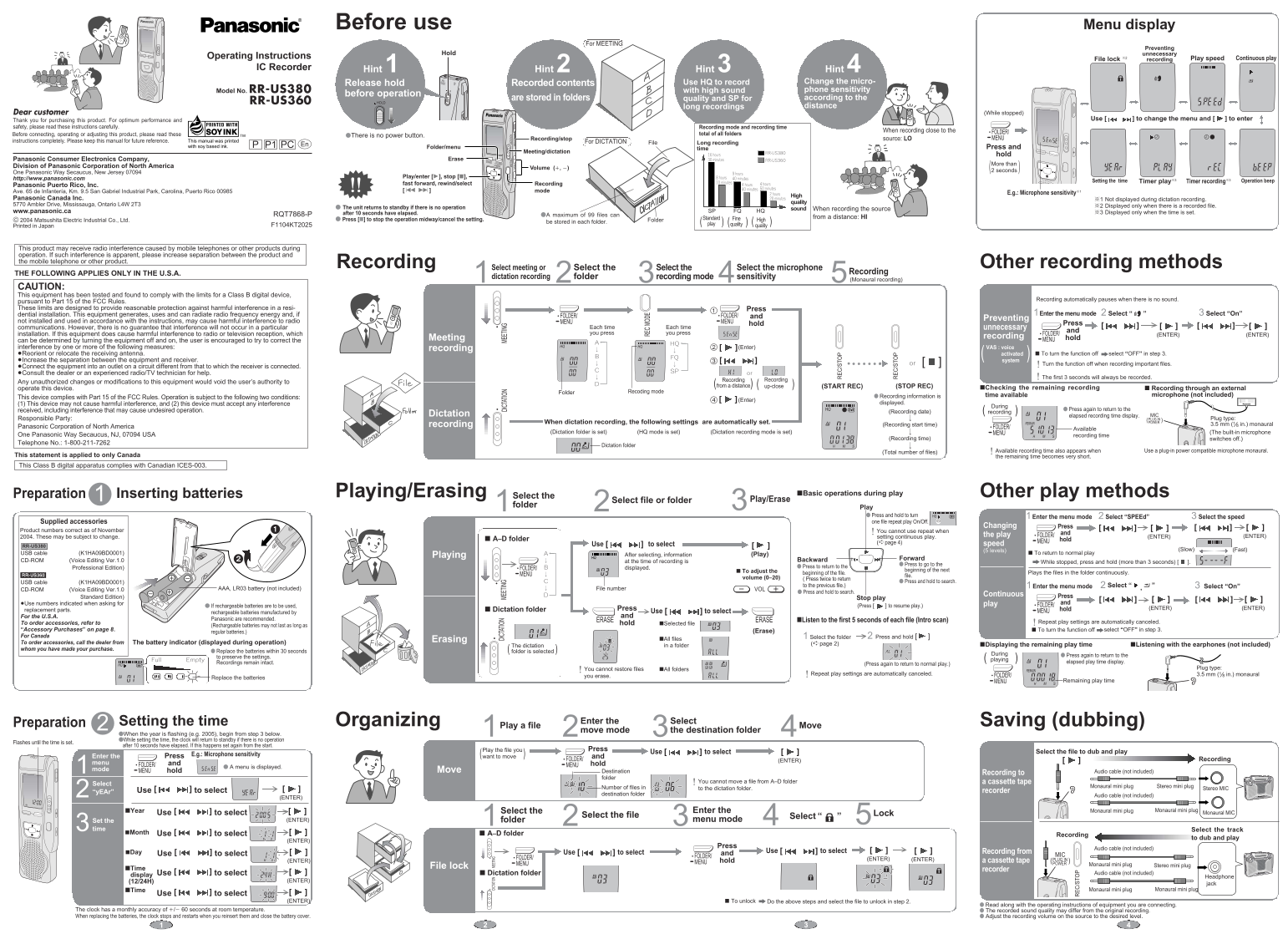
No, there is no power button. The unit returns to standby after 10 seconds of no operation.
How many files can be stored in a single folder?
A maximum of 99 files can be stored in each folder.
What is the difference between HQ and SP recording modes?
Use HQ for high sound quality recordings, and use SP for long recordings.
How do I prevent unnecessary recordings with the hold function?
To prevent unnecessary recording, press and hold the button for more than 2 seconds.
Does the recorder automatically pause when silent?
Yes, recording automatically pauses when there is no sound.