Panasonic RR-QR400, RR-QR200, RR-QR100 IC Recorder Operating Instructions
Summary
Manage and operate your Panasonic IC Recorder with confidence. This manual provides comprehensive instructions for setup, battery insertion, date/time setting, and basic operation of models RR-QR series. Essential reading for all users, it ensures optimum performance while outlining proper maintenance and compliance notices. Ideal for anyone needing reliable digital recording functionality.
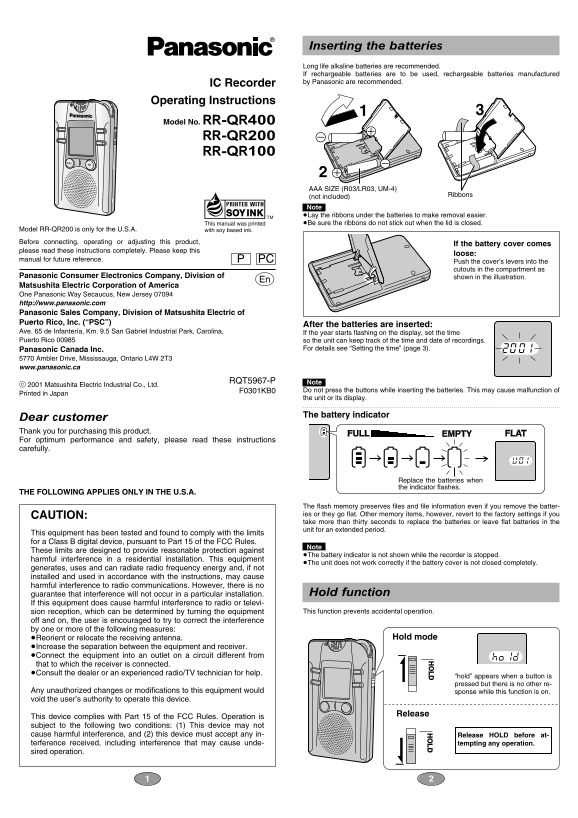
Page 1 Text Content
Inserting the batteries Long life alkaline batteries are recommended. If rechargeable batteries are to be used, rechargeable batteries manufactured IC Recorder by Panasonic are recommended.
Operating Instructions Model No. RR-QR400
RR-QR200 RR-QR100
AAA SIZE (R03/LR03, UM-4)
Ribbons
(not included) Note . ≥Lay the ribbons under the batteries to make removal easier. This manual was printed ≥Be sure the ribbons do not stick out when the lid is closed.
Model RR-QR200 is only for the U.S.A. with soy based ink.
Before connecting, operating or adjusting this product,
If the battery cover comes
please read these instructions completely. Please keep this
loose:
manual for future reference. PC
Push the cover’s levers into the cutouts in the compartment as
Panasonic Consumer Electronics Company, Division of shown in the illustration. Matsushita Electric Corporation of America One Panasonic Way Secaucus, New Jersey 07094 http://www.panasonic.com Panasonic Sales Company, Division of Matsushita Electric of Puerto Rico, Inc. (“PSC”)
After the batteries are inserted:
Ave. 65 de Infantería, Km. 9.5 San Gabriel Industrial Park, Carolina, If the year starts flashing on the display, set the time Puerto Rico 00985 so the unit can keep track of the time and date of recordings.
Panasonic Canada Inc. For details see “Setting the time” (page 3).
5770 Ambler Drive, Mississauga, Ontario L4W 2T3 www.panasonic.ca
RQT5967-P Note .
c 2001 Matsushita Electric Industrial Co., Ltd.
F0301KB0 Do not press the buttons while inserting the batteries. This may cause malfunction of
Printed in Japan
the unit or its display.
The battery indicator
Dear customer Thank you for purchasing this product.
FULL EMPTY FLAT
For optimum performance and safety, please read these instructions carefully.
Replace the batteries when the indicator flashes.
THE FOLLOWING APPLIES ONLY IN THE U.S.A.
The flash memory preserves files and file information even if you remove the batter- CAUTION: ies or they go flat. Other memory items, however, revert to the factory settings if you take more than thirty seconds to replace the batteries or leave flat batteries in the unit for an extended period.
This equipment has been tested and found to comply with the limits for a Class B digital device, pursuant to Part 15 of the FCC Rules.
Note .
These limits are designed to provide reasonable protection against
≥The battery indicator is not shown while the recorder is stopped.
harmful interference in a residential installation. This equipment
≥The unit does not work correctly if the battery cover is not closed completely.
generates, uses and can radiate radio frequency energy and, if not installed and used in accordance with the instructions, may cause harmful interference to radio communications. However, there is no
guarantee that interference will not occur in a particular installation. Hold function
If this equipment does cause harmful interference to radio or televi-
sion reception, which can be determined by turning the equipment This function prevents accidental operation.
off and on, the user is encouraged to try to correct the interference by one or more of the following measures:
≥Reorient or relocate the receiving antenna. Hold mode
≥Increase the separation between the equipment and receiver. ≥Connect the equipment into an outlet on a circuit different from that to which the receiver is connected. ≥Consult the dealer or an experienced radio/TV technician for help.
“hold” appears when a button is pressed but there is no other re-
Any unauthorized changes or modifications to this equipment would sponse while this function is on. void the user’s authority to operate this device.
Release
This device complies with Part 15 of the FCC Rules. Operation is subject to the following two conditions: (1) This device may not cause harmful interference, and (2) this device must accept any in- Release HOLD before at- terference received, including interference that may cause unde- tempting any operation. sired operation.
Page Summary Contents For Panasonic RR-QR400, RR-QR200, RR-QR100 IC Recorder Operating Instructions
Manual Details
| Brand | Panasonic |
|---|---|
| Pages | 8 |
| File Size | 862.86 KB |
| Published | June 17, 2026 |
Enter the captcha to get the download link:

Frequently Asked Questions
What batteries are recommended for the RR-QR series recorder?
Use long life alkaline or Panasonic rechargeable AAA (R03/LR03, UM-4) batteries.
How much total HQ recording time does the RR-QR400 offer?
The RR-QR400 provides 65 minutes of total HQ recording time.
Why does my recorder show 'hold' when pressing buttons?
Hold mode is on, preventing accidental operation. Release HOLD to operate.
When should I replace the recorder's batteries?
Replace them when the battery indicator flashes on the display.