Panasonic RR-US006 IC Recorder Operating Instructions
Summary
This comprehensive guide for the IC Recorder provides users with everything needed for optimal performance and safe operation. It details core functions including recording, folder management, timer settings, and connectivity options. The manual serves as a thorough troubleshooting resource, addressing common issues like no sound or recording interruptions. It is essential reading for all owners to ensure proper maintenance, utilize advanced features, and understand the product's warranty guidelines.
Page 1 Text Content
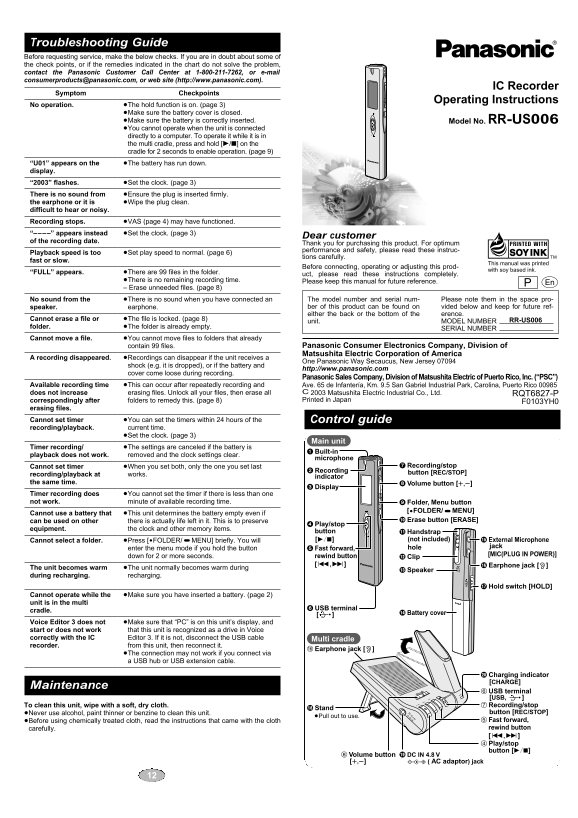
Troubleshooting Guide Before requesting service, make the below checks. If you are in doubt about some of the check points, or if the remedies indicated in the chart do not solve the problem, contact the Panasonic Customer Call Center at 1-800-211-7262, or e-mail [email protected], or web site (http://www.panasonic.com).
IC Recorder
Symptom Checkpoints
Operating Instructions
No operation. ≥The hold function is on. (page 3)
≥Make sure the battery cover is closed. ≥Make sure the battery is correctly inserted. Model No. RR-US006 ≥You cannot operate when the unit is connected directly to a computer. To operate it while it is in the multi cradle, press and hold [1/∫] on the cradle for 2 seconds to enable operation. (page 9)
“U01” appears on the ≥The battery has run down. display. “2003” flashes. ≥Set the clock. (page 3) There is no sound from ≥Ensure the plug is inserted firmly. the earphone or it is ≥Wipe the plug clean. difficult to hear or noisy. Recording stops. ≥VAS (page 4) may have functioned. “––––” appears instead ≥Set the clock. (page 3)
Dear customer
of the recording date.
Thank you for purchasing this product. For optimum performance and safety, please read these instruc-
Playback speed is too ≥Set play speed to normal. (page 6)
tions carefully.
fast or slow.
This manual was printed with soy based ink.Before connecting, operating or adjusting this prod-
“FULL” appears. ≥There are 99 files in the folder.
uct, please read these instructions completely.
≥There is no remaining recording time. Please keep this manual for future reference. – Erase unneeded files. (page 8)
No sound from the ≥There is no sound when you have connected an The model number and serial num- Please note them in the space pro- speaker. earphone. ber of this product can be found on vided below and keep for future ref- either the back or the bottom of the erence.
Cannot erase a file or ≥The file is locked. (page 8) RR-US006
unit. MODEL NUMBER
folder. ≥The folder is already empty.
SERIAL NUMBER
Cannot move a file. ≥You cannot move files to folders that already
contain 99 files. Panasonic Consumer Electronics Company, Division of Matsushita Electric Corporation of America
A recording disappeared. ≥Recordings can disappear if the unit receives a
One Panasonic Way Secaucus, New Jersey 07094
shock (e.g. it is dropped), or if the battery and
http://www.panasonic.com
cover come loose during recording.
Panasonic Sales Company, Division of Matsushita Electric of Puerto Rico, Inc. (“PSC”)
Available recording time ≥This can occur after repeatedly recording and Ave. 65 de Infantería, Km. 9.5 San Gabriel Industrial Park, Carolina, Puerto Rico 00985
does not increase erasing files. Unlock all your files, then erase all C 2003 Matsushita Electric Industrial Co., Ltd. RQT6827-P correspondingly after folders to remedy this. (page 8) Printed in Japan
F0103YH0
erasing files.
Cannot set timer ≥You can set the timers within 24 hours of the Control guide recording/playback. current time. ≥Set the clock. (page 3)
Main unit
Timer recording/ ≥The settings are canceled if the battery is
1 Built-in
playback does not work. removed and the clock settings clear.
microphone
Cannot set timer ≥When you set both, only the one you set last 7 Recording/stop
2 Recording
recording/playback at works. button [REC/STOP]
indicator
the same time. 8 Volume button [r,s]
3 Display
Timer recording does ≥You cannot set the timer if there is less than one
not work. minute of available recording time. 9 Folder, Menu button
[$FOLDER/%MENU]
Cannot use a battery that ≥This unit determines the battery empty even if
can be used on other there is actually life left in it. This is to preserve : Erase button [ERASE]
4 Play/stop
equipment. the clock and other memory items.
button ; Handstrap
Cannot select a folder. ≥Press [$FOLDER/%MENU] briefly. You will [1/∫] (not included) ? External Microphone
5 Fast forward, hole jack
enter the menu mode if you hold the button
down for 2 or more seconds. rewind button [MIC(PLUG IN POWER)]
< Clip
[:,9] @ Earphone jack [#]
The unit becomes warm ≥The unit normally becomes warm during = Speaker during recharging. recharging.
A Hold switch [HOLD]
Cannot operate while the ≥Make sure you have inserted a battery. (page 2) unit is in the multi
6 USB terminal
cradle. > Battery cover
Voice Editor 3 does not ≥Make sure that “PC” is on this unit’s display, and start or does not work that this unit is recognized as a drive in Voice correctly with the IC Editor 3. If it is not, disconnect the USB cable Multi cradle recorder. from this unit, then reconnect it.
@ Earphone jack [#]
≥The connection may not work if you connect via a USB hub or USB extension cable.
D Charging indicator [CHARGE]
Maintenance
LU ME 6 USB terminal
VO OP CHARGE
REC /ST
[USB, ] To clean this unit, wipe with a soft, dry cloth. 7 Recording/stop
B Stand
≥Never use alcohol, paint thinner or benzine to clean this unit. DC IN 4.8V button [REC/STOP]
≥Pull out to use.
≥Before using chemically treated cloth, read the instructions that came with the cloth 5 Fast forward, carefully. rewind button [:,9] 4 Play/stop button [1/∫]
C DC IN 4.8 V8 Volume button
[r,s] K( AC adaptor) jack
Page Summary Contents For Panasonic RR-US006 IC Recorder Operating Instructions
Manual Details
| Brand | Panasonic |
|---|---|
| Pages | 6 |
| File Size | 375.15 KB |
| Published | June 18, 2026 |
Enter the captcha to get the download link:

Frequently Asked Questions
What should I do if the unit displays 'NO operation'?
Check if the hold function is on, ensure the battery cover is closed, and verify that the battery is correctly inserted.
Why can’t I erase a file or move files?
You must unlock all your files first, then you can proceed to erasing or moving them.
How do I set up recording functions when using the unit in its multi cradle?
To enable operation while in the multi cradle, press and hold [1/∫] on the cradle for 2 seconds before starting the function.
What happens if I connect the unit via a USB extension cable?
The connection may not work if you use a USB hub or an USB extension cable; try connecting directly to the unit.