Panasonic RC-CD600 User Guide
Summary
Discover your perfect listening experience with this versatile audio stereo system, featuring built-in CD playback, FM/AM radio, and a precise clock function. This manual is the essential guide for new owners, providing clear instructions on unit setup, connecting the main and sub units, and optimizing all features. It includes quick start guides, detailed operational usage tips, and comprehensive troubleshooting solutions to ensure seamless, worry-free enjoyment of your music and broadcasts.
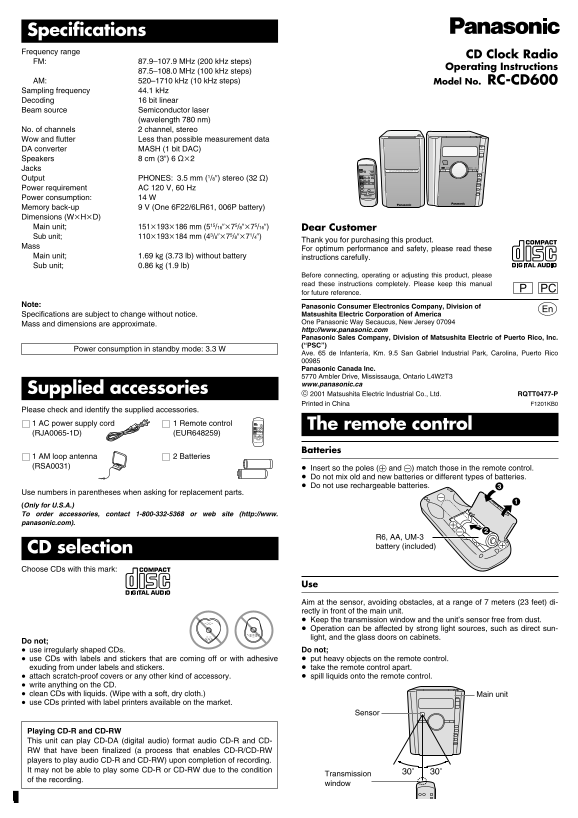
Page 1 Text Content
Specifications Frequency range
CD Clock Radio
FM: 87.9–107.9 MHz (200 k Hz steps)
Operating Instructions
87.5–108.0 MHz (100 k Hz steps)
AM: 520–1710 k Hz (10 k Hz steps) Model No. RC-CD600 Sampling frequency 44.1 k Hz Decoding 16 bit linear Beam source Semiconductor laser
(wavelength 780 nm)
No. of channels 2 channel, stereo Wow and flutter Less than possible measurement data DA converter MASH (1 bit DAC) VOL Speakers 8 cm (3q) 6 ≠k2
Í/ SLEEP RADIO CD
Jacks SLEEP SPEAKER MODE CD CLOCK RADIO SUB SPEAKER UNIT POWER FM/AM
BRIGHTNESS MEMO
FM/AM M1 M2 M3
Output PHONES: 3.5 mm (1/8q) stereo (32 ≠) M4 M5FM MODE CD CD MODE Power requirement AC 120 V, 60 Hz PRESET EQ S.VIRTUALIZER MODE VOLUME CD CLOCK RADIO
Power consumption: 14 W Memory back-up 9 V (One 6F22/6LR61, 006P battery) Dimensions (Wk Hk D) Main unit; 151k193k186 mm (515/16qk75/8qk75/16q) Dear Customer Sub unit; 110k193k184 mm (43/8qk75/8qk71/4q)
Thank you for purchasing this product.
For optimum performance and safety, please read these
Main unit; 1.69 kg (3.73 lb) without battery instructions carefully. Sub unit; 0.86 kg (1.9 lb)
Before connecting, operating or adjusting this product, please read these instructions completely. Please keep this manual
for future reference.
Note: Panasonic Consumer Electronics Company, Division of
p Matsushita Electric Corporation of America
Specifications are subject to change without notice.
One Panasonic Way Secaucus, New Jersey 07094
Mass and dimensions are approximate.
http://www.panasonic.com Panasonic Sales Company, Division of Matsushita Electric of Puerto Rico, Inc. (“PSC”)
Power consumption in standby mode: 3.3 W
Ave. 65 de Infantería, Km. 9.5 San Gabriel Industrial Park, Carolina, Puerto Rico
Panasonic Canada Inc. 5770 Ambler Drive, Mississauga, Ontario L4W2T3 www.panasonic.ca
Supplied accessories
2001 Matsushita Electric Industrial Co., Ltd. RQTT0477-P
Printed in China F1201KB0
Please check and identify the supplied accessories.
1 AC power supply cord 1 Remote control SLEEP SPEAKER MODE BRIGHTNESS FM/AM M1 M4 M2 M5FM MODE M3 The remote control CD CD MODE (RJA0065-1D) (EUR648259) PRESET EQ VOLUME S.VIRTUALIZER CD CLOCK RADIO
Batteries
1 AM loop antenna 2 Batteries (RSA0031)
≥ Insert so the poles (+ and -) match those in the remote control. ≥ Do not mix old and new batteries or different types of batteries. ≥ Do not use rechargeable batteries.
Use numbers in parentheses when asking for replacement parts. (Only for U.S.A.) To order accessories, contact 1-800-332-5368 or web site (http://www. panasonic.com).
R6, AA, UM-3 battery (included)
CD selection Choose CDs with this mark:
Aim at the sensor, avoiding obstacles, at a range of 7 meters (23 feet) di- rectly in front of the main unit. ≥ Keep the transmission window and the unit’s sensor free from dust. ≥ Operation can be affected by strong light sources, such as direct sun- light, and the glass doors on cabinets.
Do not; ≥ use irregularly shaped CDs. Do not;
≥ use CDs with labels and stickers that are coming off or with adhesive ≥ put heavy objects on the remote control. exuding from under labels and stickers. ≥ take the remote control apart. ≥ attach scratch-proof covers or any other kind of accessory. ≥ spill liquids onto the remote control.
≥ write anything on the CD. ≥ clean CDs with liquids. (Wipe with a soft, dry cloth.) Main unit ≥ use CDs printed with label printers available on the market.
Sensor
Playing CD-R and CD-RW This unit can play CD-DA (digital audio) format audio CD-R and CD- RW that have been finalized (a process that enables CD-R/CD-RW players to play audio CD-R and CD-RW) upon completion of recording. It may not be able to play some CD-R or CD-RW due to the condition 30e30e
Transmission
of the recording.
window
Page Summary Contents For Panasonic RC-CD600 User Guide
Manual Details
| Brand | Panasonic |
|---|---|
| Pages | 8 |
| File Size | 392.85 KB |
| Published | May 29, 2026 |
Enter the captcha to get the download link:

Frequently Asked Questions
What power source should I use to keep settings saved?
Insert a memory back-up battery (6F22/6LR61, 006P) to save clock, timer, and radio preset settings when power is cut.
How do I connect the main unit and sub unit cables properly?
Connect corresponding color cables (+/-) to terminals on both units. The green and blue cables carry commands; red and black carry sound.
What should I know about playing CD-R/CD-RWs?
The unit can play finalized CD-DA (digital audio) format recordings, but it might not work with all due to the recording's condition.
Why is my radio noisy, or why isn't the alarm working?
Separate the unit from mobile phones and TVs; ensure the physical indicator for 'ALARM 1' or 'ALARM 2' is on.