Panasonic RC-7200 RC-7150 User's Manual
Summary
This sophisticated FM/AM Clock Radio combines multiple functionalities into one unit, featuring backup battery power and customizable alarm settings for ultimate reliability. This user guide provides comprehensive instructions on setting timers, adjusting alarms, mastering radio operation across various bands, and utilizing the specialized Doze function. Essential reading for new owners, it covers detailed setup procedures, vital operation guidelines, required safety precautions (including handling electrical sources), and maintenance tips to ensure the longevity of your model.
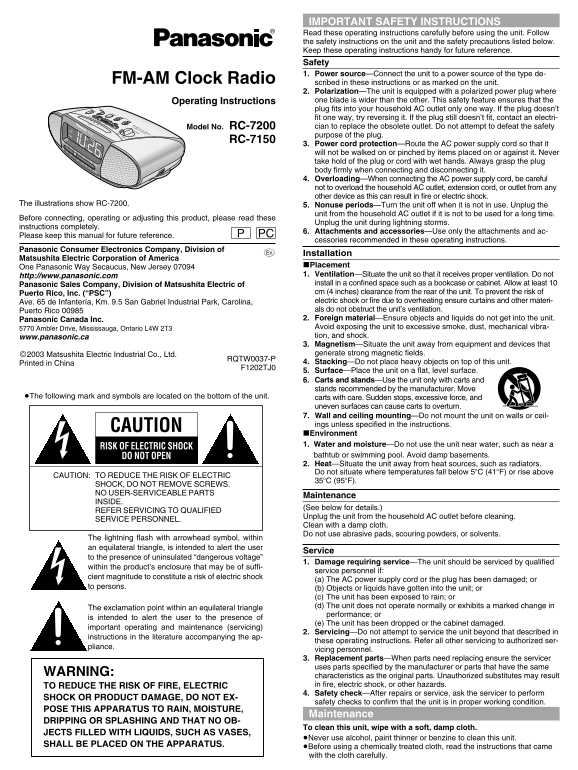
Page 1 Text Content
IMPORTANT SAFETY INSTRUCTIONS Read these operating instructions carefully before using the unit. Follow the safety instructions on the unit and the safety precautions listed below. Keep these operating instructions handy for future reference. Safety 1. Power source—Connect the unit to a power source of the type de-
FM-AM Clock Radio scribed in these instructions or as marked on the unit.
2. Polarization—The unit is equipped with a polarized power plug where Operating Instructions one blade is wider than the other. This safety feature ensures that the
TIME SETRADIO
OFF plug fits into your household AC outlet only one way. If the plug doesn’t SLEEP OFF AL1 DISP/ADJUST RADIO ALARM fit one way, try reversing it. If the plug still doesn’t fit, contact an electri-
DOZE OFF FM-AM CLOCK RADIO
BUZZER 2-ALARM / SURE ALARM RC-7200
VOLUME Model No. cian to replace the obsolete outlet. Do not attempt to defeat the safety
AL1 RC-7200 MIN
AL2 MAX purpose of the plug. FM RC-7150
3. Power cord protection—Route the AC power supply cord so that it
will not be walked on or pinched by items placed on or against it. Never
MHz take hold of the plug or cord with wet hands. Always grasp the plug
X10k Hz body firmly when connecting and disconnecting it.
4. Overloading—When connecting the AC power supply cord, be careful not to overload the household AC outlet, extension cord, or outlet from any other device as this can result in fire or electric shock.
The illustrations show RC-7200. 5. Nonuse periods—Turn the unit off when it is not in use. Unplug the
unit from the household AC outlet if it is not to be used for a long time.
Before connecting, operating or adjusting this product, please read these
Unplug the unit during lightning storms.
instructions completely.
6. Attachments and accessories—Use only the attachments and ac-
Please keep this manual for future reference. PC
cessories recommended in these operating instructions.
Panasonic Consumer Electronics Company, Division of
Installation
Matsushita Electric Corporation of America
∫Placement
One Panasonic Way Secaucus, New Jersey 07094
http://www.panasonic.com 1. Ventilation—Situate the unit so that it receives proper ventilation. Do not Panasonic Sales Company, Division of Matsushita Electric of install in a confined space such as a bookcase or cabinet. Allow at least 10 Puerto Rico, Inc. (“PSC”) cm (4 inches) clearance from the rear of the unit. To prevent the risk of Ave. 65 de Infantería, Km. 9.5 San Gabriel Industrial Park, Carolina, electric shock or fire due to overheating ensure curtains and other materi- Puerto Rico 00985 als do not obstruct the unit’s ventilation. Panasonic Canada Inc. 2. Foreign material—Ensure objects and liquids do not get into the unit. 5770 Ambler Drive, Mississauga, Ontario L4W 2T3 Avoid exposing the unit to excessive smoke, dust, mechanical vibra- www.panasonic.ca tion, and shock. 3. Magnetism—Situate the unit away from equipment and devices that ©2003 Matsushita Electric Industrial Co., Ltd. generate strong magnetic fields.
RQTW0037-P
Printed in China 4. Stacking—Do not place heavy objects on top of this unit.
F1202TJ0
5. Surface—Place the unit on a flat, level surface. 6. Carts and stands—Use the unit only with carts and stands recommended by the manufacturer. Move
≥The following mark and symbols are located on the bottom of the unit. carts with care. Sudden stops, excessive force, and
uneven surfaces can cause carts to overturn. 7. Wall and ceiling mounting—Do not mount the unit on walls or ceil- ings unless specified in the instructions.
CAUTION
∫Environment 1. Water and moisture—Do not use the unit near water, such as near a
RISK OF ELECTRIC SHOCK
DO NOT OPEN bathtub or swimming pool. Avoid damp basements. 2. Heat—Situate the unit away from heat sources, such as radiators. Do not situate where temperatures fall below 5o C (41o F) or rise above
CAUTION: TO REDUCE THE RISK OF ELECTRIC
SHOCK, DO NOT REMOVE SCREWS. NO USER-SERVICEABLE PARTS
Maintenance
INSIDE.
(See below for details.)
REFER SERVICING TO QUALIFIED
Unplug the unit from the household AC outlet before cleaning.
SERVICE PERSONNEL.
Clean with a damp cloth. Do not use abrasive pads, scouring powders, or solvents.
The lightning flash with arrowhead symbol, within an equilateral triangle, is intended to alert the user
Service
to the presence of uninsulated “dangerous voltage”
1. Damage requiring service—The unit should be serviced by qualified
within the product’s enclosure that may be of suffi-
service personnel if:
cient magnitude to constitute a risk of electric shock
(a) The AC power supply cord or the plug has been damaged; or
to persons. (b) Objects or liquids have gotten into the unit; or
(c) The unit has been exposed to rain; or (d) The unit does not operate normally or exhibits a marked change in
The exclamation point within an equilateral triangle
performance; or
is intended to alert the user to the presence of
(e) The unit has been dropped or the cabinet damaged.
important operating and maintenance (servicing)
2. Servicing—Do not attempt to service the unit beyond that described in
instructions in the literature accompanying the ap-
these operating instructions. Refer all other servicing to authorized ser-
pliance.
vicing personnel. 3. Replacement parts—When parts need replacing ensure the servicer uses parts specified by the manufacturer or parts that have the same
WARNING:
characteristics as the original parts. Unauthorized substitutes may result TO REDUCE THE RISK OF FIRE, ELECTRIC in fire, electric shock, or other hazards. 4. Safety check—After repairs or service, ask the servicer to perform
SHOCK OR PRODUCT DAMAGE, DO NOT EX-
safety checks to confirm that the unit is in proper working condition.
POSE THIS APPARATUS TO RAIN, MOISTURE,
Maintenance
DRIPPING OR SPLASHING AND THAT NO OB-
To clean this unit, wipe with a soft, damp cloth.
JECTS FILLED WITH LIQUIDS, SUCH AS VASES,
≥Never use alcohol, paint thinner or benzine to clean this unit.
SHALL BE PLACED ON THE APPARATUS.
≥Before using a chemically treated cloth, read the instructions that came with the cloth carefully.
Page Summary Contents For Panasonic RC-7200 RC-7150 User's Manual
Manual Details
| Brand | Panasonic |
|---|---|
| Pages | 4 |
| File Size | 858.96 KB |
| Published | May 31, 2026 |
Enter the captcha to get the download link:

Frequently Asked Questions
What is the proper ventilation clearance for the unit?
Allow at least 10 cm (4 inches) clearance from the rear of the unit to prevent overheating.
How should I prepare the unit for long-term nonuse?
Turn the unit off and unplug it from the household AC outlet if you are not planning to use it for an extended period.
Where can I safely situate the radio clock away from potential hazards?
Keep it away from strong magnetic fields, water sources (like bathtubs), heat sources, and direct obstruction of its ventilation.
What steps should be taken if the unit does not operate normally?
The unit must be serviced by qualified service personnel to ensure safety and proper functioning.