Panasonic AKHHD931P User Guide
Summary
This modular unit is an advanced signal interface designed for integrating complex video and audio transmission systems into camera control units. Featuring multiple ports—including SDI, HDMI, WFM, and auxiliary inputs—it supports professional broadcast signals and robust infrastructure management. The included documentation provides comprehensive, step-by-step servicing instructions detailing installation procedures within the parent unit. This kit is strictly intended for qualified service personnel and trained technical staff managing mission-critical broadcasting equipment.
Page 1 Text Content
720P Output Port Unit Model No. AK-HHD931P
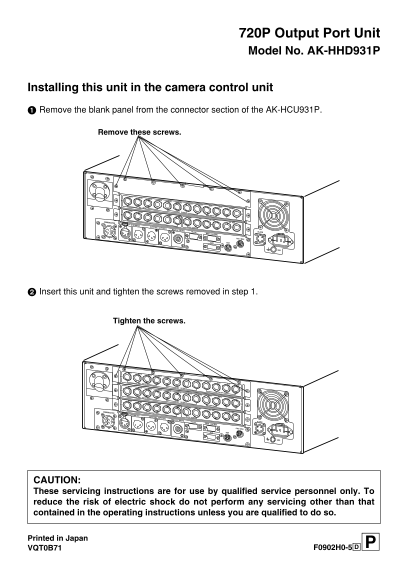
Installing this unit in the camera control unit Remove the blank panel from the connector section of the AK-HCU931P.
Remove these screws.
RET1 RET2
SD RET3 RET4
OUT1 OUT2
OUT3 OUT4
SDI INPUT RET1 RET2
PROMPT
WFM1 WFM2 SDI OUTPUT
SD PM1 PM2 SD
VBS1 VBS2 INPUT
HD SD
HD REF
COMMUNICATION IN OUTPUT SD REF
RTS OUT
CH–1 MIC OUT CH–2 SYNC OUTPUT
DIGITAL AUDIO
TRUNK WFM CONTROL ALARM
AC IN
CSU / MSU
AUX ROP
Insert this unit and tighten the screws removed in step 1.
Tighten the screws.
RET1 RET2
HD RET3 RET4
OUT1 OUT2
OUT3 OUT4/PM
SDI INPUT Y / G Pb / B
Pr / R PM
RET1 RET2 SDI OUTPUT
SD RET3 RET4 HD
OUT1 OUT2 OUTPUT
OUT3 OUT4
SDI INPUT RET1 RET2
PROMPT
WFM1 WFM2 SDI OUTPUT
SD PM1 PM2 SD
VBS1 VBS2 INPUT
HD SD
HD REF
COMMUNICATION IN OUTPUT SD REF
RTS OUT
CH–1 MIC OUT CH–2 SYNC OUTPUT
DIGITAL AUDIO
TRUNK WFM CONTROL ALARM
AC IN
CSU / MSU
AUX ROP
CAUTION: These servicing instructions are for use by qualified service personnel only. To reduce the risk of electric shock do not perform any servicing other than that contained in the operating instructions unless you are qualified to do so.
Printed in Japan
VQT0B71 F0902H0-5@3
Page Summary Contents For Panasonic AKHHD931P User Guide
Manual Details
| Brand | Panasonic |
|---|---|
| Pages | 1 |
| File Size | 108.25 KB |
| Published | June 05, 2026 |
Enter the captcha to get the download link:

Frequently Asked Questions
How do I install the AK-HHD931P unit?
Remove the blank panel from the connector section of the AK-HCU931P, insert this unit, and then tighten the screws.
Who should service this equipment?
These servicing instructions are for use by qualified service personnel only.
What kind of wiring or connections are available (inputs/outputs)?
The device offers various ports including SYNC, CLOCK, HDMI, SDI, and multiple auxiliary outputs (RET1-4, OUT1-4).
Is there an electric shock danger when servicing?
To reduce the risk of electric shock, only perform servicing outlined in the operating instructions unless qualified to do so.