Page 1
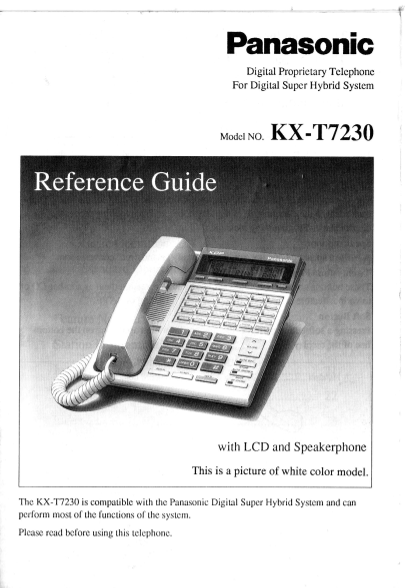
Digital Proprietary Telephone For Digital Super Hybrid System Modcr No. KX -T7230 Thc KX-T7230 is compatible with the Panasonic Digi Lal Super Hybrid System and can perform most of fte functions of lh...
Page 2
Thank you for purchasing this Panasonic Telephone. Please read IMPOKIANT SAFETY INSTRUCTIONS on pages 24-25 before use. Read and understand all instructions. Introduction This KX-T7230 Digital Proprie...
Page 3
Thble of Contents Location of Controls Connection Volume Control 7 Handset Aleadset S lection .................. 7 Feature Descriptions........... 8 Operating Instructions Basic Operation 11 Standard ...
Page 4
Location of Controls ?Display (Liquid Crystal Display) Solt Iluttons A l6-characterf2-line (Sl through 53) readout. Prcssing a Soft button pcrlirrrns the function/ opcration appearing on PROGRAM Butto...
Page 5
Location of Controls (contd.) FWD/DND Button Uscd to program Call Forwarding or set Do Not Disturb. MESSAGE Button Used to call back the message sendcr. CONF (Conference) Button PAUSE Button Used to e...
Page 6
iffi :f Connection Connect as shown. If you connect to a Singlc Linc Tolcphone (SLT), -+ conncct to a jack of a Singlc Linc Telephonc (SLT). (Refcr to ttre lnstallation Manual of t Jrc Digital Super H...
Page 7
Volume Control You can adjust the volume by pressing the VOLUME button. The number of * 's on the display shows tre volume level. <Example> tf tl"l COntra St -Speaker Volume Control I hess ...
Page 8
Feature Descriptions I Absent Message Capability I Call Forwarding (FWD) There are nine flexible abscnt messages Automatically ransfers incoming calls available. If you select, a message it will to an...
Page 9
Feature Descriptions (contd.) I Call Transfer to Extension I Line Access, Autonutic Transfcrs incoming CO or extcnsion Allows you to sclcct an available CO calls to another extcnsion (scrccncd or inc ...
Page 10
Feature Descriptions (contd.) I Paralleled Telephone Connection I Trunk (CO Line) Answer from This unit can be connccted in parallel Any Station (TAFAS) with a single line telephone. When this Ringing...
Page 11
Operating Instructions Basic Operation - Off-hook: Lift the handset or prcss the Making Cal ls SP-PHONE burron. - Intercom Cal ing On-hook: Replace thc handsct or prcss . OIT-hook. the SP-PHONE bulton...
Page 12
Operating Instructiolls (contd.) Standard Operation Cancelling . Off-hook. I Absent Message Capability fi . Dial FSool. Setting t,1 . On-hook. Message 1. '6\ilill Return Soon" . Off-hook. Account...
Page 13
Operating Instructiolls (contd.) t Call Forwarding (FWD) Cancell ing - At the original extension Setting - All Calls . Off-hook. . Off-hook. . Prcss I t'WD/p NDl burron. . Press I FFD-/D-M burton. . D...
Page 14
O peratin g Instructiorls (contd.) I Call Park I Call Transfer to Extension - Screened Setting While having a conversailon; While having a conversation: . Press Fn ANs.FFTI bu[on. . hess ITR-n NSI'ER ...
Page 15
Operating Instructiolls (contd.) I Conference I Full One-Touch Dialing nr While laving a conversatbn; Change a CO button to function as an . Presslt6Nt']bu[on. One-Touch or SAVE button beforehand. . D...
Page 16
O peratin g Instructiolls (contd.) I Paging ,ffi I Paging and Transfer - All To transfer . Off-hook. . Press ITI-IFs FER-] buuon before . Dial EA 1or@1 +@. dialing the paging feature number - Cordirma...
Page 17
Operating Instructiolls (contd.) I Station Feature Clear I Voice Mail Integration . Off-hook. Setting Call l-orwarding to Voice . Dial heol . Processing System -Confirmation lone is audible. . Off-hoo...
Page 18
Operating Instructiolls (c'ntd.) Operator Operation - t Outgoing Message (OGM) Allows !o rccord a mcssage for play back with various mcssagc scrviccs. Only the operator I can perform the following ope...
Page 19
Feature Numbers This Manual uses the initial factory settings (dcfault value) for feature descriptions. If you change the feature number, use the new code instead. Additional Required Featrue Numbers ...
Page 20
Station Programming Before entering Programming, you need to I Preferred Line Assignment- enter Programming mode. Outgoing When the teleplnne is idle and on-lnok; . Dial [ + fiine nlmue Tl (1, 2, or 3...
Page 21
Installing the Card Holder I Match the marks ()) on the card holder and on the slide rails on the unit. s=-sg 2 Push two shaded portions lightly and insert the edges of the holder undcr the slide rail...
Page 22
Wall Mounting i I Remove the handset hook by pulling it 4 Phce rhe stand on the center line. loward the top of the unit. Turn it around. Re-insert. 2 Remove the attaching stand. 5 Mount the unit on th...
Page 23
Index Absent Message Capability Account Code Entry ............. Altemate Calling - R in gf/ o ice .'.............. ^Automatic Callback Busy (Camp-On) ....."......"'..... Background Music (B...
Page 24
Accessorv Order Information Replacement parts and accessories are availablc through your local authorized parts distributor. For ordering the accessory, call oll free: l-800-332-5368 Part No. Picture ...
Page 25
Important Safety Instructions (contd.) 7. Do not allow anything to rest on the D. If the product does not operate telephone cord. Do not locatc this normally by following the product where the cord wi...
Page 26
FCC and Other Information NOTE: If thcre is any trouble, disconnect the unit This equipment has been tested and found from the extcnsion linc and connect a to comply wittr the limits for a Class A kno...