Nikon D100 Quick Reference Guide
Summary
This comprehensive guide provides detailed operating instructions for the Nikon D100 camera, perfect for both novice photographers and users seeking advanced control. The manual walks you through standard point-and-shoot functions, specialized setups for multi-flash photography, and master modes like Shutter and Aperture Priority Auto. It also covers technical setup, including running the camera with a laptop to manage settings and view images digitally.
Page 1 Text Content
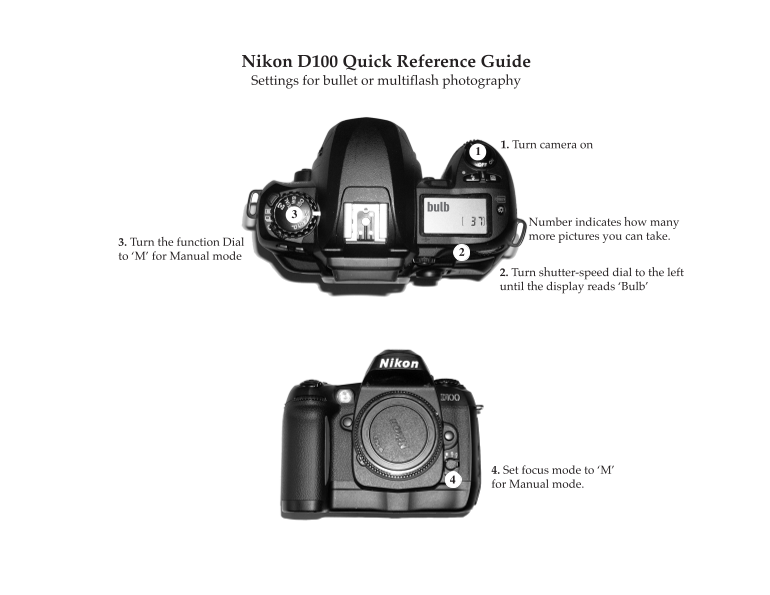
Nikon D100 Quick Reference Guide Settings for bullet or multiflash photography
1. Turn camera on
Number indicates how many more pictures you can take.
3. Turn the function Dial to ‘M’ for Manual mode
2. Turn shutter-speed dial to the left until the display reads ‘Bulb’
4. Set focus mode to ‘M’ for Manual mode.4
Page Summary Contents For Nikon D100 Quick Reference Guide
Manual Details
| Brand | Nikon |
|---|---|
| Pages | 6 |
| File Size | 2.59 MB |
| Published | June 01, 2026 |
Enter the captcha to get the download link:

Frequently Asked Questions
How do I restore basic camera settings?
Hold both the BKT and $\text{FLASH}$ buttons for two seconds.
What is the process for using the D100 with a laptop?
Set up on a tripod, power it via AC adapter, plug the USB cable into both the camera and the laptop, then open the Nikon Capture Control program.
When should I switch to manual focus mode?
Switch manually when the green light in the viewfinder is blinking, indicating autofocus failure.
How do I control exposure using advanced settings?
Use Shutter-Priority Auto (S) by selecting shutter speed; or use Aperture-Priority Auto (A) by selecting aperture.