Nikon D80 Quick Reference Sheet
Summary
Master the professional Nikon D80 camera with this comprehensive technical reference view. This guide meticulously details every component—from front and back controls and specialized dials to multiple LCD indicators on the top and bottom. Learn how to adjust focus modes, utilize precise exposure compensation, manage ISO settings, and leverage advanced features like bracketing modes (AE/AF-L). Essential for professional photographers and serious enthusiasts who require absolute control over depth of field and image capture workflow.
Page 1 Text Content
D80 Quick Reference Sheet (Adapted from Thom Hogan’s Complete Guide to the Nikon D80)
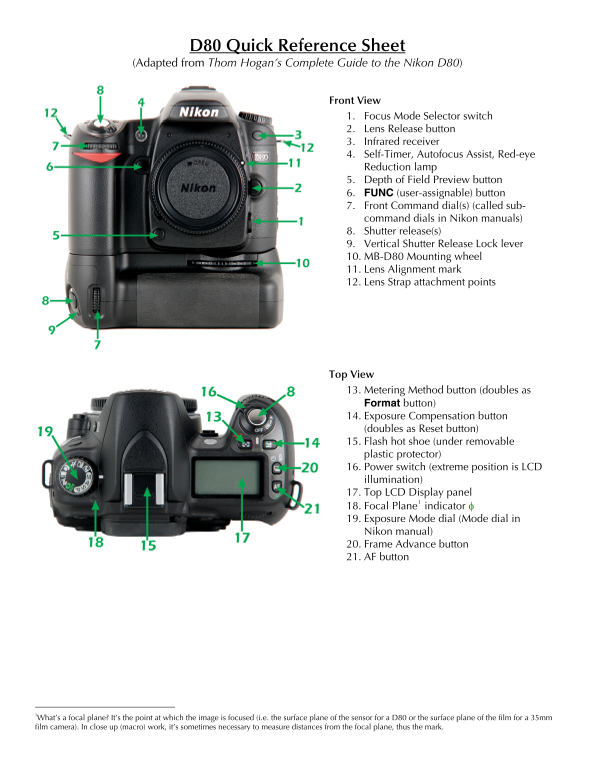
Front View 1. Focus Mode Selector switch 2. Lens Release button 3. Infrared receiver 4. Self-Timer, Autofocus Assist, Red-eye Reduction lamp 5. Depth of Field Preview button 6. FUNC (user-assignable) button 7. Front Command dial(s) (called sub- command dials in Nikon manuals) 8. Shutter release(s) 9. Vertical Shutter Release Lock lever 10. MB-D80 Mounting wheel 11. Lens Alignment mark 12. Lens Strap attachment points
Top View 13. Metering Method button (doubles as Format button) 14. Exposure Compensation button (doubles as Reset button) 15. Flash hot shoe (under removable plastic protector) 16. Power switch (extreme position is LCD illumination) 17. Top LCD Display panel
18. Focal Plane indicator φ 1
19. Exposure Mode dial (Mode dial in Nikon manual) 20. Frame Advance button 21. AF button
1What’s a focal plane? It’s the point at which the image is focused (i.e. the surface plane of the sensor for a D80 or the surface plane of the film for a 35mm
film camera). In close up (macro) work, it’s sometimes necessary to measure distances from the focal plane, thus the mark.
Page Summary Contents For Nikon D80 Quick Reference Sheet
Manual Details
| Brand | Nikon |
|---|---|
| Pages | 4 |
| File Size | 3.01 MB |
| Published | June 01, 2026 |
Enter the captcha to get the download link:

Frequently Asked Questions
How can I connect external equipment like video or USB?
Connect via the Wired remote connector (under bottom rubber flap) for accessories, Video Out, DC In, or USB connectors (all under top rubber flap).
Where is the main battery compartment located?
The latch for the MB-D80 Battery Compartment Door is located on the side view of the camera body.
What indicators display current image quality and size settings?
Check the panels for Image Quality indicators (RAW, FINE, NORM, BASIC) and Image Size status (L = large, M = medium, S = small).
What is the function of the Focal Plane indicator φ?
It marks the point at which the image is focused, representing the surface plane of the sensor or film.