Nikon D7000 Setup Guide
Summary
Master the Nikon D7000 with this comprehensive setup guide designed for serious photographers of all genres, including portrait, landscape, travel, and wedding photography. This manual walks you through deep technical controls, covering everything from optimizing exposure modes and advanced autofocus settings (AF-C/AF-S) to mastering RAW image quality and dedicated video functions. Easily customize metering, bracketing sequences, and capture professional-grade images with expert precision.
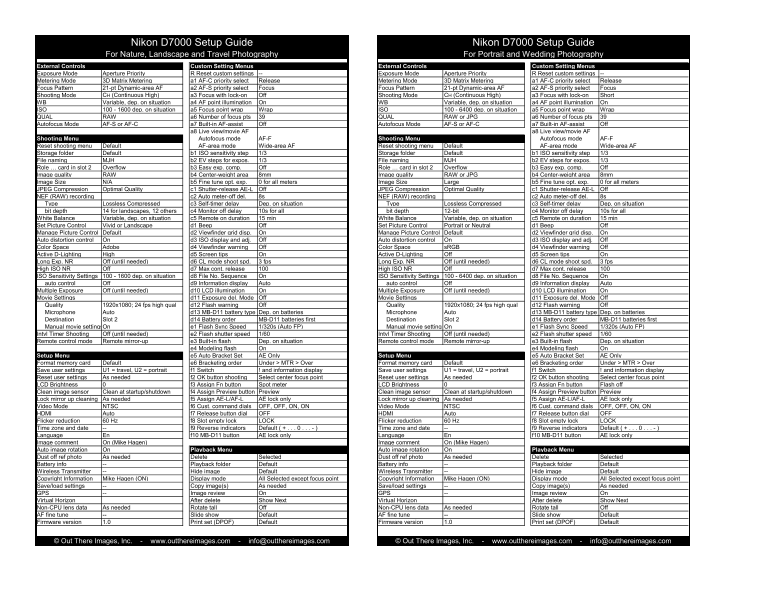
Page 1 Text Content
Nikon D7000 Setup Guide Nikon D7000 Setup Guide For Nature, Landscape and Travel Photography For Portrait and Wedding Photography
External Controls Custom Setting Menus External Controls Custom Setting Menus Exposure Mode Aperture Priority R Reset custom settings Exposure Mode Aperture Priority R Reset custom settings Metering Mode 3D Matrix Metering a1 AF-C priority select Release Metering Mode 3D Matrix Metering a1 AF-C priority select Release Focus Pattern 21-pt Dynamic-area AF a2 AF-S priority select Focus Focus Pattern 21-pt Dynamic-area AF a2 AF-S priority select Focus
Shooting Mode CH (Continuous High) a3 Focus with lock-on Off Shooting Mode CH (Continuous High) a3 Focus with lock-on Short
WB Variable, dep. on situation a4 AF point illumination On WB Variable, dep. on situation a4 AF point illumination On ISO 100 - 1600 dep. on situation a5 Focus point wrap Wrap ISO 100 - 6400 dep. on situation a5 Focus point wrap Wrap QUAL RAW a6 Number of focus pts QUAL RAW or JPG a6 Number of focus pts Autofocus Mode AF-S or AF-C a7 Built-in AF-assist Off Autofocus Mode AF-S or AF-C a7 Built-in AF-assist Off
a8 Live view/movie AF a8 Live view/movie AF
Shooting Menu Autofocus mode AF-F Shooting Menu Autofocus mode AF-F Reset shooting menu Default AF-area mode Wide-area AF Reset shooting menu Default AF-area mode Wide-area AF Storage folder Default b1 ISO sensitivity step 1/3 Storage folder Default b1 ISO sensitivity step 1/3 File naming MJH b2 EV steps for expos. 1/3 File naming MJH b2 EV steps for expos. 1/3 Role … card in slot 2 Overflow b3 Easy exp. comp. Off Role … card in slot 2 Overflow b3 Easy exp. comp. Off Image quality RAW b4 Center-weight area 8mm Image quality RAW or JPG b4 Center-weight area 8mm Image Size N/A b5 Fine tune opt. exp. 0 for all meters Image Size Large b5 Fine tune opt. exp. 0 for all meters JPEG Compression Optimal Quality c1 Shutter-release AE-L Off JPEG Compression Optimal Quality c1 Shutter-release AE-L Off NEF (RAW) recording c2 Auto meter-off del. 8s NEF (RAW) recording c2 Auto meter-off del. 8s Type Lossless Compressed c3 Self-timer delay Dep. on situation Type Lossless Compressed c3 Self-timer delay Dep. on situation bit depth 14 for landscapes, 12 others c4 Monitor off delay 10s for all bit depth 12-bit c4 Monitor off delay 10s for all White Balance Variable, dep. on situation c5 Remote on duration 15 min White Balance Variable, dep. on situation c5 Remote on duration 15 min Set Picture Control Vivid or Landscape d1 Beep Off Set Picture Control Portrait or Neutral d1 Beep Off Manage Picture Control Default d2 Viewfinder grid disp. On Manage Picture Control Default d2 Viewfinder grid disp. On Auto distortion control On d3 ISO display and adj. Off Auto distortion control On d3 ISO display and adj. Off Color Space Adobe d4 Viewfinder warning Off Color Space s RGB d4 Viewfinder warning Off Active D-Lighting High d5 Screen tips On Active D-Lighting Off d5 Screen tips On Long Exp. NR Off (until needed) d6 CL mode shoot spd. 3 fps Long Exp. NR Off (until needed) d6 CL mode shoot spd. 3 fps High ISO NR Off d7 Max cont. release High ISO NR Off d7 Max cont. release ISO Sensitivity Settings 100 - 1600 dep. on situation d8 File No. Sequence On ISO Sensitivity Settings 100 - 6400 dep. on situation d8 File No. Sequence On auto control Off d9 Information display Auto auto control Off d9 Information display Auto Multiple Exposure Off (until needed) d10 LCD illumination On Multiple Exposure Off (until needed) d10 LCD illumination On Movie Settings d11 Exposure del. Mode Off Movie Settings d11 Exposure del. Mode Off Quality 1920x1080; 24 fps high qual d12 Flash warning Off Quality 1920x1080; 24 fps high qual d12 Flash warning Off Microphone Auto d13 MB-D11 battery type Dep. on batteries Microphone Auto d13 MB-D11 battery type Dep. on batteries Destination Slot 2 d14 Battery order MB-D11 batteries first Destination Slot 2 d14 Battery order MB-D11 batteries first Manual movie settings On e1 Flash Sync Speed 1/320s (Auto FP) Manual movie settings On e1 Flash Sync Speed 1/320s (Auto FP) Intvl Timer Shooting Off (until needed) e2 Flash shutter speed 1/60 Intvl Timer Shooting Off (until needed) e2 Flash shutter speed 1/60 Remote control mode Remote mirror-up e3 Built-in flash Dep. on situation Remote control mode Remote mirror-up e3 Built-in flash Dep. on situation
e4 Modeling flash On e4 Modeling flash On
Setup Menu e5 Auto Bracket Set AE Only Setup Menu e5 Auto Bracket Set AE Only Format memory card Default e6 Bracketing order Under > MTR > Over Format memory card Default e6 Bracketing order Under > MTR > Over Save user settings U1 = travel, U2 = portrait f1 Switch ! and information display Save user settings U1 = travel, U2 = portrait f1 Switch ! and information display Reset user settings As needed f2 OK button shooting Select center focus point Reset user settings As needed f2 OK button shooting Select center focus point LCD Brightness f3 Assign Fn button Spot meter LCD Brightness f3 Assign Fn button Flash off Clean image sensor Clean at startup/shutdown f4 Assign Preview button Preview Clean image sensor Clean at startup/shutdown f4 Assign Preview button Preview Lock mirror up cleaning As needed f5 Assign AE-L/AF-L AE lock only Lock mirror up cleaning As needed f5 Assign AE-L/AF-L AE lock only Video Mode NTSC f6 Cust. command dials OFF, OFF, ON, ON Video Mode NTSC f6 Cust. command dials OFF, OFF, ON, ON HDMI Auto f7 Release button dial OFF HDMI Auto f7 Release button dial OFF Flicker reduction 60 Hz f8 Slot empty lock LOCK Flicker reduction 60 Hz f8 Slot empty lock LOCK Time zone and date f9 Reverse indicators Default ( + . . . 0 . . . - ) Time zone and date f9 Reverse indicators Default ( + . . . 0 . . . - ) Language En f10 MB-D11 button AE lock only Language En f10 MB-D11 button AE lock only Image comment On (Mike Hagen) Image comment On (Mike Hagen) Auto image rotation On Playback Menu Auto image rotation On Playback Menu Dust off ref photo As needed Delete Selected Dust off ref photo As needed Delete Selected Battery info Playback folder Default Battery info Playback folder Default Wireless Transmitter Hide image Default Wireless Transmitter Hide image Default Copyright Information Mike Hagen (ON) Display mode All Selected except focus point Copyright Information Mike Hagen (ON) Display mode All Selected except focus point Save/load settings Copy image(s) As needed Save/load settings Copy image(s) As needed GPS Image review On GPS Image review On Virtual Horizon After delete Show Next Virtual Horizon After delete Show Next Non-CPU lens data As needed Rotate tall Off Non-CPU lens data As needed Rotate tall Off AF fine tune Slide show Default AF fine tune Slide show Default Firmware version 1.0 Print set (DPOF) Default Firmware version 1.0 Print set (DPOF) Default
© Out There Images, Inc. - www.outthereimages.com - [email protected] © Out There Images, Inc. - www.outthereimages.com - [email protected]
Page Summary Contents For Nikon D7000 Setup Guide
Manual Details
| Brand | Nikon |
|---|---|
| Pages | 2 |
| File Size | 136.39 KB |
| Published | June 01, 2026 |
Enter the captcha to get the download link:

Frequently Asked Questions
How often should I clean the camera's image sensor?
It is recommended to clean the image sensor at startup/shutdown.
What is the proper order for placing batteries in the camera?
You must place the MB-D11 batteries into Destination Slot 2 first.
How can I shoot high-quality images while maintaining control over focus points?
The camera allows you to use up to 39 focus points with either QUAL RAW or JPG format.
Are there specific rules for setting the continuous shooting limit?
Yes, the maximum number of consecutive releases is set at 100.