Motorola Quench Focus on What Matters User Guide
Summary
Stay effortlessly connected with this feature-rich Motorola device model. This comprehensive guide introduces detailed operation for key functions including synchronized contacts, multimedia management, emailing, and instant messaging through both physical buttons and a vibrant touchscreen interface. Learn how to easily integrate services like GPS navigation, Bluetooth connectivity, and advanced widgets while customizing your device's aesthetic to match your personal style. Ideal for users seeking a powerful, reliable smartphone experience that makes staying organized and connected simple and intuitive.
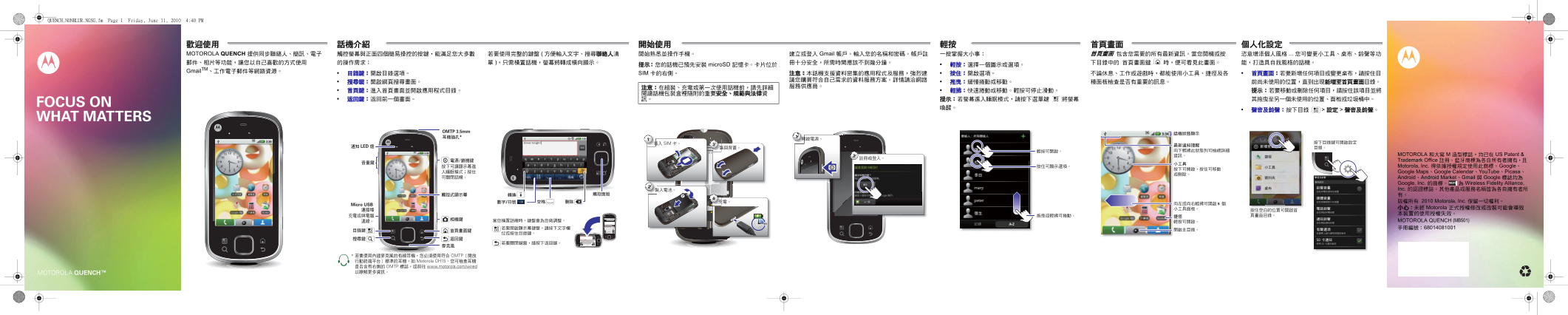
Page 1 Text Content
QUENCH.NONBLUR.NGSG.fm Page 1 Friday, June 11, 2010 4:40 PM
社交能力MOTOROLA 話機介紹 開始操作 觸控提示 首頁畫面首頁畫面 包含您需要的所有最新資訊。 當您開機或按 個人化設定
QUENCH 提供同步聯絡人、簡訊、電子 觸控螢幕與正面四個簡易操控的按鍵,能滿足您大多數 若要使用完整的鍵盤 ( 方便輸入文字、搜尋聯絡人清 開始熟悉並操作手機。 建立或登入 Gmail 帳戶。 輸入您的名稱和密碼。 帳戶註 一按掌握大小事: 恣意增添個人風格 ... 您可變更小工具、桌布、鈴聲等功
提示: 您的話機已預先安裝 micro SD 記憶卡。 卡片位於 • 輕按: 選擇一個圖示或選項。
Gmail TM、工作電子郵件等網路資源。
• 目錄鍵: 開啟目錄選項。 SIM 卡的右側。 注意: 本話機支援資料密集的應用程式及服務, 強烈建 • 按住: 開啟選項。 不論休息、工作或遊戲時,都能使用小工具、捷徑及各 • 首頁畫面: 若要新增任何項目或變更桌布,請按住目
OMTP 3.5mm
Contacts
3 SIM
LED Alex Pico
Add to Home screen
MOTOROLA 和大寫 M 造型標誌,均已在 US Patent &
Shortcuts
Search Dan Smith Trademark Office 註冊。 藍牙商標為各自所有者擁有,且
Widgets Motorola, Inc. 得依據授權規定使用此商標。 Google、
Google Maps、Google Calendar、You Tube、Picasa、
Kate Shunney Folders
Sound & ringtones Android、Android Market、Gmail 與 Google 標誌均為 Barry Smyth Wallpapers Sound settings
Google, Inc. 的商標。 為 Wireless Fidelity Alliance,
Check out my gig
on Friday night. Keith Zang Ringer volume
Set volume for incoming calls and Inc. 的認證標誌。其他產品或服務名稱皆為各自擁有者所
notifications
2 minutes ago 有。
Luke Carmody Media volume
Set volume for music and videos 版權所有 2010 Motorola, Inc. 保留一切權利。
Micro USB
Browser Market 小心 未經 Motorola 正式授權修改或改裝可能會導致
Phone ringtone Mariana Bukvic Set your default incoming call ringtone 本裝置的使用授權失效。
To: 11:353G
Notification ringtone MOTOROLA QUENCH (MB501) Enter message here Send 3H History A-Z Set your default notification ringtone
Audible selection 手冊編號: 68014081001
?123 Play sound when making screen
Enter message here Set your status 11:353G selection
has hired Kat Bleser as his Music Advisor. And in return is heading to Matt's birthday party. 15 minutes ago SD card notification
is so glad he doesn't have a paper to write! 2 days ago she gets dating advice. 1 day ago
?123 Disable SD card notification sounds
Page Summary Contents For Motorola Quench Focus on What Matters User Guide
Manual Details
| Brand | Motorola |
|---|---|
| Pages | 2 |
| File Size | 4.26 MB |
| Published | May 27, 2026 |
Enter the captcha to get the download link:

Frequently Asked Questions
在使用話機前,我需要注意什么?
請先詳細閱讀話機包裝盒裡隨附的重要安全、規範與法律資訊。
如何在首頁畫面新增個人小工具或更改風格?
點擊按住目 錄鍵來新增任何項目或變更桌布。
如何連接和配對藍牙配件以免持通話?
請按下藍牙設定並完成連線至您的配件。
屏幕進入睡眠模式時,怎样唤醒它?
只需按壓選單鍵即可喚醒螢幕。