HP Photosmart 130 Series Printer - 130 Photo Printer Setup Guide (English Version)
Summary
Effortlessly bring your cherished digital photos to life with this HP Photosmart 130 tri-color photo printer. Designed for quick and easy printing, it seamlessly accepts memories from SmartMedia or CompactFlash memory cards directly into your home workflow. This comprehensive manual guides new users through every step: from initial setup and power connection to carefully installing the print cartridge and successfully transferring digital images from camera memory. Everything you need to start creating high-quality prints right out of the box is covered here!
Page 1 Text Content
setup
hp photosmart
guide
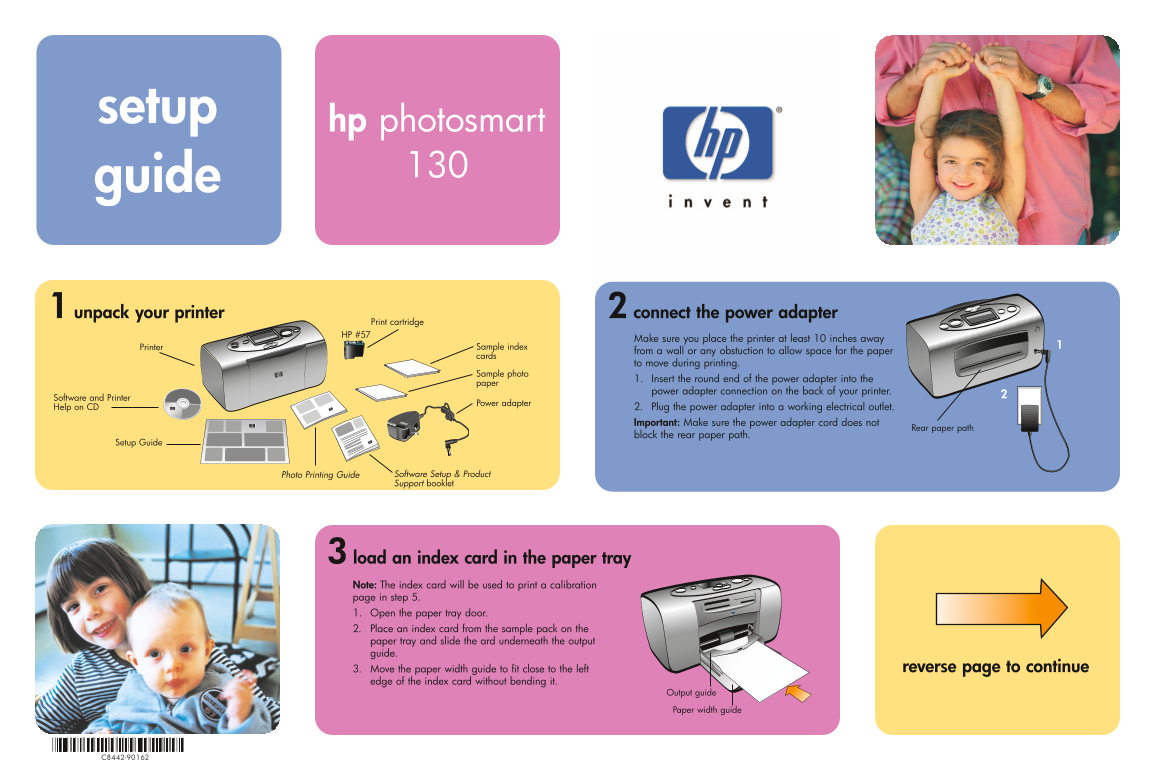
unpack your printer connect the power adapter
Print cartridge HP #57
Make sure you place the printer at least 10 inches away
Printer Sample index
from a wall or any obstuction to allow space for the paper
cards
to move during printing.
Sample photo
1. Insert the round end of the power adapter into the
paper
power adapter connection on the back of your printer.
Software and Printer
Power adapter
Help on CD 2. Plug the power adapter into a working electrical outlet.
Important: Make sure the power adapter cord does not
Rear paper path
block the rear paper path.
Setup Guide
Photo Printing Guide Software Setup & Product Support booklet
load an index card in the paper tray Note: The index card will be used to print a calibration page in step 5. 1. Open the paper tray door. 2. Place an index card from the sample pack on the paper tray and slide the ard underneath the output guide.
3. Move the paper width guide to fit close to the left reverse page to continue
edge of the index card without bending it.
Output guide Paper width guide
Page Summary Contents For HP Photosmart 130 Series Printer - 130 Photo Printer Setup Guide (English Version)
Manual Details
| Brand | HP |
|---|---|
| Pages | 2 |
| File Size | 1.09 MB |
| Published | June 06, 2026 |
Enter the captcha to get the download link:

Frequently Asked Questions
What is required before setting up the printer?
Place it at least 10 inches away from walls or obstructions, and ensure the rear paper path remains clear.
How do I install the print cartridge correctly?
Pull the pink pull-tab to remove protective tape, open the door, place the cartridge with nozzles facing down, and push until you feel it snap into position.
Which types of digital memory cards can I use?
The printer supports Secure Digital, SmartMedia, MultiMediaCard, and Memory Stick cards.
What is the first photo printed when using a memory card?
The machine automatically prints the first photo on the memory card at 4 x 6 inches (10 x 15 cm).