HP Deskjet 5740 Series Printer Setup Flyer - (Windows)
Summary
Quickly set up your HP Deskjet 5700 series multi-function printer with this comprehensive guide. This detailed manual walks first-time users through every step, from initial hardware setup—including unpacking and cartridge installation—to connecting the unit to your computer. It provides clear instructions for installing necessary software drivers across various Windows platforms and includes essential troubleshooting tips, ensuring a smooth start right out of the box.
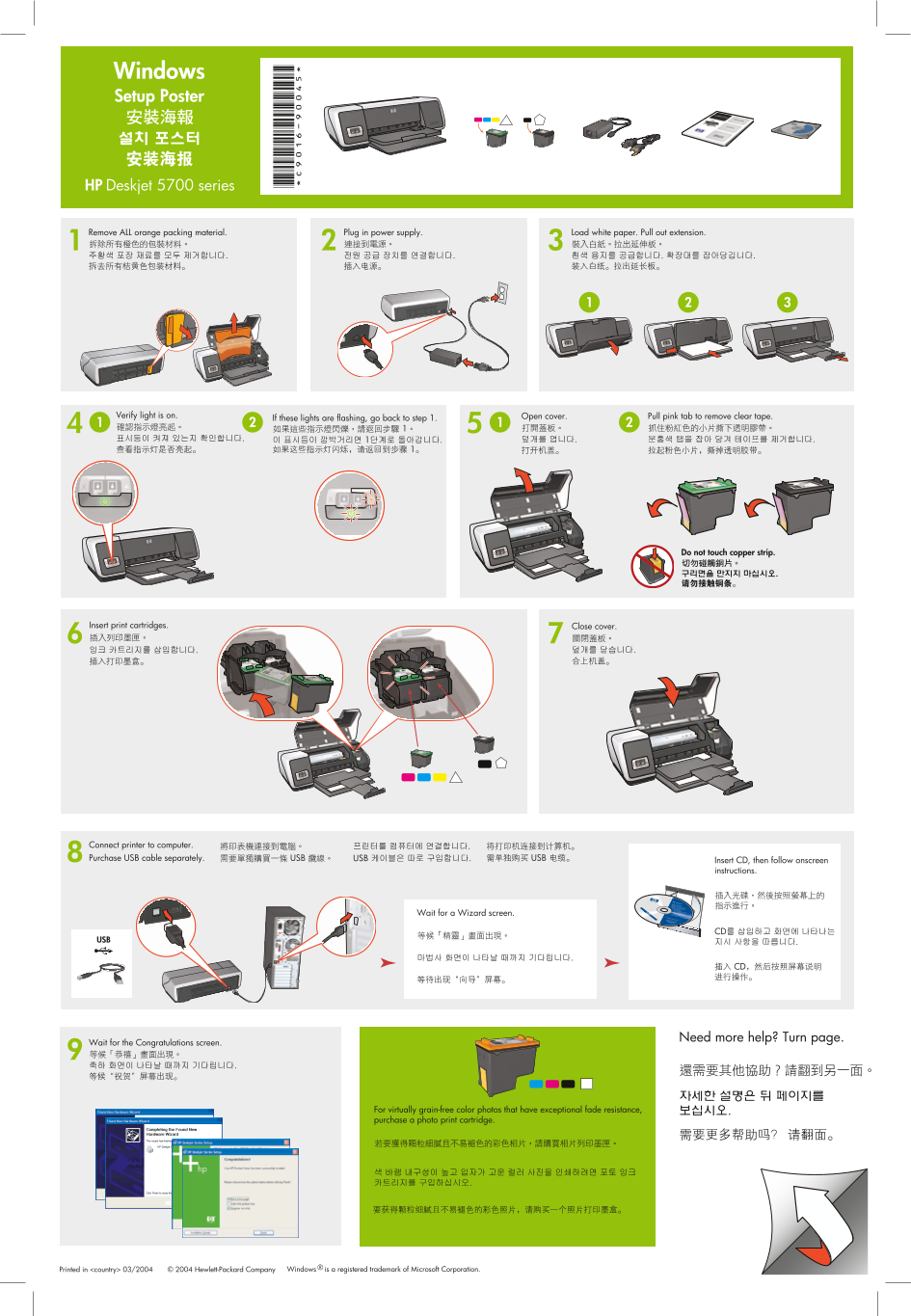
Page 1 Text Content
Windows Setup Poster
HP Deskjet 5700 series
Plug in power supply. Load white paper. Pull out extension.Remove ALL orange packing material.
Verify light is on. Open cover. Pull pink tab to remove clear tape.
If these lights are flashing, go back to step 1.
Do not touch copper strip.
Insert print cartridges. Close cover.
Connect printer to computer. Purchase USB cable separately.
Insert CD, then follow onscreen instructions.
Wait for a Wizard screen.
Need more help? Turn page.
Wait for the Congratulations screen.
For virtually grain-free color photos that have exceptional fade resistance, purchase a photo print cartridge.
Windows ® is a registered trademark of Microsoft Corporation.© 2004 Hewlett-Packard Company Printed in <country> 03/2004
Page Summary Contents For HP Deskjet 5740 Series Printer Setup Flyer - (Windows)
Manual Details
| Brand | HP |
|---|---|
| Pages | 2 |
| File Size | 2.51 MB |
| Published | May 31, 2026 |
Enter the captcha to get the download link:

Frequently Asked Questions
How do I connect this printer to my computer?
Connect the printer to your computer using a USB cable; note that you must purchase this cable separately.
What should I do if the software installation fails?
Restart the computer, temporarily disable any firewalls or anti-virus software, and then re-run the setup from the CD.
I don't see a wizard screen during setup. How do I proceed?
Click Start > Run, use Browse to select the HPPP CD, choose Setup, and follow the onscreen instructions.
Which cartridges are best for professional photo printing?
For fade-resistant color photos, purchase a specialized photo print cartridge.