Gigabyte Rackmount Server R282- Z97 (rev. A00) User Manual - Rail Kit Installation SOP English
Summary
Master this complex sliding mechanism assembly with our comprehensive installation guide. This manual provides detailed, step-by-step instructions for professional setup of your modular rail system, covering everything from mounting outer and inner rails to accurately slotting the chassis into place. Perfect for furniture makers, cabinet builders, and advanced DIY enthusiasts, this resource ensures correct alignment and structural integrity regardless of post hole type (round or square). Follow along to ensure smooth, reliable function every time you build.
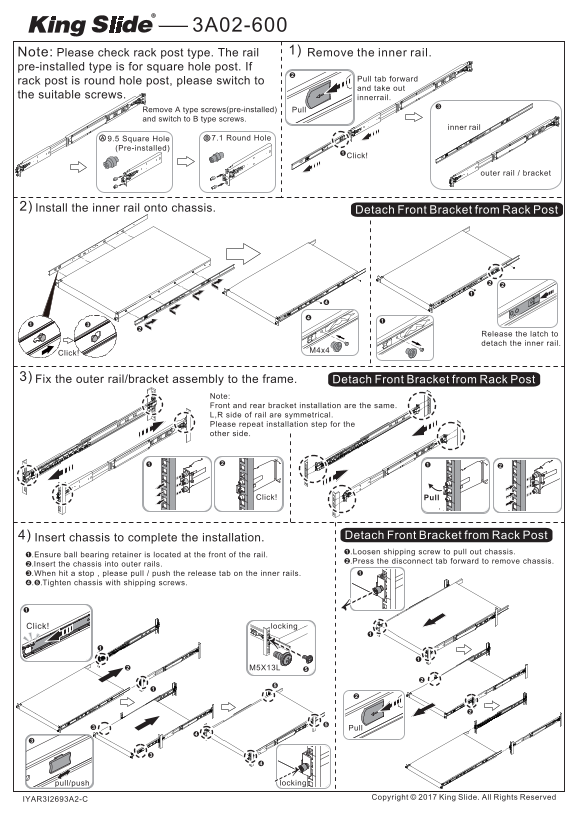
Page 1 Text Content
Note: Please check rack post type. The rail 1) Remove the inner rail.
pre-installed type is for square hole post. If
Pull tab forward
rack post is round hole post, please switch to
and take out
the suitable screws. innerrail.
Remove A type screws(pre-installed) Pull and switch to B type screws.
inner rail
Ⓑ7.1 Round Hole9.5 Square Hole
(Pre-installed)
Click!
outer rail / bracket
2) Install the inner rail onto chassis.
Detach Bracket from Rack Post
Release the latch to detach the inner rail.
Click!
3) Fix the outer rail/bracket assembly to the frame. Detach Bracket from Rack Post
Note: Front and rear bracket installation are the same. L,R side of rail are symmetrical. Please repeat installation step for the other side.
Click! Pull
4) Insert chassis to complete the installation. Detach Bracket from Rack Post ➊.Loosen shipping screw to pull out chassis.
➊.Ensure ball bearing retainer is located at the front of the rail.
➋.Press the disconnect tab forward to remove chassis.
➋.Insert the chassis into outer rails. ➌.When hit a stop , please pull / push the release tab on the inner rails. ➍.➎.Tighten chassis with shipping screws.
Click! locking
pull/push locking
Copyright King Slide. All Rights Reserved
IYAR3I2693A2-C
Page Summary Contents For Gigabyte Rackmount Server R282- Z97 (rev. A00) User Manual - Rail Kit Installation SOP English
Manual Details
| Brand | GIGABYTE |
|---|---|
| Pages | 1 |
| File Size | 2.48 MB |
| Published | June 02, 2026 |
Enter the captcha to get the download link:

Frequently Asked Questions
How do I install the inner rail onto the chassis?
First, ensure the ball bearing retainer is at the front of the rail, then insert the inner rails into the outer rails and pull/push the release tab when hitting a stop.
What types of rack posts are compatible with this rail system?
The system supports both square hole post (pre-installed type) and round hole post, though instructions require using suitable screws for round hole posts.
How do I attach the outer rail/bracket assembly to the frame?
Detach the Front Bracket from the Rack Post, then fix the outer rail/bracket assembly to the frame. The side installation is symmetrical, so repeat the process for the other side.
What steps are required for proper chassis installation?
Loosen the shipping screw and pull out the chassis. Finally, insert the chassis into the outer rails and tighten it using the remaining shipping screws until locked.