Delta Industrial Automation HMI Megmeet MC 280 Online Manual
Summary
This essential technical guide provides comprehensive wiring instructions for integrating our HMI series with controllers from various manufacturers. It details robust connectivity methods using both RS-232 and multiple variations of the industry-standard RS-485 protocol. The manual also clarifies all necessary memory mapping, including precise addressing schemes for registers and input/output coils. This documentation is mandatory reading for system integrators, automation engineers, and maintenance technicians responsible for establishing reliable and complex industrial control connections.
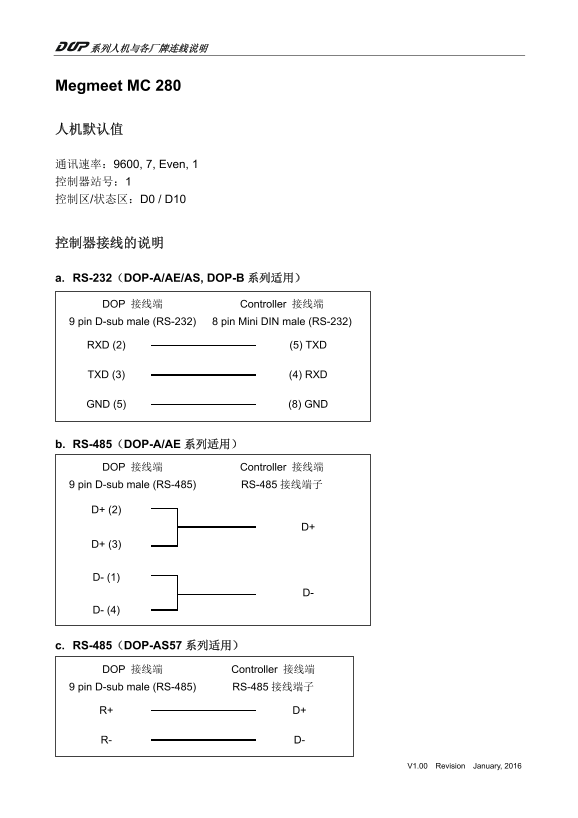
Page 1 Text Content
Megmeet MC 280
通讯速率:9600, 7, Even, 1 控制器站号:1 控制区/状态区:D0 / D10
a. RS-232(DOP-A/AE/AS, DOP-B 系列适用)
DOP 接线端 Controller 接线端 9 pin D-sub male (RS-232) 8 pin Mini DIN male (RS-232)
RXD (2) (5) TXD
TXD (3) (4) RXD
GND (5) (8) GND
b. RS-485(DOP-A/AE 系列适用)
DOP 接线端 Controller 接线端 9 pin D-sub male (RS-485) RS-485 接线端子
c. RS-485(DOP-AS57 系列适用)
DOP 接线端 Controller 接线端 9 pin D-sub male (RS-485) RS-485 接线端子
V1.00 Revision January, 2016
Page Summary Contents For Delta Industrial Automation HMI Megmeet MC 280 Online Manual
Manual Details
| Brand | Delta |
|---|---|
| Pages | 3 |
| File Size | 51.34 KB |
| Published | June 03, 2026 |
Enter the captcha to get the download link:

Frequently Asked Questions
What is the default communication setting?
The default settings are: Baud Rate (通讯速率): 9600, Parity: Even, Data Bits: 7, Stop Bits: 1.
Which connections are supported for RS-232?
RS-232 supports 9 pin D-sub male controllers connecting to specific DOP models like DOP-A/AE/AS and DOP-B series.
What is the address range for Word type registers (D_Register)?
D_Registers utilize addresses from D0 – D7999, containing a Word data length.