# A B C D E F G H I J K L M N O P Q R S T U V W X Y Z

Dell Setup and Features Information Owner's Manual

Summary

This is the setup and features information guide for the Dell Latitude 5420, E5420, E5420m, 5520, E5520, and E5520m laptop models (Regulatory Models P15F and P16G). The manual provides front and back view diagrams with component callouts, port identification, and basic setup instructions. It covers display features, connectivity options including USB, HDMI, VGA, e-SATA, and security features like fingerprint readers. Target users are business professionals, corporate users, and IT departments deploying Dell Latitude laptops in enterprise environments.
📄 Preview 📖 Table of Contents Contents PAGE OF 10

Page 1 Text Content

Dell Latitude 5420/E5420/E5420m/5520/E5520/ E5520m Setup And Features Information About Warnings WARNING: A WARNING indicates a potential for property damage, personal injury, or death. Latitude 5420/E5420/E5420m — Front And Back View

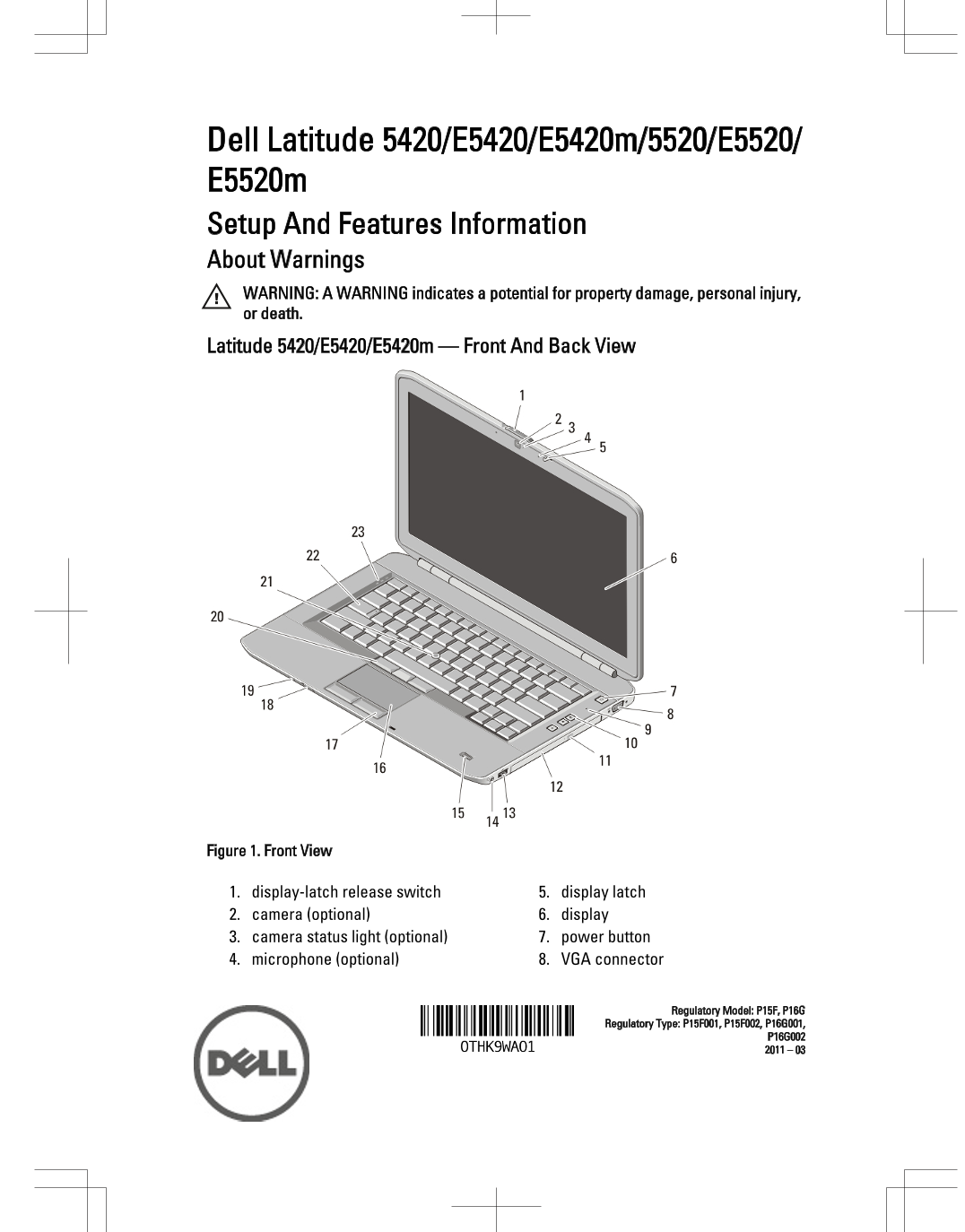
Figure 1. Front View

1. display-latch release switch 5. display latch 2. camera (optional) 6. display 3. camera status light (optional) 7. power button 4. microphone (optional) 8. VGA connector

Regulatory Model: P15F, P16G

Regulatory Type: P15F001, P15F002, P16G001,

Page Summary Contents For Dell Setup and Features Information Owner's Manual

Page 1 Dell Latitude 5420/E5420/E5420m/5520/E5520/ E5520m Setup And Features Information About Warnings WARNING: A WARNING indicates a potential for property damage, personal injury, or death. Latitude 5420/...
Page 2 9. microphone 17. touchpad buttons (2) 10. volume control buttons 18. wireless switch 11. optical-drive eject button 19. power and battery status indicators 12. optical drive 20. trackstick buttons (3...
Page 3 Latitude 5520/E5520/E5520m — Front And Back View Figure 3. Front View 1. display latch 13. headphone connector 2. microphone 14. fingerprint reader (optional) 3. display-latch release switch 15. wirel...
Page 4 Figure 4. Back View 1. network connector 7. IEEE 1394a connector 2. USB 2.0 connector 8. HDMI connector 3. modem connector (optional) 9. e SATA/USB 2.0 connector 4. power connector 10. USB 2.0 connect...
Page 5 CAUTION: When you disconnect the AC adapter cable from the computer, grasp the connector, not the cable itself, and pull firmly but gently to avoid damaging the cable. When you wrap the AC adapter cab...
Page 6 5. Open the computer display and press the power button to turn on the computer. Figure 9. Power Button NOTE: It is recommended that you turn on and shut down your computer at least once before you in...
Page 7 Video Latitude 5420/E5420/5520/E5520 Intel HD Graphics Intel HD Graphics 3000 Latitude E5420m/E5520m Intel GM45 Memory Memory connector two DIMM slots Memory capacity 1 GB, 2 GB, 4 GB, and 8 GB Memory...
Page 8 Battery Temperature range: Operating 0 °C to 35 °C (32 °F to 95 °F) Non-operating –40 °C to 65 °C (–40 °F to 149 °F) Coin-cell battery 3 V CR2032 Lithium coin cell AC Adapter Input voltage 100 VAC to ...
Page 9 Environmental Temperature: Operating 0 °C to 35 °C (32 °F to 95 °F) Storage –40 °C to 65 °C (–40 °F to 149 °F) Relative humidity (maximum) : Operating 10% to 90% (noncondensing) Storage 5% to 95% (n...
Page 10 AMD Athlon™, ATI Radeon™, and ATI Fire Pro™ are trademarks of Advanced Micro Devices, Inc. Microsoft®, Windows®, MS-DOS®, Windows Vista®, the Windows Vista start button, and Office Outlook® are either...

Manual Details

Brand Dell
Pages 10
File Size 880.79 KB
Published June 29, 2026
4 views

Enter the captcha to get the download link:

captcha

Frequently Asked Questions

What should I do if the fan noise increases?

The computer turns on the fan when it gets hot; restricting airflow can damage the device or cause a fire.

Where is the recommended storage location for the Dell computer?

Do not store your Dell computer in a low-airflow environment, such as a closed briefcase, while running.

What types of processors are supported by the Latitude series models?

Supported processors include Intel Core i3, i5, i7, and Intel Core 2 series.

Which external connectors are available on the back panel?

Available ports include HDMI, VGA, USB 2.0, IEEE 1394, e-SATA/USB 2.0, and SD card slots.