Dell Latitude 13 Setup and Features Information
Summary
Setup and features information guide for Dell Latitude 13 ultraportable laptop. Covers hardware features including front view components (microphone, camera, display, keyboard, media-card reader, ExpressCard slot, audio connectors, touchpad), back view ports (network, eSATA/USB, USB, VGA, AC adapter), and quick setup procedures. Includes safety warnings about airflow and AC adapter usage. Intended for business professionals setting up and familiarizing themselves with the Dell Latitude 13 laptop.
Page 1 Text Content
T7K43am0.fm Page 1 Thursday, February 4, 2010 10:14 AM
About Warnings
Dell™ Latitude™ 13
WARNING: A WARNING indicates a potential for property damage, personal injury, or death.
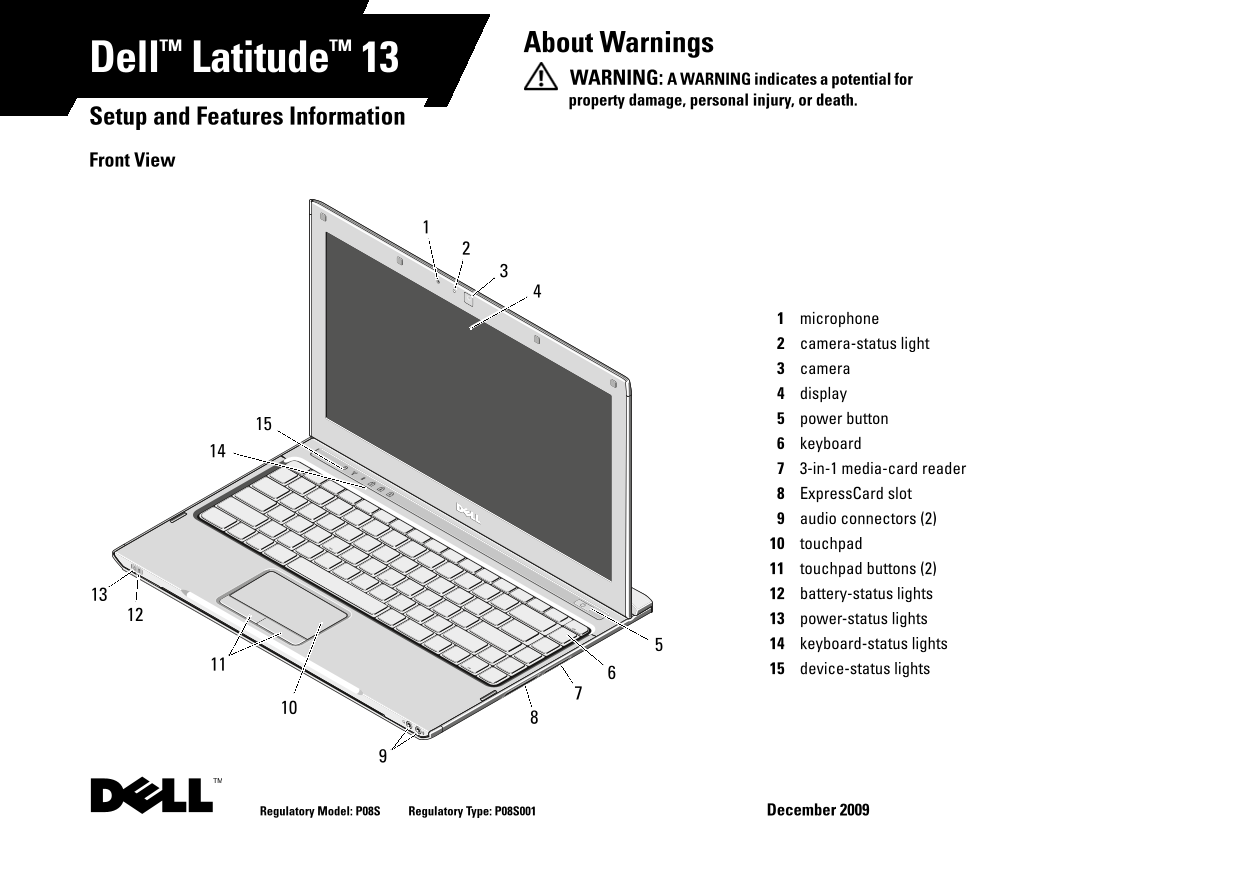
Setup and Features Information Front View
microphone camera-status light camera display power button keyboard 3-in-1 media-card reader Express Card slot audio connectors (2) touchpad touchpad buttons (2) battery-status lights power-status lights keyboard-status lights device-status lights
Regulatory Model: P08S Regulatory Type: P08S001 December 2009
Page Summary Contents For Dell Latitude 13 Setup and Features Information
Manual Details
| Brand | Dell |
|---|---|
| Pages | 5 |
| File Size | 363.21 KB |
| Published | June 27, 2026 |
Enter the captcha to get the download link:

Frequently Asked Questions
What should I do if my computer is overheating?
Do not block, push objects into, or allow dust to accumulate in the air vents. Restricting airflow can cause fire.
How do I safely disconnect a peripheral device?
Grasp the connector, not the cable itself, and pull firmly but gently to avoid damaging the cable.
What is the operating temperature range for this laptop?
The operating temperature range is 0 °C to 35 °C (32 °F to 95 °F).
Does powering off the unit matter when expanding components?
It is recommended that you turn on and shut down your computer at least once before installing any cards or connecting external devices.