Dell OptiPlex 9010 Setup and Features Information
Summary
The Dell OptiPlex 9010 is a business desktop computer available in Mini-Tower, Desktop, and Small Form Factor configurations. This setup and features manual provides detailed information about front and back panel components, including power buttons, optical drives, USB 2.0/3.0 connectors, audio connectors, network ports, DisplayPort and VGA connectors, expansion card slots, and power supply diagnostic features. It also covers regulatory information, safety warnings, and environmental specifications. Designed for business and enterprise users seeking reliable desktop computing solutions.
Page 1 Text Content
Dell Opti Plex 9010 Setup and Features Information About Warnings WARNING: A WARNING indicates a potential for property damage, personal injury, or death.
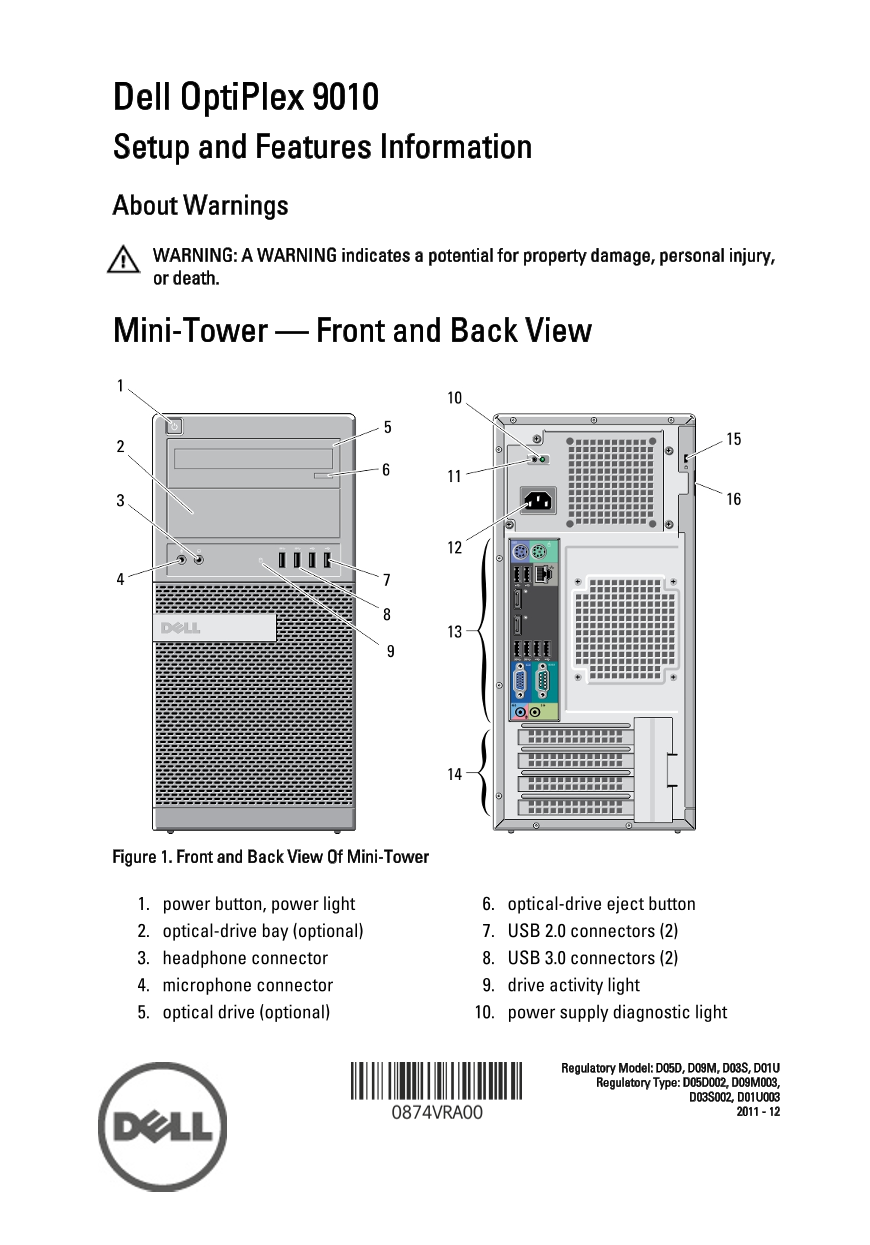
Mini-Tower — Front and Back View
Figure 1. Front and Back View Of Mini-Tower
1. power button, power light 6. optical-drive eject button 2. optical-drive bay (optional) 7. USB 2.0 connectors (2) 3. headphone connector 8. USB 3.0 connectors (2) 4. microphone connector 9. drive activity light 5. optical drive (optional) 10. power supply diagnostic light
Regulatory Model: D05D, D09M, D03S, D01U Regulatory Type: D05D002, D09M003,
Page Summary Contents For Dell OptiPlex 9010 Setup and Features Information
Manual Details
| Brand | Dell |
|---|---|
| Pages | 10 |
| File Size | 1.56 MB |
| Published | June 25, 2026 |
Enter the captcha to get the download link:
