Dell S320 Projector RS232 Command Line Interface Guide
Summary
This is the Dell S320/S320wi projector RS232 protocol document, defining the serial communication protocol for controlling Dell projectors via RS232 interface. The document covers pin assignments, communication settings, command syntax, and response messages for power control and system status queries. It is intended for AV integrators and system developers who need to integrate Dell projectors into automated control systems.
Page 1 Text Content
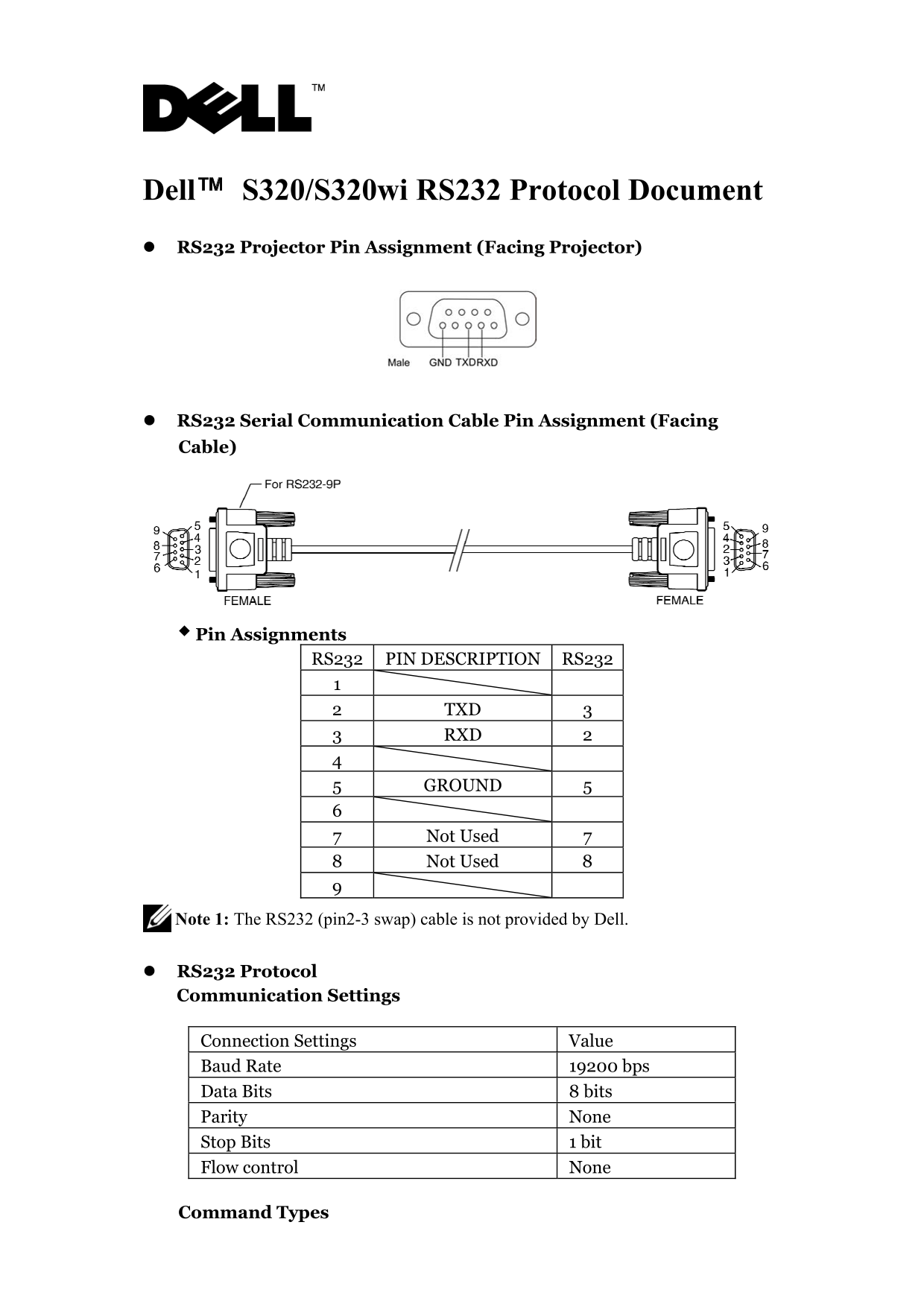
Dell™ S320/S320wi RS232 Protocol Document RS232 Projector Pin Assignment (Facing Projector)
RS232 Serial Communication Cable Pin Assignment (Facing Cable)
Pin Assignments
RS232 PIN DESCRIPTION RS232
2 TXD 3 3 RXD 2
5 GROUND 5
7 Not Used 7 8 Not Used 8
Note 1: The RS232 (pin2-3 swap) cable is not provided by Dell.
RS232 Protocol Communication Settings
Connection Settings Value Baud Rate 19200 bps Data Bits 8 bits Parity None Stop Bits 1 bit Flow control None
Command Types
Page Summary Contents For Dell S320 Projector RS232 Command Line Interface Guide
Manual Details
| Brand | Dell |
|---|---|
| Pages | 6 |
| File Size | 307.35 KB |
| Published | June 29, 2026 |
Enter the captcha to get the download link:

Frequently Asked Questions
Which pins should I connect for transmitting and receiving data?
TXD is on Pin 2, and RXD is on Pin 3.
What standard communication settings must I use?
The required settings are a Baud Rate of 19200 bps, 8 Data Bits, No Parity, and 1 Stop Bit.
How can I retrieve the projector's current operational lamp hours?
To read the lamp hour status, send the command with code 0x2f (Lamp Hour), which returns data in Byte 2 (LSB) and Byte 3 (MSB).
What do the standard response codes indicate?
Success is indicated by 0x00; 0x01 means Invalid Command, while 0x02 signals an Error Command. Complete sentences are needed for confirmation.