Dell 4320 Projector Command Line Interface Guide_4220
Summary
This RS232 protocol document for the Dell 4220 and 4320 projectors provides technical specifications for serial communication control. It details pin assignments for RS232 projector and serial communication cable connections, communication settings (19200 bps, 8 data bits, no parity, 1 stop bit), control command syntax with hex examples, projector response message tables, system status codes, and lamp hour query format. Designed for AV integrators and automation programmers controlling Dell projectors via RS232.
Page 1 Text Content
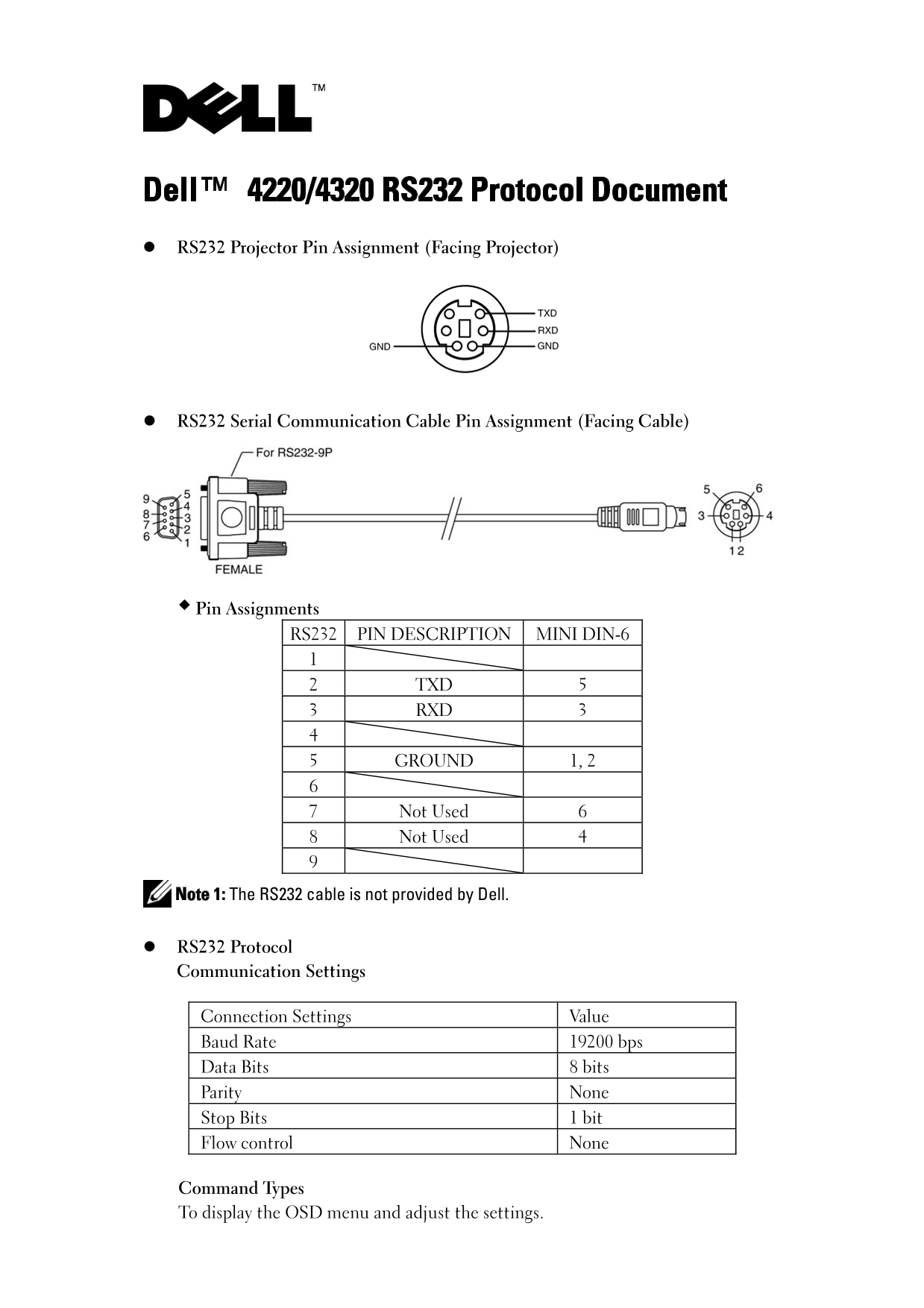
Dell™ 4220/4320 RS232 Protocol Document RS232 Projector Pin Assignment (Facing Projector)
RS232 Serial Communication Cable Pin Assignment (Facing Cable)
Pin Assignments RS232 PIN DESCRIPTION MINI DIN-6
2 TXD 5 3 RXD 3
5 GROUND 1, 2
7 Not Used 6 8 Not Used 4
Note 1: The RS232 cable is not provided by Dell.
RS232 Protocol Communication Settings
Connection Settings Value Baud Rate 19200 bps Data Bits 8 bits Parity None Stop Bits 1 bit Flow control None
Command Types To display the OSD menu and adjust the settings.
Page Summary Contents For Dell 4320 Projector Command Line Interface Guide_4220
Manual Details
| Brand | Dell |
|---|---|
| Pages | 6 |
| File Size | 199.68 KB |
| Published | July 01, 2026 |
Enter the captcha to get the download link:

Frequently Asked Questions
What fundamental communication settings are required?
The connection must use 19200 bps Baud Rate, 8 Data Bits, None Parity, and 1 Stop Bit.
How do I retrieve the current operation status of the projector?
Send a command using Byte1 set to 0xff. A successful response requires Byte0 to be 0x00.
What is the correct sequence for powering on the projector via RS232?
Use the explicit "Power On" command code, and importantly, wait 5 seconds after powering up before sending any subsequent commands.