Dell 4320 Projector User Guide - Command Line Interface_4220 (English Only)
Summary
This Dell 4220/4320 RS232 Protocol Document provides technical specifications for serial communication with Dell projectors. The manual covers RS232 pin assignments, communication settings (baud rate, data bits, parity), command syntax for projector control, response message formats, and system status queries. It includes detailed command code tables for power control, input selection, and lamp hour monitoring. Target users are AV integrators, control system programmers, and IT professionals who need to integrate Dell projectors into automated control systems via RS232 serial interfaces.
Page 1 Text Content
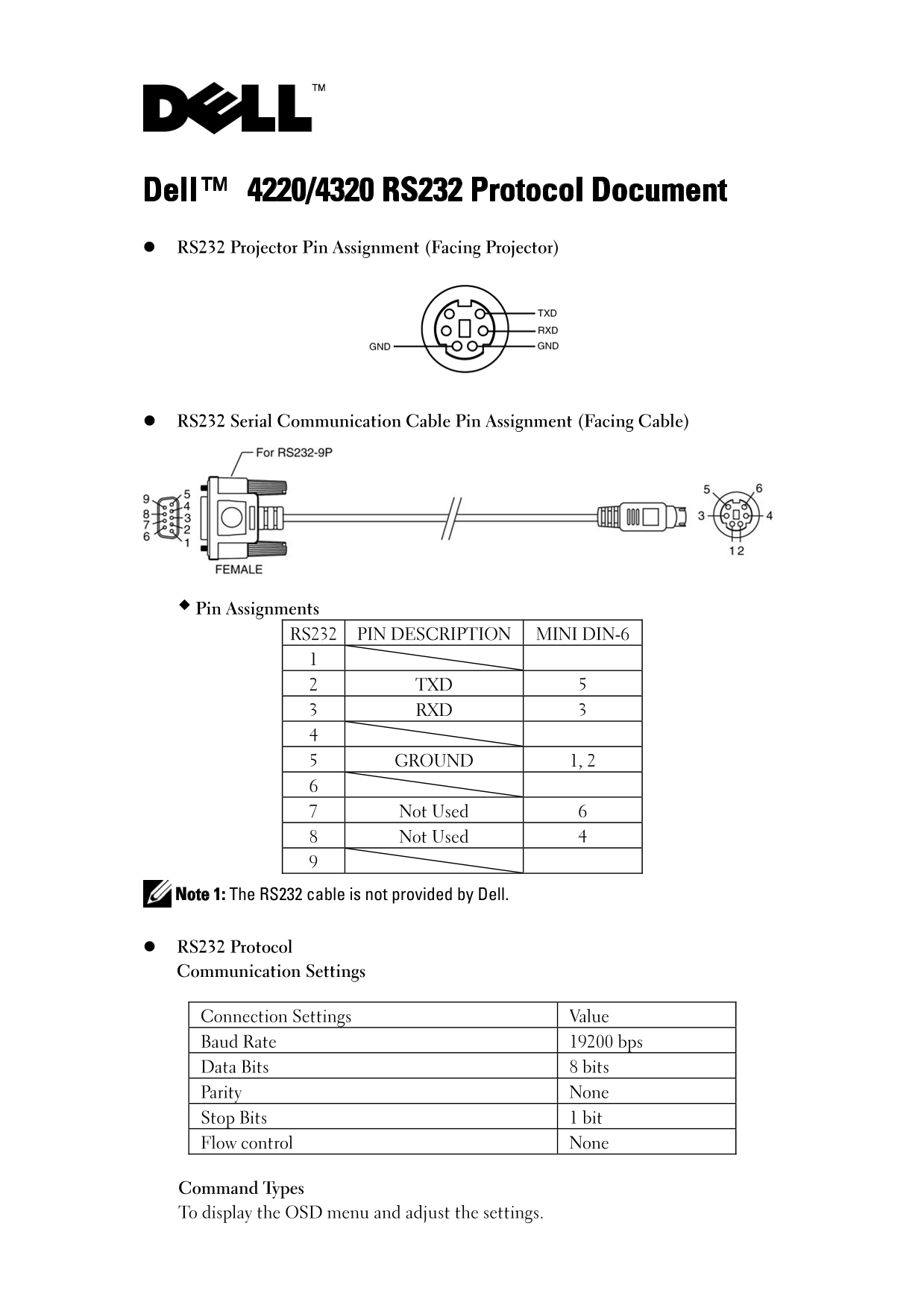
Dell™ 4220/4320 RS232 Protocol Document RS232 Projector Pin Assignment (Facing Projector)
RS232 Serial Communication Cable Pin Assignment (Facing Cable)
Pin Assignments RS232 PIN DESCRIPTION MINI DIN-6
2 TXD 5 3 RXD 3
5 GROUND 1, 2
7 Not Used 6 8 Not Used 4
Note 1: The RS232 cable is not provided by Dell.
RS232 Protocol Communication Settings
Connection Settings Value Baud Rate 19200 bps Data Bits 8 bits Parity None Stop Bits 1 bit Flow control None
Command Types To display the OSD menu and adjust the settings.
Page Summary Contents For Dell 4320 Projector User Guide - Command Line Interface_4220 (English Only)
Manual Details
| Brand | Dell |
|---|---|
| Pages | 6 |
| File Size | 199.68 KB |
| Published | June 29, 2026 |
Enter the captcha to get the download link:

Frequently Asked Questions
What are the required serial communication parameters?
The settings must be 19200 bps with 8 data bits, None parity, 1 stop bit, and no flow control.
What does a response byte of 0x02 indicate?
A value of 0x02 means an Error Command was issued, which can include CRC errors or unknown command codes.
How is the projector's accumulated lamp hour count returned?
The service returns the hours using two bytes: Byte2 contains the LSB (Low Side Byte) and Byte3 contains the MSB (High Side Byte).
If I send multiple commands, what critical precaution must I take?
You must wait for a response from the projector after receiving any command before sending subsequent commands.