Dell 4320 Projector RS232 Command Line Interface Guide
Summary
Dell 4220/4320 Projector RS232 Protocol Document provides technical specifications for serial communication control of Dell projectors. It details pin assignments, communication settings including baud rate and data format, command syntax structure, CRC calculation, and response message formats. The document targets AV system integrators and developers building custom control systems for Dell projectors in conference rooms, classrooms, and digital signage deployments.
Page 1 Text Content
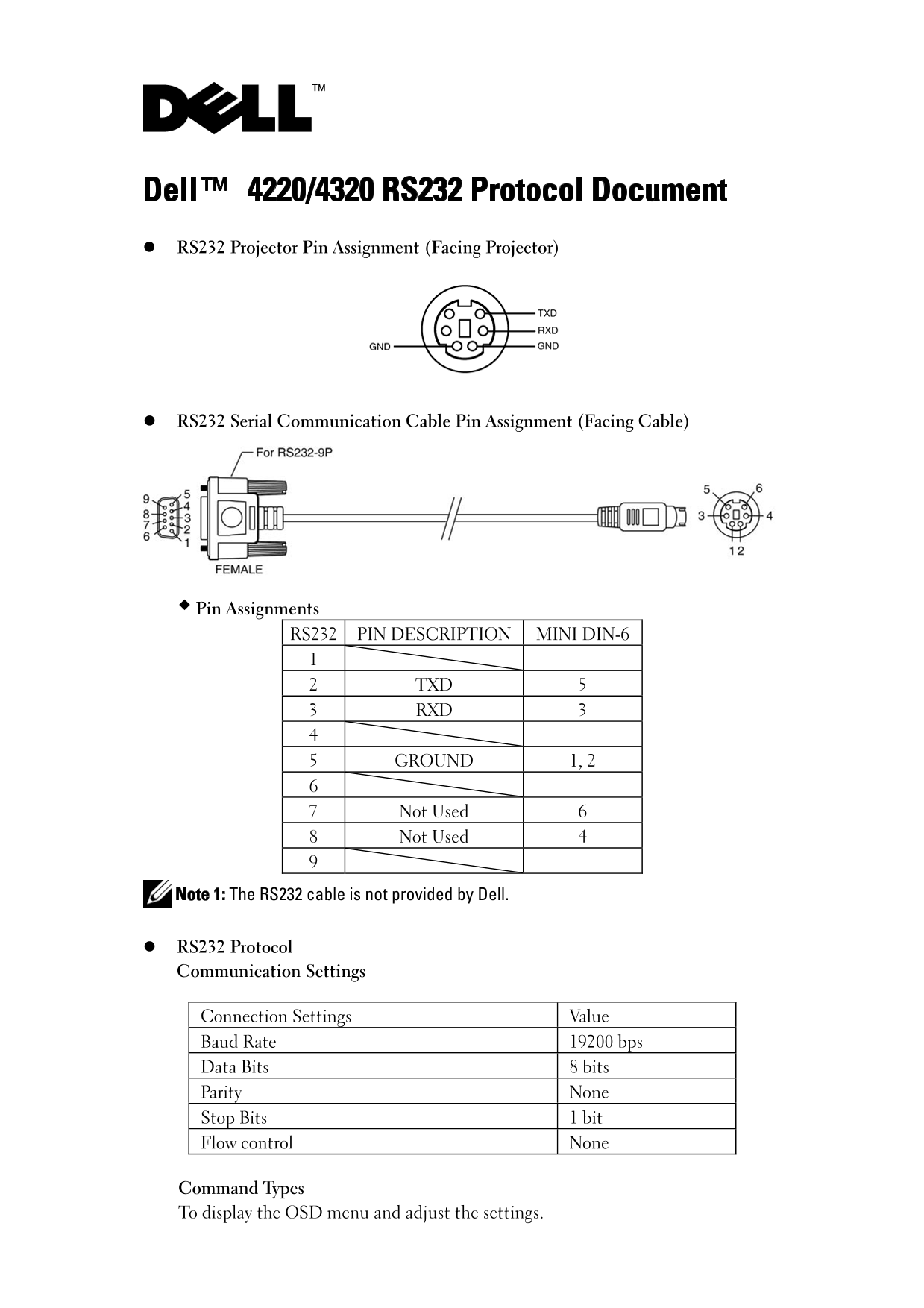
Dell™ 4220/4320 RS232 Protocol Document RS232 Projector Pin Assignment (Facing Projector)
RS232 Serial Communication Cable Pin Assignment (Facing Cable)
Pin Assignments RS232 PIN DESCRIPTION MINI DIN-6
2 TXD 5 3 RXD 3
5 GROUND 1, 2
7 Not Used 6 8 Not Used 4
Note 1: The RS232 cable is not provided by Dell.
RS232 Protocol Communication Settings
Connection Settings Value Baud Rate 19200 bps Data Bits 8 bits Parity None Stop Bits 1 bit Flow control None
Command Types To display the OSD menu and adjust the settings.
Page Summary Contents For Dell 4320 Projector RS232 Command Line Interface Guide
Manual Details
| Brand | Dell |
|---|---|
| Pages | 6 |
| File Size | 199.64 KB |
| Published | June 29, 2026 |
Enter the captcha to get the download link:

Frequently Asked Questions
What communication settings should I use for the RS232 cable?
Baud Rate must be 19200 bps, Data Bits 8 bits, Parity None, Stop Bits 1 bit, and Flow control None.
How do I trigger basic functions like 'Power On' via RS232?
Use the command structure [H][AC][SoP][CRC][ID][SoM][COMMAND], for example, Power On uses code: 0xbe, 0xef, 0x10, 0x05, 0x00, 0xc6, 0xff, 0x11, 0x11, 0x01, 0x00, 0x01.
What precautions should I take when sending multiple commands?
Wait for a response from the projector after each command sent. Also, wait 5 seconds after power on before sending any subsequent commands.
How can I read the current lamp operating hours?
Send the 'Lamp-Hours' command (0xefbe...) and check Byte2 (LSB) and Byte3 (MSB) in the four-byte response for the required hours.