Dell 7700HD Projector RS232 Command Interface User Guide (Limited to English)
Summary
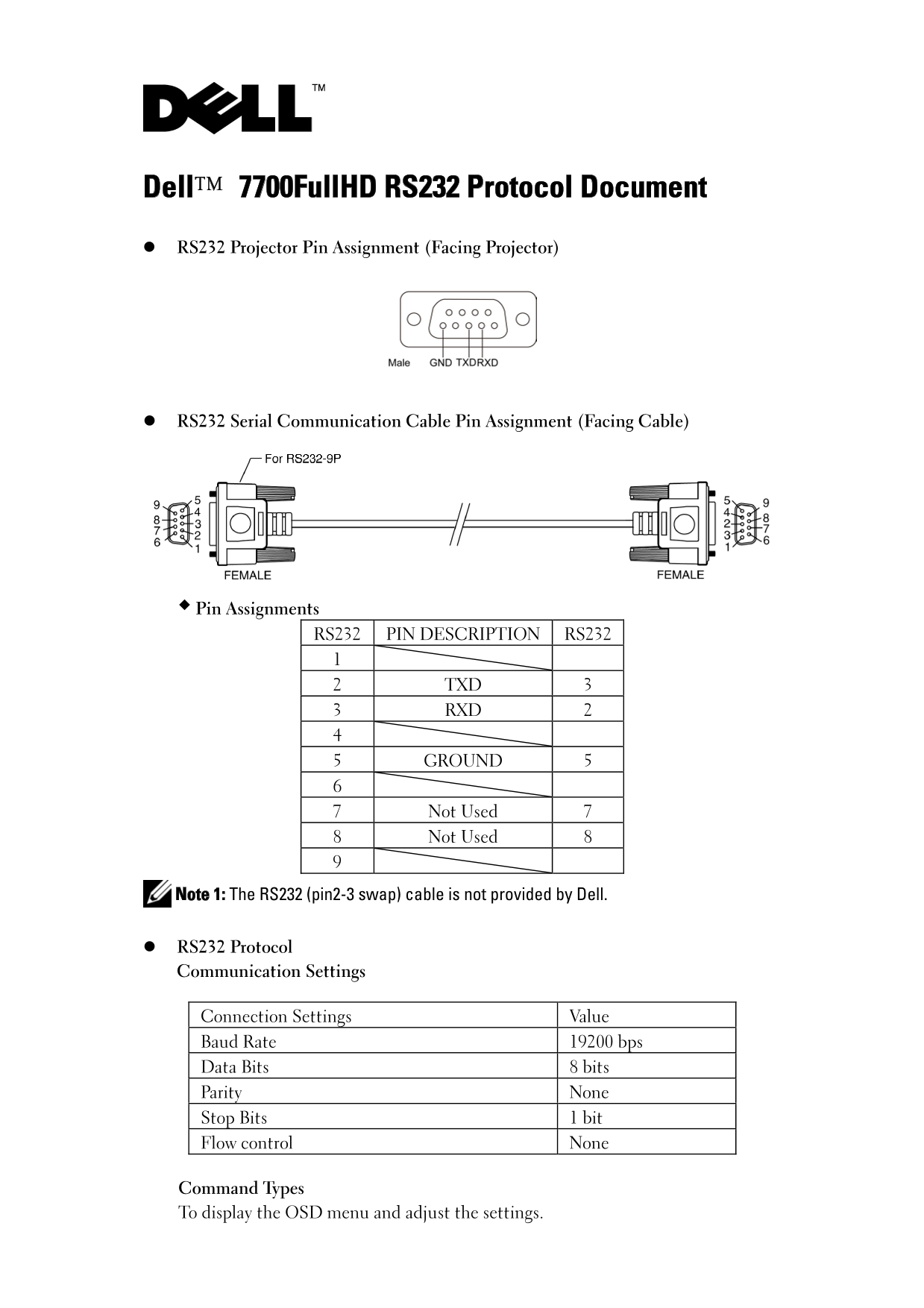
RS232 Protocol Document for the Dell 7700FullHD projector detailing serial communication pin assignments (TXD pin 2, RXD pin 3, Ground pin 5), connection settings at 19200 bps with 8 data bits and no parity, and command syntax structure. Documents control command format with hex examples for power on, projector response message table with success/error codes, system status return values, and lamp hour query formats for integration.
Page 1 Text Content
Dell™ 7700Full HD RS232 Protocol Document RS232 Projector Pin Assignment (Facing Projector)
RS232 Serial Communication Cable Pin Assignment (Facing Cable)
Pin Assignments
RS232 PIN DESCRIPTION RS232
2 TXD 3 3 RXD 2
5 GROUND 5
7 Not Used 7 8 Not Used 8
Note 1: The RS232 (pin2-3 swap) cable is not provided by Dell.
RS232 Protocol Communication Settings
Connection Settings Value Baud Rate 19200 bps Data Bits 8 bits Parity None Stop Bits 1 bit Flow control None
Command Types To display the OSD menu and adjust the settings.
Page Summary Contents For Dell 7700HD Projector RS232 Command Interface User Guide (Limited to English)
Manual Details
| Brand | Dell |
|---|---|
| Pages | 6 |
| File Size | 243.33 KB |
| Published | July 03, 2026 |
Enter the captcha to get the download link:

Frequently Asked Questions
What are the standard communication settings for this protocol?
The connection requires a Baud Rate of 19200 bps, 8 data bits, no parity, and 1 stop bit.
How is the full command structure to initialize a function?
It follows: Header [H], Address Code [AC], Size of Payload [SoP], CRC16 [CRC], MsgID [ID], MsgSize [SoM], COMMAND (and optionally Value).
What is the required sequence to turn the projector on?
You must send the Power On command code: 0xbe, 0xef, 0x10, 0x05, 0x00, 0xc6, 0xff, 0x11, 0x11, 0x01, 0x00, 0x01.
How do I check the projector's current status (e.g., standby)?
Send the System Status command; the return status in Byte2 will indicate the mode, such as 0x01 for standby.